NutriBullet Flex XL handleiding
Handleiding
Je bekijkt pagina 10 van 467
1817
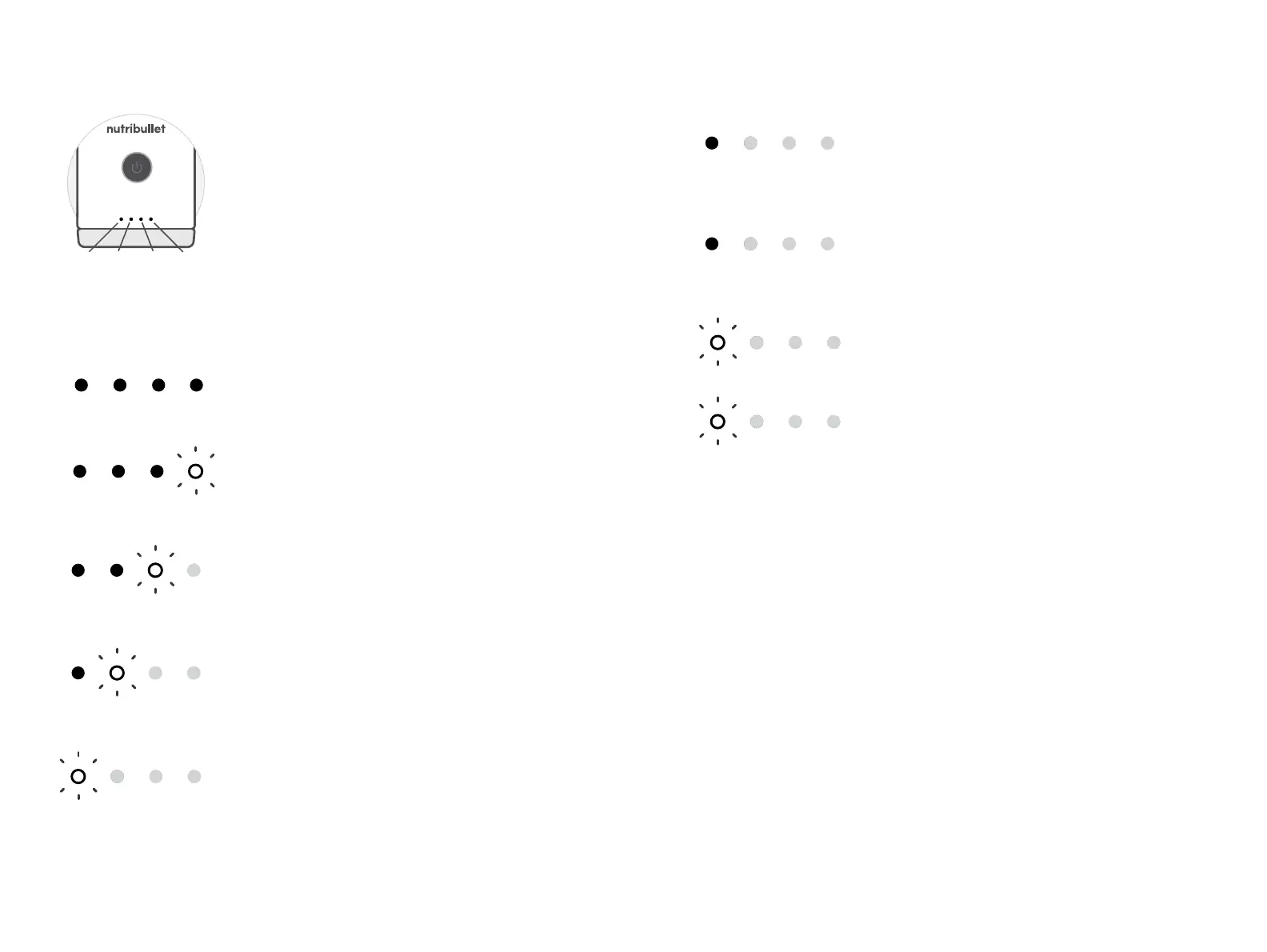
LED battery bar.
The nutribullet
Flex
™
Portable Blender
includes a dedicated LED battery bar to
show you clearly & simply when its time to
charge. The 4-tier LEDs appear white, red,
or orange depending on battery state &
charge status. See below for details.
Battery state & charge status.
Solid white LEDs 1, 2, 3, 4:
Full charge.
Solid white LED 1,
flashing LED 2:
25-50% charge.
Solid white LEDs 1, 2, 3,
flashing LED 4:
75-99% charge.
Solid white LEDs 1, 2,
flashing LED 3:
50-75% charge.
1
2
4
3
Flashing white LED 1:
0-25% charge.
For best product experience & battery
practices, we recommend plugging in
the unit.
Solid orange LED 1:
Low battery.
Solid red LED 1:
In need of charge.
Blinking red LED 1:
Battery depleted / cannot operate.
Orange flashing LED 1:
Active charging, 0%.
PRO TIP: You can blend while your unit is
plugged in. Once Battery Bar LED 1 turns white,
the unit is capable of completing a full blend cycle.
Note that charging will momentarily pause while
the motor is running.
Bekijk gratis de handleiding van NutriBullet Flex XL, stel vragen en lees de antwoorden op veelvoorkomende problemen, of gebruik onze assistent om sneller informatie in de handleiding te vinden of uitleg te krijgen over specifieke functies.
Productinformatie
| Merk | NutriBullet |
| Model | Flex XL |
| Categorie | Blender |
| Taal | Nederlands |
| Grootte | 50200 MB |