Electrolux EFI974EY6S handleiding
Handleiding
Je bekijkt pagina 18 van 352
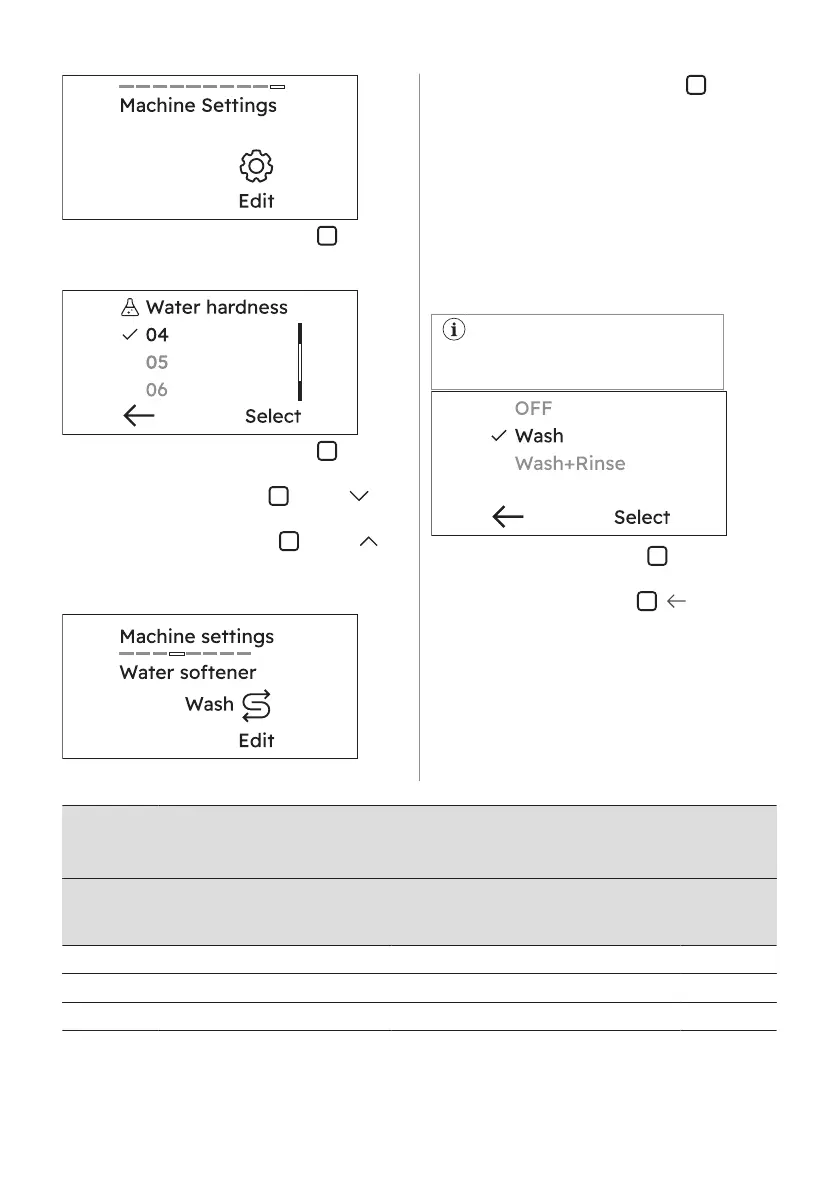
3. Tap on Edit, the right soft key , to enter
the setting list.
4. Scroll the list to find Water Hardness.
5. Tap on Edit, the right soft key , to enter
the setting list. To select de desired level:
• Tap the left soft key
next to
indicator to decrease hardness.
• Tap the right soft key next to
indicator to increase hardness.
6. Rotate the dial one position more to find
Water Softener setting
7. Tap on Edit, the right soft key , to enter
the setting list.
8. Rotate the dial to visualize the options:
• OFF : to deactivate the water softener.
• Wash : the water softener acts during
washing phase only. This setting
satisfies most of the use condition.
• Wash + Rinse: if the inlet water is
particularly hard (6 and 7 levels), we
suggest to set the water softener also
during rinsing phase to preserve the
fabric softness.
This setting increases the salt
consumption.
9. Tap on the right soft key , Select, to
confirm.
10. Tap on the left soft key
, , to display
the previous view.
Water hardness levels
Levels
Levels as indi‐
cated on the
tester
1)
Water hardness range
°f
(French
degrees)
°d
(German
degrees)
°e
(English
degrees)
mmol/l ppm
1 C01 ≤5 ≤3 ≤ 4 ≤0.5 ≤ 50
2 C02 6 - 13 4 - 7 5 - 9 0.6 - 1.3 60 - 130
3 C03 14 - 21 8 - 11 10 -15 1.4 - 2.1 140 - 210
18 ENGLISH
Bekijk gratis de handleiding van Electrolux EFI974EY6S, stel vragen en lees de antwoorden op veelvoorkomende problemen, of gebruik onze assistent om sneller informatie in de handleiding te vinden of uitleg te krijgen over specifieke functies.
Productinformatie
| Merk | Electrolux |
| Model | EFI974EY6S |
| Categorie | Wasmachine |
| Taal | Nederlands |
| Grootte | 33928 MB |