Whirlpool WDT550SAPZ handleiding
Handleiding
Je bekijkt pagina 28 van 64
28
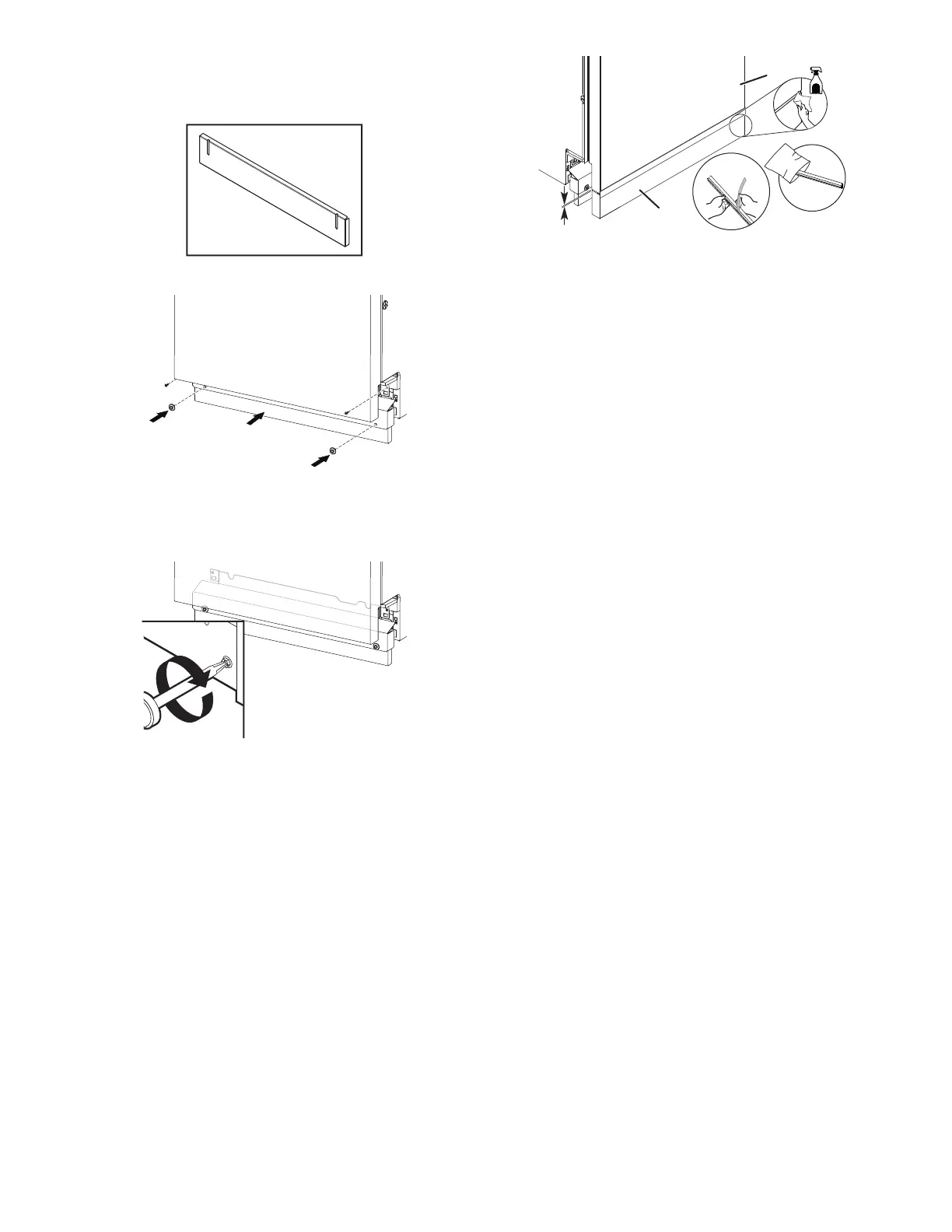
IMPORTANT: If there is visible gap to the floor after installing
the toe panel, replace it with alternate (tall) toe panel
supplied with dishwasher, shipped at the back of the
dishwasher.
37. Install access panels
Place the access panel against dishwasher legs. Using a
Phillips screwdriver or 1/4" nut driver, reinstall the screws
through the holes in the access panel.
38. Tighten screws
Tighten access panel screws.
T-Gasket Installation (on some
models)
If an installer will be using a custom access panel to be mounted
on top of the unit's access panel and if the installer chooses to
cover the seam gap then the T-Gasket bottom could be attached
between the custom front panel & the access panel.
Custom access panel can be attached to the top of the
dishwasher access panel. Installer can use T-Gasket to fill the gap
between custom access panel and custom panel door (as shown
below).
C
B
A
D
E
A. T-Gasket
B. Polybag
C. 3/16" (5 mm)
D. Custom Access Panel
E. Custom Panel Door
1. Remove the adhesive strips from the T-Gasket and attach it to
the top surface of custom access panel. Start along the left or
right edge and continue along that edge.
2. Using a paper towel or cloth, press along the front surface of
the T-Gasket to ensure it is flushed well.
Check Operation
� Read the dishwasher Quick Start Guide that came with your
dishwasher.
� Check that all parts have been installed and no steps were
skipped.
If the dishwasher is not working properly, disconnect power or
unplug dishwasher and refer to the “If Dishwasher Does Not
Operate” section.
If Dishwasher Does Not Operate
First try the solutions suggested here to possibly avoid the cost of
a service call.
� Has the circuit breaker tripped or the house fuse blown?
� Is the door closed tightly and latched?
� Has the cycle been set correctly to start the dishwasher?
� Is the water turned on?
If none of these possible solutions work, refer to the contact
information referenced in your Quick Start Guide.
Additional Tips
Expect longer wash times. Your new dishwasher will average
2–5 hours per load but use nearly 40% less energy than older
models. Designed with a low-wattage, low-energy-consumption
motor, your dishwasher washes longer to ensure exceptional
cleaning. Certain models are equipped with an optical water
sensor, so the first cycle will run longer to calibrate the optical
sensor. Selecting certain options could increase cycle time past
3.5 hours.
Rinse aid is necessary for good drying results:
This dishwasher is designed to be used with rinse aid for good
drying performance and controlling hard-water-deposit buildup.
Energy-efficient dishwashers use less water and energy, so they
depend on the water sheeting action of rinse aid for good drying
performance.
Start/Resume light may flash:
When pressing Start/Resume, you must make sure the door is
closed within 4 seconds. If you do not close the door within
4 seconds, the Start/Resume light will flash until you press it
again. (You must also do this when adding a dish during the
middle of a cycle.)
Bekijk gratis de handleiding van Whirlpool WDT550SAPZ, stel vragen en lees de antwoorden op veelvoorkomende problemen, of gebruik onze assistent om sneller informatie in de handleiding te vinden of uitleg te krijgen over specifieke functies.
Productinformatie
| Merk | Whirlpool |
| Model | WDT550SAPZ |
| Categorie | Wasmachine |
| Taal | Nederlands |
| Grootte | 11080 MB |