NutriBullet Flex XL handleiding
Handleiding
Je bekijkt pagina 14 van 467
2625
Using the nutribullet Flex
™
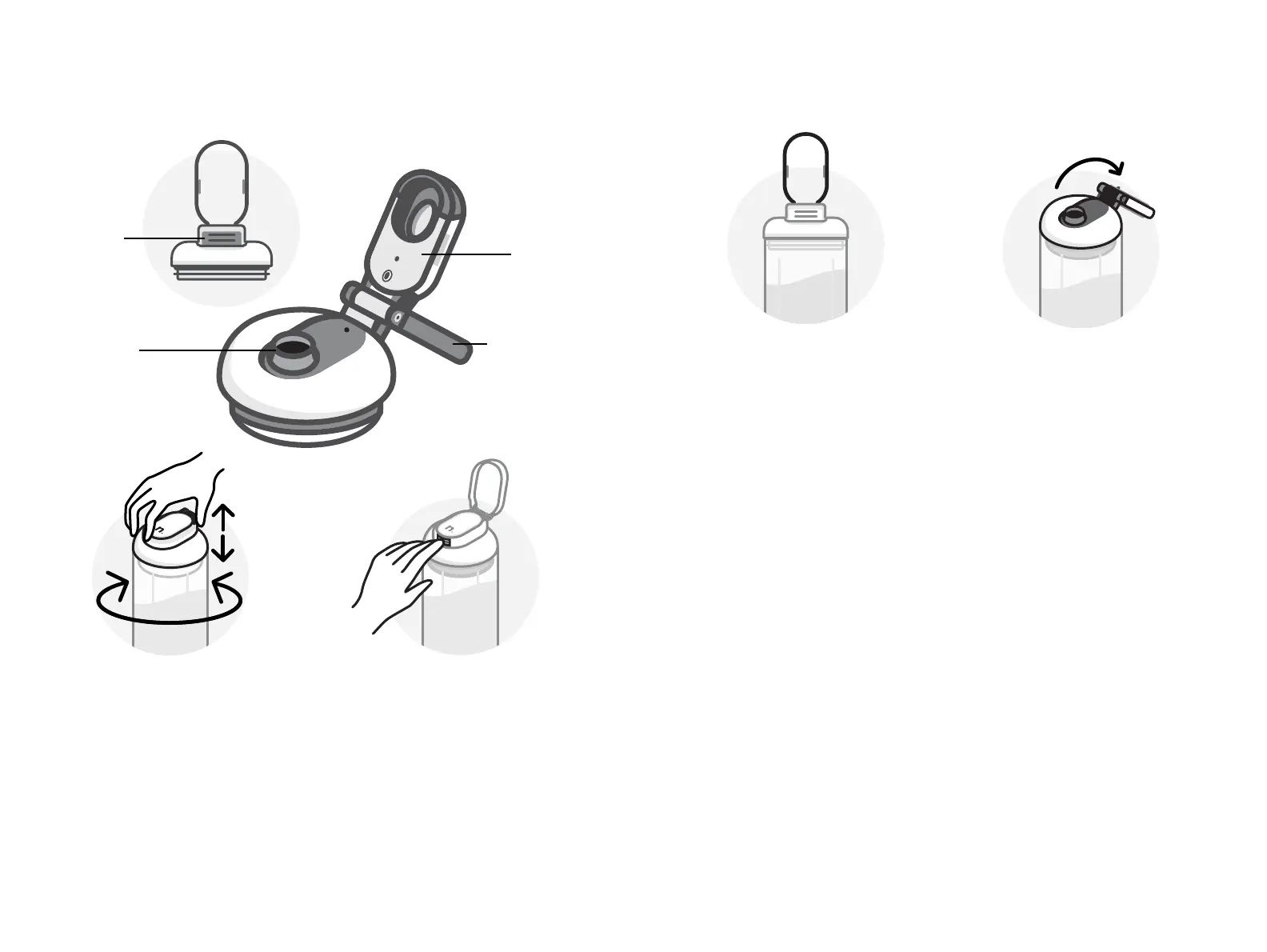
Sip Lid with Carry Loop:
2 Release Button: Press to
flip the Sip Cap open and
reveal the Sip Spout. To
close the Sip Cap, press in
place over the Sip Spout. A
“click” sound and sensation
occurs when the Cap is
properly closed and the
seal is engaged.
1 Twist on clockwise. Twist o
counter-clockwise. Always
make sure the Sip Cap is in
the closed position when
attaching or removing the
Sip Lid with Carry Loop.
PRO TIP: Use the Carry Loop and
Sip Cap area to grip when attaching
or removing the Sip Lid with Carry
Loop. Pinch the hinge area for easy
leverage, with the nutribullet
®
(n.)
logo against the palm.
twist on clockwise
sip lid with release button
3 Carry Loop: Comfortable,
convenient and flexible.
Flip down during blending.
Flip back for sipping and
carrying.
PRO TIP: Carry it or carabiner-it.
4 Sip Cap Lock: In the open
position, lightly press the Sip
Cap down, toward the Cup,
to lock in place. To release
the Sip Cap Lock, gently
press up and away from
the Cup.
PRO TIP: In closed position, the
Carry Loop doubles as a leak-proof
feature to protect from accidental
spills. Best for unpredictable
transport!
PRO TIP: Always make sure the
Sip Lid with Carry Loop is fully dry
before blending or storing to avoid
trapping moisture in the gasket or
seal areas. Air-dry in the above
position to avoid trapping moisture.
carry loop
carry loop
sip cap
spout
release
button
Bekijk gratis de handleiding van NutriBullet Flex XL, stel vragen en lees de antwoorden op veelvoorkomende problemen, of gebruik onze assistent om sneller informatie in de handleiding te vinden of uitleg te krijgen over specifieke functies.
Productinformatie
| Merk | NutriBullet |
| Model | Flex XL |
| Categorie | Blender |
| Taal | Nederlands |
| Grootte | 50200 MB |