NutriBullet Flex XL handleiding
Handleiding
Je bekijkt pagina 13 van 467
2423
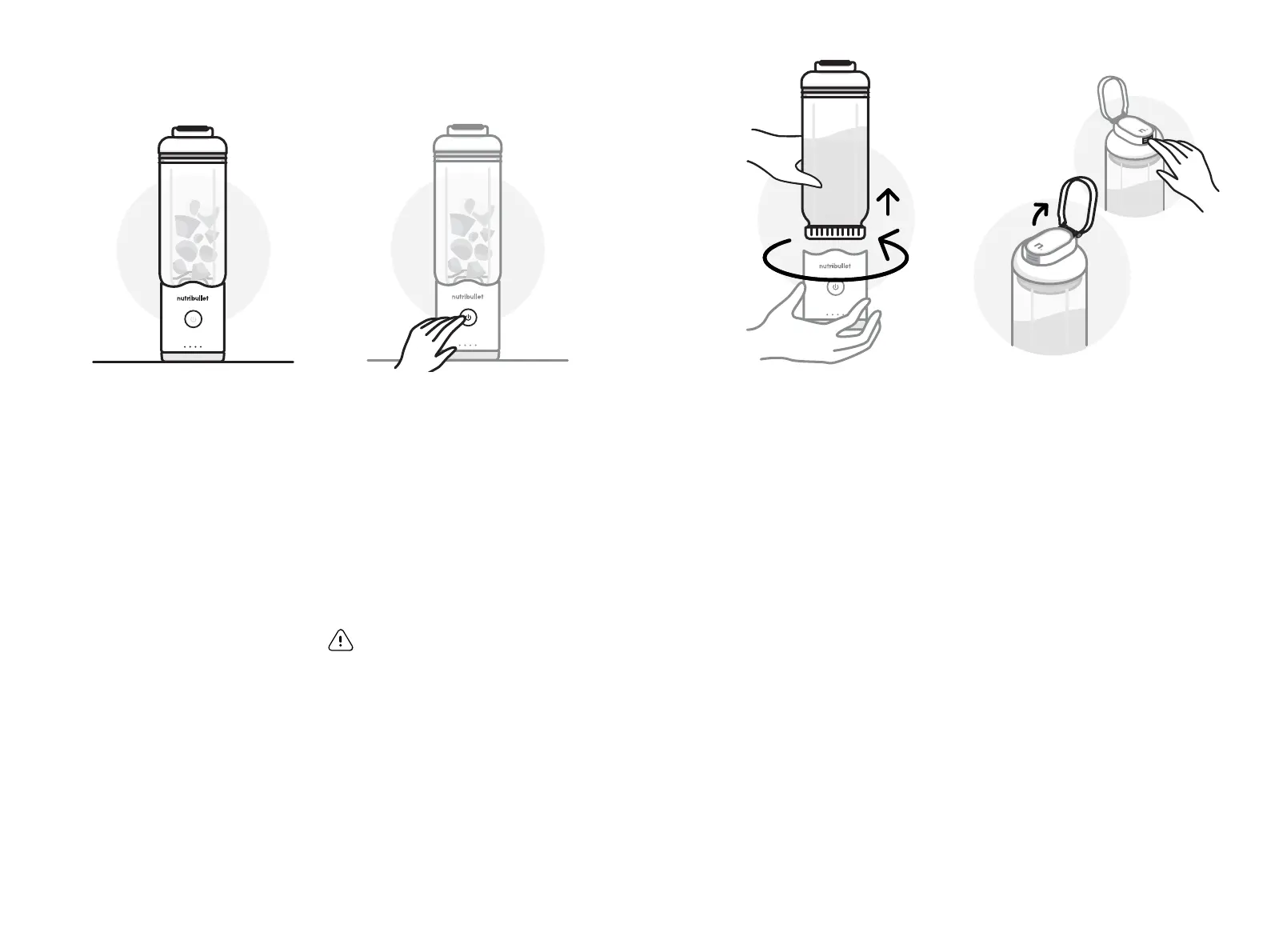
place nutribullet ex on clean surface
once blender is awake, press power button
5 Place the nutribullet Flex
™
Portable Blender on a
clean, dry, and level surface.
Wake up by pressing the
Power button once. Wait
about 1 second for the LED
animation to complete and
for the battery state
to show.
NOTE: After 90 seconds of
inactivity, your blender will
automatically go into Sleep Mode.
This prevents accidental blends
and preserves battery life.
6 Once your blender is awake,
press the Power button
again to start a 30-second
blend cycle.
If you want to Pulse your
ingredients or stop your
blend cycle early, press the
Power button again to stop.
PRO TIP: Blend until smooth,
running a second blending cycle,
if needed.
WARNING! Do not blend
for more than 4 consecutive
cycles to avoid excess heat
and pressure build-up.
For repeat cycles, carefully
open the container to release
any built-up pressure before
blending again.
8 Flip the Carry Loop away
from the Sip Lid Cap to
reveal the release button.
Press the button, reveal
the Sip Spout, and enjoy
your creation.
✓
sip lid with release button
7 When blending is complete,
gently twist the Cup o of the
Motor Base to enter To-Go
mode. Or, skip to step 8.
NOTE: Never apply downward
force or grip from the Sip Lid when
detaching the Cup from the Motor
Base. Grip the Motor Base and Cup
for best experience.
sip lid with release button
Bekijk gratis de handleiding van NutriBullet Flex XL, stel vragen en lees de antwoorden op veelvoorkomende problemen, of gebruik onze assistent om sneller informatie in de handleiding te vinden of uitleg te krijgen over specifieke functies.
Productinformatie
| Merk | NutriBullet |
| Model | Flex XL |
| Categorie | Blender |
| Taal | Nederlands |
| Grootte | 50200 MB |