
Marshall Electronics ML-702 handleiding
Handleiding
Je bekijkt pagina 3 van 7
www.marshall-usa.com
3
4
ML-702-V2 User Manual
www.marshall-usa.com
Product Description
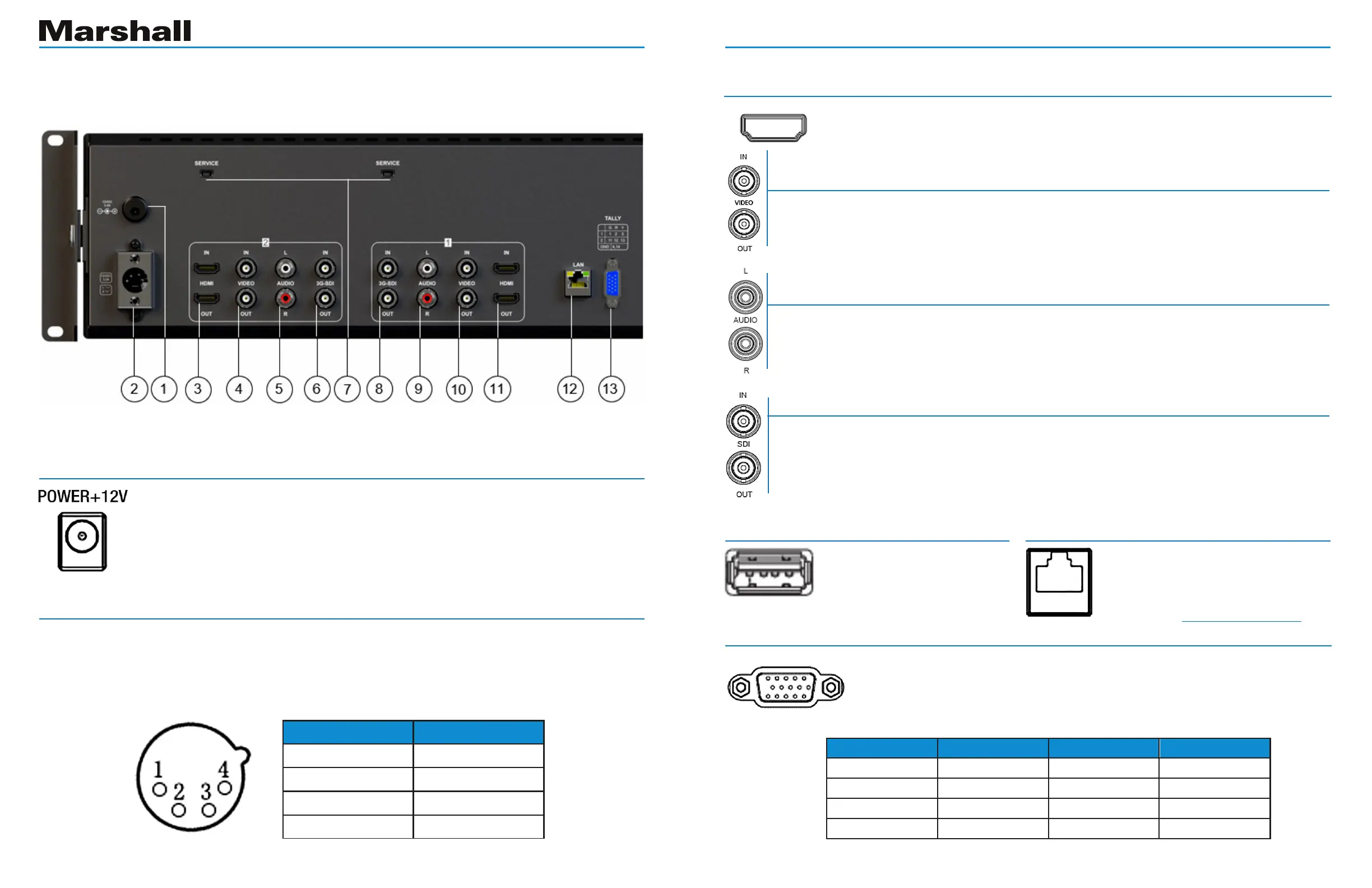
Back Panel Features
1. Push-on Power Connector
12V DC power input 5.5mm x 2.1mm push-on connector.
Plug the supplied DC power adapter here. (Center pin is +)
Important: Please connect only one type of power supply at a time to
this monitor.
2. 4-pin Power Connector
4-pin XLR DC power input compatible with typical broadcast television camera 12-volt power
supplies. CAUTION: Some 4-pin power supplies provide 24 volts. These are NOT compatible
with this monitor. Please check the label on the power supply before connecting.
Important: Please connect only one type of power supply at a time to this monitor.
3, 11. HDMI Digital Video Connectors
HDMI input and loop out. Embedded audio may be monitored at the
headphone jack and visually monitored on-screen.
Note: Power, TALLY and LAN apply to both screens. Inputs and USB service ports apply to each screen individually.
4, 10. Composite Analog Connectors
Video input and loop out. Used for NTSC or PAL composite (CVBS)
video sources.
5, 9. Analog RCA Connectors
Audio left and right inputs. These audio inputs are active only whenever Video is
selected as the source. This audio may be monitored at the headphone jack.
6, 8. Serial Digital “BNC” Connectors
SDI input and loop out. Compatible with SDI, HD SDI and 3G SDI inputs.
Embedded audio may be monitored at the headphone jack and visually
monitored on-screen.
7. USB Service Ports
USB input (Only used
for program upgrades
and LUT load).
12. Ethernet LAN RJ-45 Connector
LAN port. The monitor can be
operated from a Windows™ PC
using the PCSet application
available on Marshall-usa.com.
13. TALLY Connector
A red, green, or yellow on-screen tally bar can be made to appear by
grounding the appropriate pin on the Tally connector as shown in the
table. It is compatible with “open collector” and “pull down” type GPI
controls. Caution: External power should never be applied to the Tally.
Pin number Signal
1
GND
2
No connection
3
No connection
4
+12V
Screen #1 Tally Screen #2 Tally
1 Green Light 11 Green Light
2 Red Light 12 Red Light
3 Yellow Light 13 Yellow Light
4 Ground 14 Ground
Bekijk gratis de handleiding van Marshall Electronics ML-702, stel vragen en lees de antwoorden op veelvoorkomende problemen, of gebruik onze assistent om sneller informatie in de handleiding te vinden of uitleg te krijgen over specifieke functies.
Productinformatie
| Merk | Marshall Electronics |
| Model | ML-702 |
| Categorie | Monitor |
| Taal | Nederlands |
| Grootte | 3552 MB |