
Khind WM80A handleiding
Handleiding
Je bekijkt pagina 7 van 29
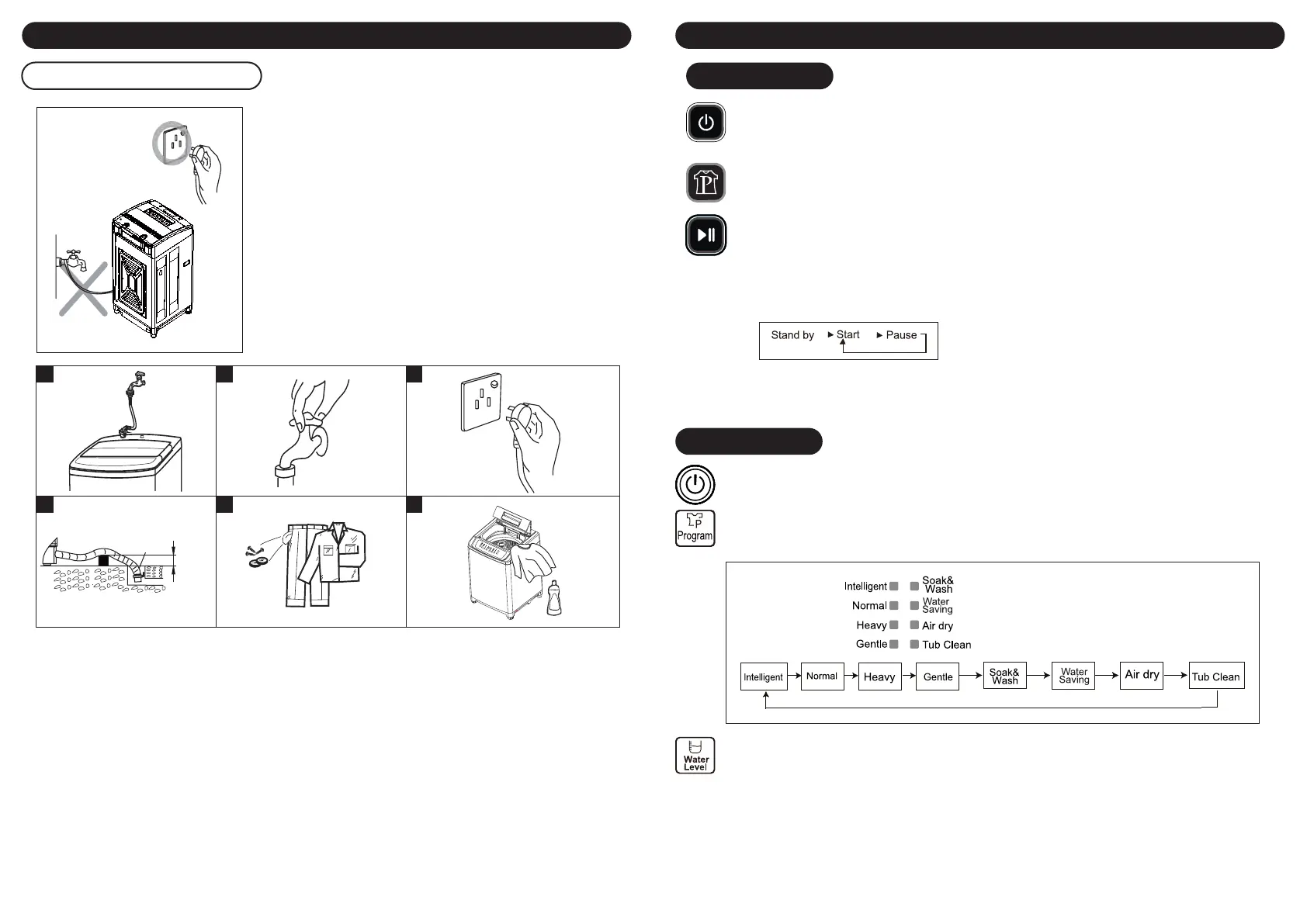
Connection of the power cord
Installation How To Use
11 12
1 2 3
4 5 6
1. Install the water inlet hose.
2. Turn on the tap.
3. Plug in the power cord.
4. Insert the end of the drain hose into the hook shelf, and hang the drain hose over a drain outlet.
5. Before washing, please take out coins or other hard goods, and pull to close the zip fastener to prevent
clothes and barrel from damage.
6. Put suitable detergent and wash load into the tub.
• The earthing which is indicated by yellow and green colour must
be rmly connected to a special Earthing. Please call the
technician to assemble.
• The socket should have assembled the 3A fuse.
Note:
• Never try to connect the earthing of the washing machine
together with that of gas pipe or water pipe, telephone cord or
lightening rod.
• Do not use the damaged cord because it could cause electricity
leakage and re.
• In case cord is damaged, please contact the local service
company, because it is removed and replaced with special tools.
WM80A
Power Switch
Press the power switch to turn on the washing machine.The default indicator will light on.
Washing Program Selector
The model has 8 programs to t for dierent clothes quality. The default program is “Normal”.
If other program is needed, you can press Program button to choose.
Start/Pause Button
• After pressing START/PAUSE button, the washing machine start to work.
• If it is needed to change PROGRAM or WATER LEVEL, please press START/PAUSE button to pause the
washing machine and reset the model. After the setting, press this button again, the washing
machine will start according to the new setting.
• To avoid danger, do not open the wash lid during the running of washing machine, especially in
spinning process.
Wash Over
• The Buzzer will alarm nish, and it will power o automatically.
• Unplug the power cord.
Power Switch
Press the power switch to turn on the washing machine.The default indicator will light on.
Washing Program Selector
The model has 8 programs for dierent clothes quality. You can select the desired program according to
the need.
Water Level Switch
Choose the water level according to the wash loading.
Diy Switch To Choose Suitable Wash Way
• After power on, press Program to choose a suitable program.
• After setting the program, you can press Wash, Rinse, Spin, Water Level or Preset button to set the
washing time, rinsing frequency, spinning time, or if select water recycles and preset function
according to the user’s need.
• Press the Start button to start.
• Close the door lid.
WM100A
outlet
less than
6cm
Bekijk gratis de handleiding van Khind WM80A, stel vragen en lees de antwoorden op veelvoorkomende problemen, of gebruik onze assistent om sneller informatie in de handleiding te vinden of uitleg te krijgen over specifieke functies.
Productinformatie
| Merk | Khind |
| Model | WM80A |
| Categorie | Wasmachine |
| Taal | Nederlands |
| Grootte | 6220 MB |
