Amcrest IP2M-852EB handleiding
Handleiding
Je bekijkt pagina 26 van 66
26
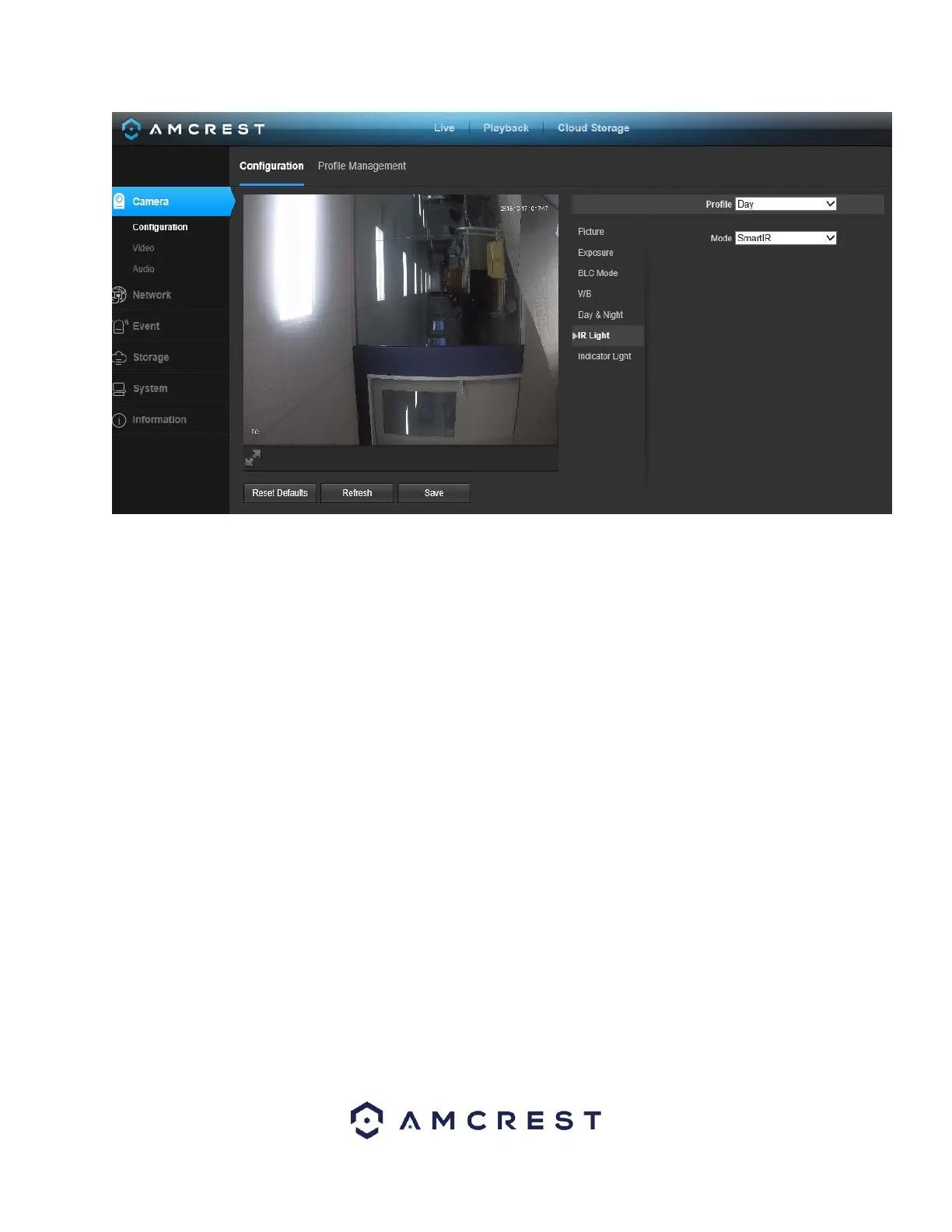
• Profile: This dropdown box allows the user to select which profile to modify. The 3
options are Day, Night, and Normal.
• Mode: This dropdown box allows the user to select whether to turn the indication
light on or off. SmartIR can also be set to automatically set the camera’s IR lights to on
and off positions based on Day & Night conditions. This setting is usually set by default
within the camera.
To reset to default settings, click the Reset Defaults button. To refresh the screen, click on
Refresh. To save the settings, click the Save button.
5.4.1.7. Indicator Light
This menu box allows the user to select whether the indicator light in the camera is on or
off for the selected profile. Below is a screenshot of this menu:
Bekijk gratis de handleiding van Amcrest IP2M-852EB, stel vragen en lees de antwoorden op veelvoorkomende problemen, of gebruik onze assistent om sneller informatie in de handleiding te vinden of uitleg te krijgen over specifieke functies.
Productinformatie
| Merk | Amcrest |
| Model | IP2M-852EB |
| Categorie | Bewakingscamera |
| Taal | Nederlands |
| Grootte | 16167 MB |