
Handleiding
Je bekijkt pagina 29 van 65
VIZIO XVT323SV/XVT373SV User Manual
Version 4/16/2010 29
www.VIZIO.com
COMPUTER
COMPUTER
Connecting a Computer
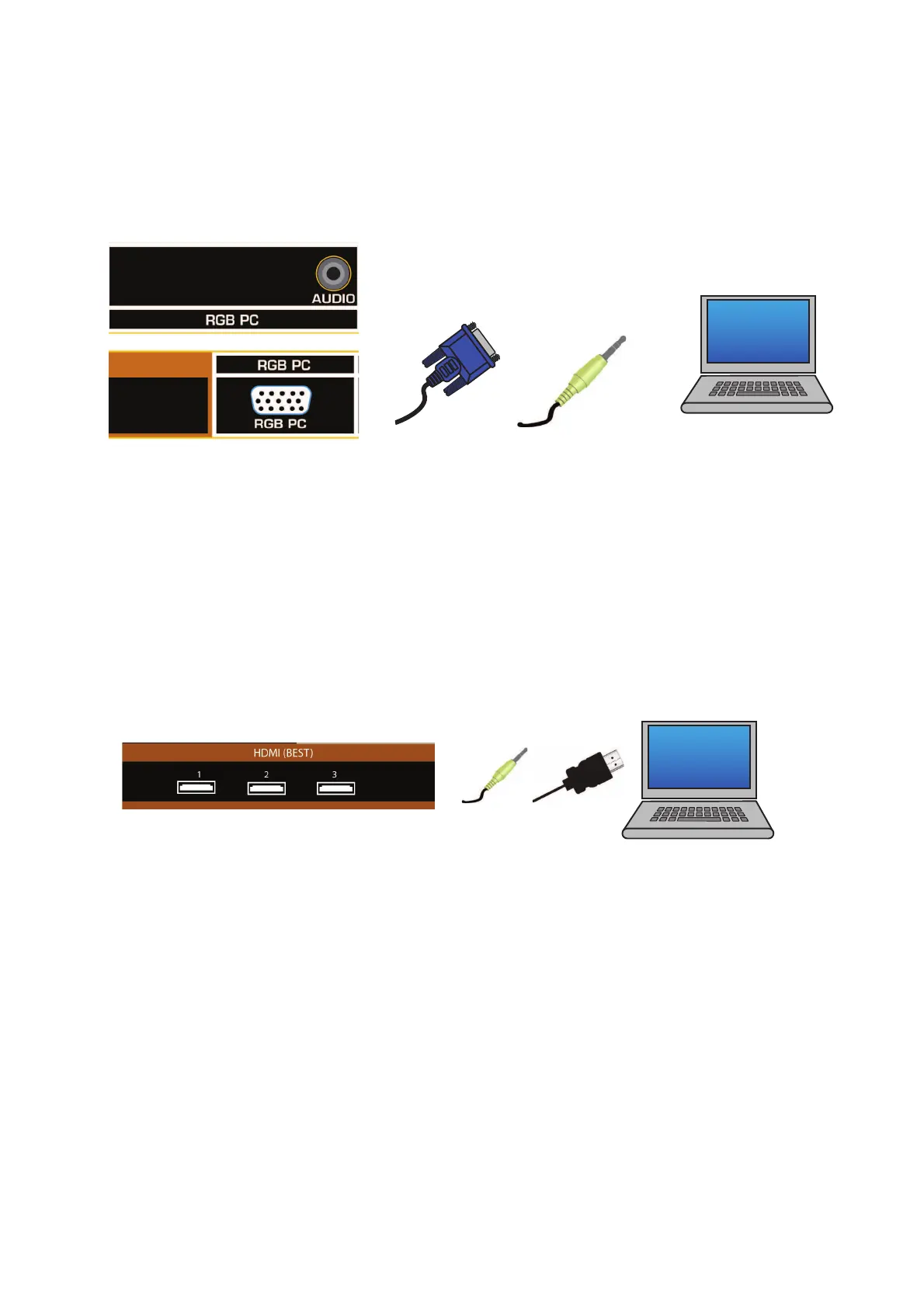
RGB (VGA)
1. Set computer to a resolution supported by your HDTV (see Preset PC Resolutions on page 61). If
your computer supports it, we recommend 1920x1080.
2. Turn off the power to your HDTV and computer.
3. Connect the RGB (VGA) cable from your computer to the RGB PC jack on of your HDTV.
4. Connect the 1/8-inch audio cable from your computer to the RGB PC Audio jack on your HDTV.
This step is optional and only needed if you want to transmit audio from the computer through the
TV.
5. Turn on the power to your HDTV and computer.
6. Select RGB (VGA) using the INPUT button on the remote control or side of the TV.
Note:
Refer to your PC computer user manual for more information about the video output requirements.
Using HDMI
1. Turn off your HDTV and computer.
2. Connect a HDMI cable to the HDMI output of your computer and the other end to the HDMI 1, 2,
3, or HDMI SIDE jack on your HDTV.
3. Connect the 1/8-inch audio cable from your computer to the RGB PC Audio jack on your HDTV.
This step is optional and only needed if you want to transmit audio from the computer through the
TV.
4. Turn on the power to your HDTV and your computer.
5. Select HDMI-1, HDMI-2, HDMI-3, or HDMI SIDE using the INPUT button on the remote control or
side of the TV.
Bekijk gratis de handleiding van Vizio XVT323SV, stel vragen en lees de antwoorden op veelvoorkomende problemen, of gebruik onze assistent om sneller informatie in de handleiding te vinden of uitleg te krijgen over specifieke functies.
Productinformatie
| Merk | Vizio |
| Model | XVT323SV |
| Categorie | Televisie |
| Taal | Nederlands |
| Grootte | 12664 MB |
Caratteristiche Prodotto
| Kleur van het product | Zwart |
| Kinderslot | Nee |
| LED-indicatoren | Ja |
| Beeldschermdiagonaal | 32 " |
| Resolutie | 1920 x 1080 Pixels |


