
Handleiding
Je bekijkt pagina 39 van 76
VIZIO VO37L HDTV10A User Manual
Version 2/28/2008 39
www.VIZIO.com
4.2
4.24.2
4.2 DTV / TV Input Pictur
DTV / TV Input PicturDTV / TV Input Pictur
DTV / TV Input Picture Adjustment
e Adjustmente Adjustment
e Adjustment
4.2.1
4.2.14.2.1
4.2.1 Picture Mode
Picture ModePicture Mode
Picture Mode
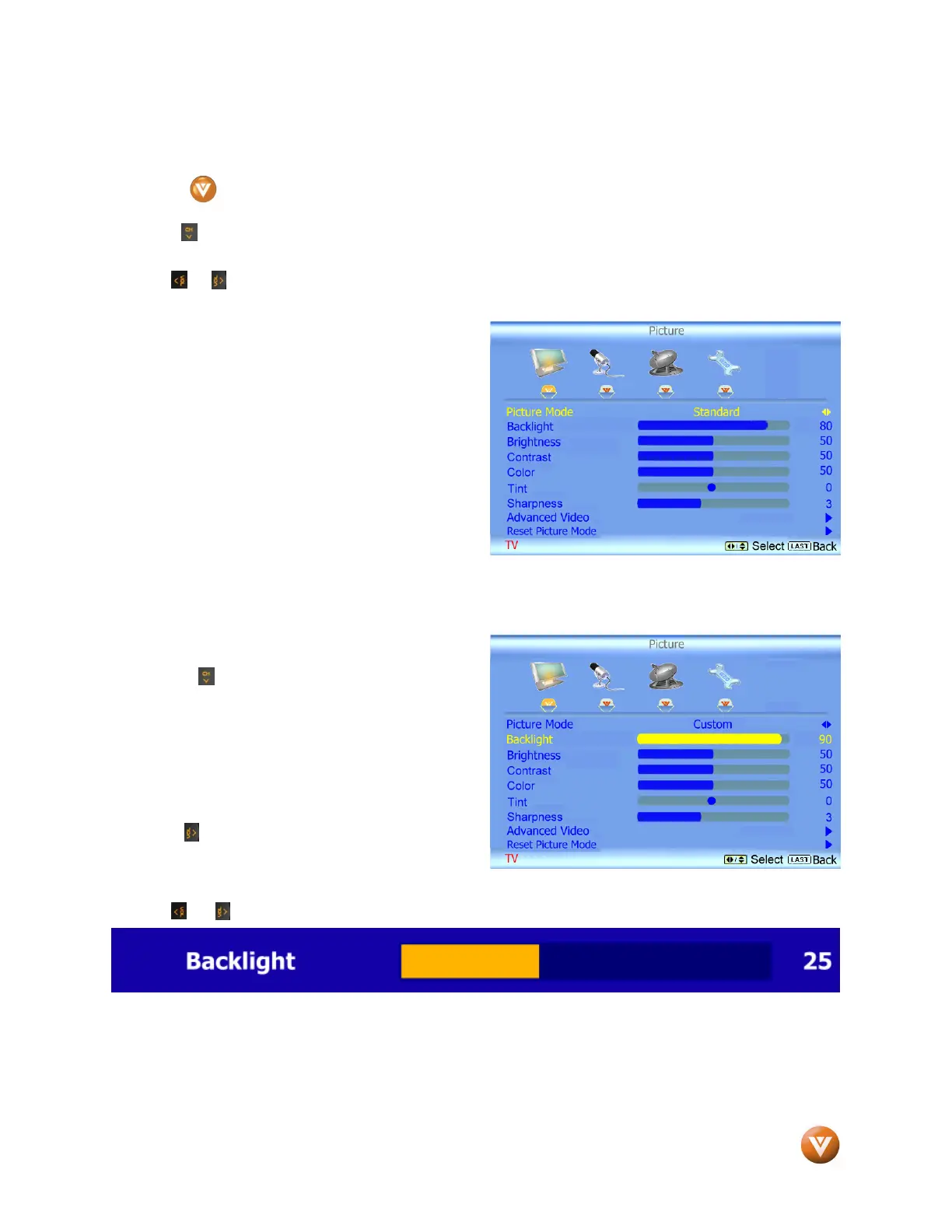
When the button is pressed, the On Screen Display (OSD) appears on the PICTURE adjustment
page.
Press the button to highlight the Picture Mode selection.
Use the or button to choose from Custom, Standard, Movie, Game, Vivid, Football, Golf, Basketball
and Baseball.
Picture Adjustments are available for you to set
them to your preferred settings.
Once the adjustments are completed press the LAST button repeatedly to exit the OSD completely.
4.2.2
4.2.24.2.2
4.2.2 Backlight
BacklightBacklight
Backlight
Press the button to highlight the Backlight
selection.
Press the button to start adjusting the brightness
of the Backlight and the menu page will disappear
and be replaced by a small Backlight Indicator Bar
so you can see the light level between the minimum and maximum available levels.
Use the or button to adjust the level.
The Backlight level does not affect the Brightness (black level) or Contrast (white level) of the picture, it
adjusts the lamp current and this affects the overall brilliance of the picture.
Once the adjustments are completed press the LAST button repeatedly to exit the OSD completely.
Note: This setting will be disabled and disappear if Enhanced Contrast Ratio is turned on.
Bekijk gratis de handleiding van Vizio VO37L, stel vragen en lees de antwoorden op veelvoorkomende problemen, of gebruik onze assistent om sneller informatie in de handleiding te vinden of uitleg te krijgen over specifieke functies.
Productinformatie
| Merk | Vizio |
| Model | VO37L |
| Categorie | Televisie |
| Taal | Nederlands |
| Grootte | 17993 MB |


