
Handleiding
Je bekijkt pagina 18 van 72
VIZIO VF552XVT HDTV User Manual
18
www.VIZIO.com
Chapter 4 Using your HDTV for the first time
Connecting to the Internet
Set up the Internet connection using the initial Setup App or the Network Menu in the HDTV Settings App.
Your HDTV has 802.11n dual-band wireless, so you can connect your TV to the Internet through your
wireless home network. Or you can also connect to the Internet by plugging in an Ethernet cable from
your Internet connection into the Ethernet port on your HDTV. A wired connection may provide a more
consistent connection depending on the conditions in your home environment. See the Network Menu on
page 52 for detailed information on setting up your Internet connection.
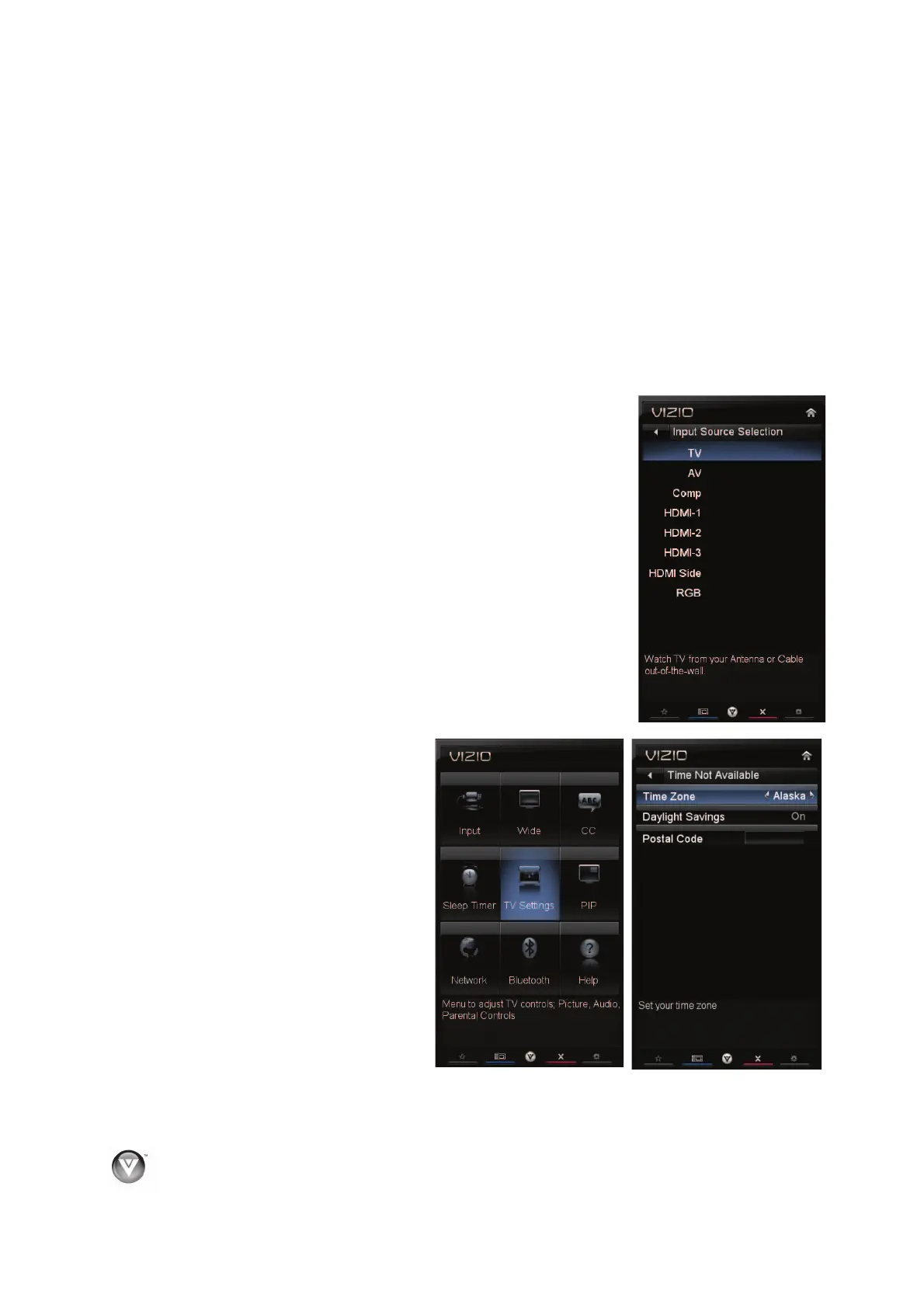
Selecting an Input Source
Select the input source for your HDTV by pressing INPUT on the remote
control or side of the TV. Pressing this button will cycle you through the
following options: TV, AV (Composite), COMP (Component), HDMI-1, HDMI-
2, HDMI-3, HDMI-4, HDMI side, and RGB (VGA).
Turn on your device and you will see a picture on your HDTV. If there is no
picture, make sure you have selected the correct input on your HDTV.
Note: If the selected device is RF connected, your HDTV needs to be in TV
mode and on either channel 3 or channel 4 matching the channel which has
been selected on the back of the VCR, Cable Box, External TV Tuner or
Satellite Receiver. Please refer to Owner or User’s Manual of such
equipment for details.
Setting the Time Zone & Daylight Savings
1. Press the VIA button.
2. Press ◄ or ► on the remote control
to select the HDTV Settings App, and
then press OK. The Main Menu will be
displayed.
3. Press ◄, ►,
Ÿ, or ź on the remote
control to highlight TV Settings,
and then press OK to select it. The
Input Source sub-menu will be
highlighted.
4. Press
Ÿ or ź on the remote control
to highlight Time & Local Settings,
and then press OK to select it. The
Time Zone sub-menu will be
highlighted. Press ◄ or ► to select
your time zone.
5. Press
ź to scroll down to Daylight
Savings, and then press ◄ or ► to
set to On or Off.
6. Press EXIT to return to your program.
Bekijk gratis de handleiding van Vizio VF552XVT, stel vragen en lees de antwoorden op veelvoorkomende problemen, of gebruik onze assistent om sneller informatie in de handleiding te vinden of uitleg te krijgen over specifieke functies.
Productinformatie
| Merk | Vizio |
| Model | VF552XVT |
| Categorie | Televisie |
| Taal | Nederlands |
| Grootte | 15226 MB |
Caratteristiche Prodotto
| Kleur van het product | Zwart |
| Gebruikershandleiding | Ja |
| LED-indicatoren | Ja |
| Bluetooth | Nee |
| Beeldschermdiagonaal | 55 " |


