
Handleiding
Je bekijkt pagina 15 van 83
2
8
REMOTE CONTROL
REMOTE CONTROL
INFO
MENU
GUIDEBACK
VOL
ENTER
CH
3D
1 2 3
4 5 6
7 8
0
9
EXIT
INPUT
LIST
OK
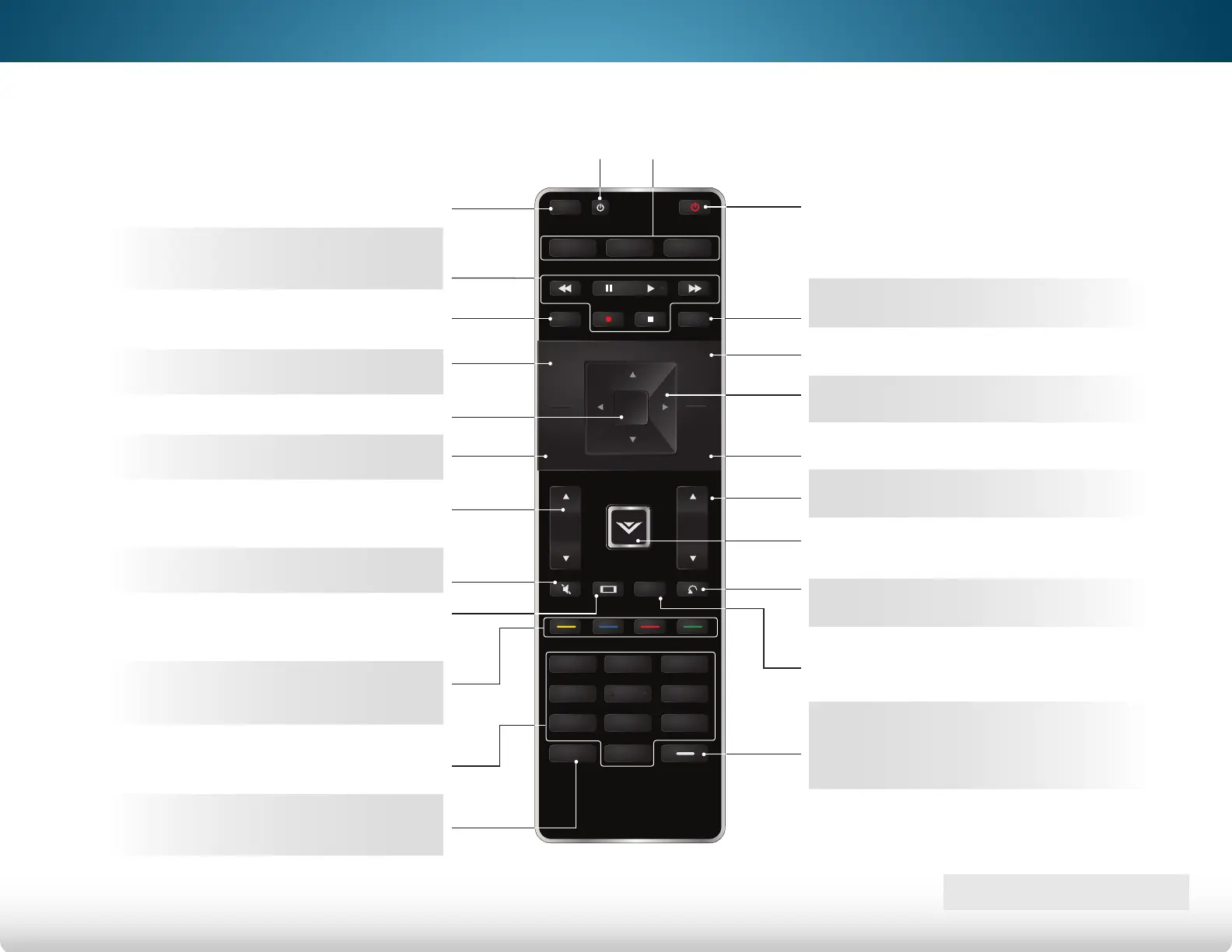
APP LAUNCHER
Quickly launch the pictured App.
INPUT
Change the currently
displayed input.
HOT KEYS
Perform functions within an
on-screen menu or app.
NUMBER PAD
Manually enter a channel.
WIDE
Change the display mode.
ENTER
Confirm channel or passcode
entered using the Number Pad.
ARROW
Navigate the on-screen menu.
POWER
Turn TV on or off.
INFO
Display the info window.
MENU
Display the on-screen menu.
GUIDE
Display the info window.
3D
Turn on 3D mode.
V BUTTON
Open the VIZIO Internet Apps Plus
™
(V.I.A.
Plus) dock.
CHANNEL UP/DOWN
Change the channel.
LAST
Return to the channel last viewed.
DASH
Use with number pad to manually
enter a digital sub-channel.
(For example, 18-4 or 18-5.)
A/V CONTROLS
Control USB media player and
video streaming playback.
DEVICE POWER
Turn devices on or off.
LIST
Display the channel guide
when using a set-top box.
EXIT
Close the on-screen menu.
VOLUME UP/DOWN
Increase or decrease loudness
of the audio.
OK
Select the highlighted option.
BACK
Go to the previous on-screen menu.
MUTE
Turn the audio off or on.
Bekijk gratis de handleiding van Vizio M651D-A2R, stel vragen en lees de antwoorden op veelvoorkomende problemen, of gebruik onze assistent om sneller informatie in de handleiding te vinden of uitleg te krijgen over specifieke functies.
Productinformatie
| Merk | Vizio |
| Model | M651D-A2R |
| Categorie | Televisie |
| Taal | Nederlands |
| Grootte | 14800 MB |
Caratteristiche Prodotto
| Kleur van het product | Zwart |
| Gewicht verpakking | 41900 g |
| Breedte verpakking | 1635 mm |
| Diepte verpakking | 147.07 mm |
| Hoogte verpakking | 1050 mm |


