
Handleiding
Je bekijkt pagina 35 van 49
4SmartCast TV
What is SmartCast TV
SM
?
SmartCast TV lets you discover, stream, and control your content like never before. Access top apps
like Netix more easily, using the included remote to browse and launch content directly from the
big screen. SmartCast TV makes nding something to watch more fun - discover new shows including
movies in 4K UHD and Dolby Vision HDR. Plus, you can quickly set up and adjust settings right on the
TV using the included remote control.
What can you do with SmartCast TV:
• Browse and launch top tier apps directly from the big screen using the included remote.
• Stream content directly from the home screen with a single button press.
• Stream high quality entertainment in Full HD.
• Initiate a stream with the included IR remote, pause with mobile app, continue controlling with
voice via Google Home.
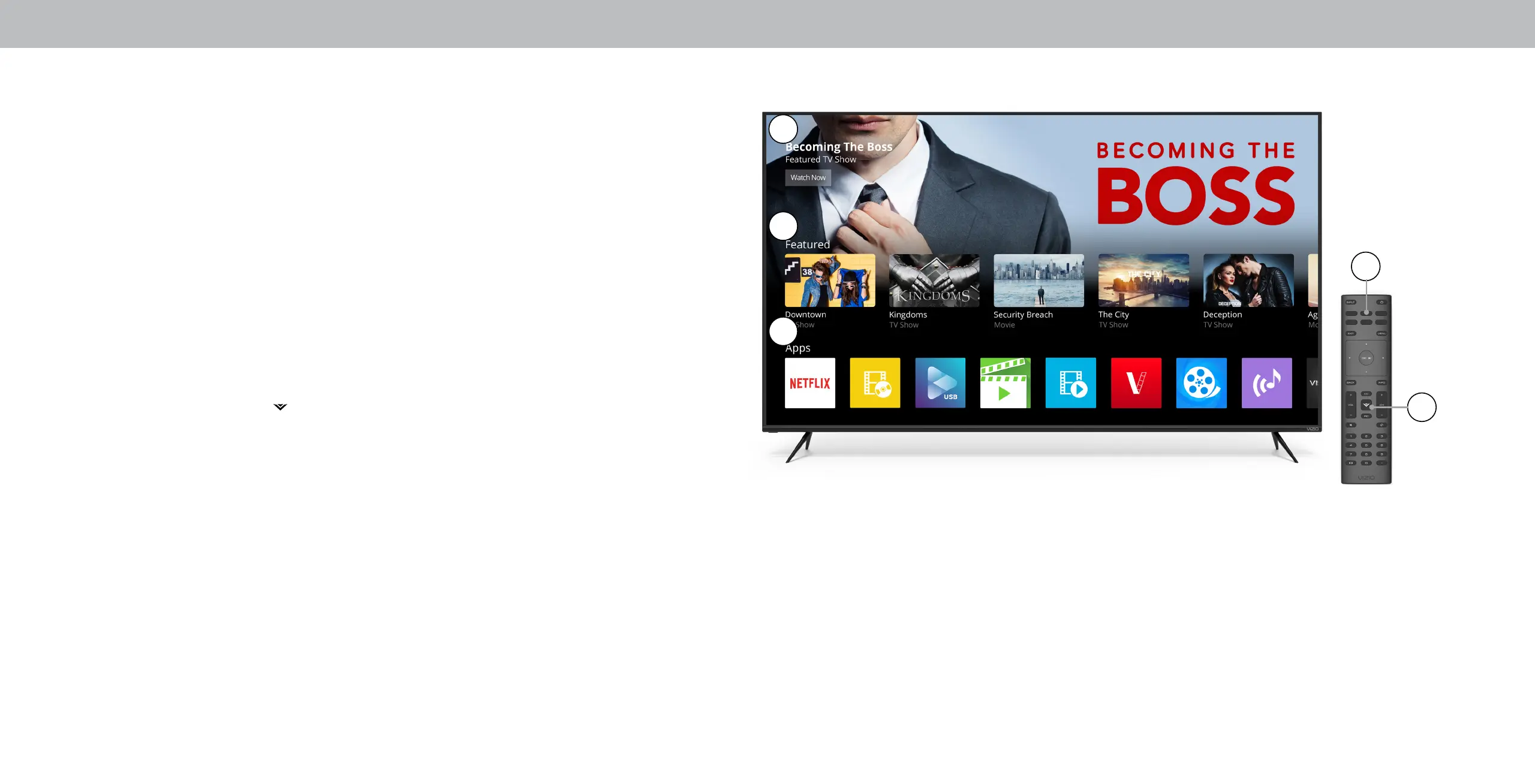
How to Launch SmartCast TV
To launch and begin streaming with SmartCast TV:
• Press the V-Logo button ( ) on your remote
-OR-
• Select SmartCast from the list of inputs.
1. Marquee Content Carousel
2. Discover - New or popular content across multiple apps, including 4k HDR content
3. Streaming Apps
4. Quick Access to Popular Apps
5. V-Key - Lauch SmartCast TV with one click
1
2
4
3
5
35
Bekijk gratis de handleiding van Vizio M65-F0, stel vragen en lees de antwoorden op veelvoorkomende problemen, of gebruik onze assistent om sneller informatie in de handleiding te vinden of uitleg te krijgen over specifieke functies.
Productinformatie
| Merk | Vizio |
| Model | M65-F0 |
| Categorie | Televisie |
| Taal | Nederlands |
| Grootte | 18674 MB |
Caratteristiche Prodotto
| Kleur van het product | Zwart |
| Gewicht verpakking | 29970 g |
| Breedte verpakking | 1620 mm |
| Diepte verpakking | 163.1 mm |
| Hoogte verpakking | 990.1 mm |


