
Handleiding
Je bekijkt pagina 11 van 76
1
5
5
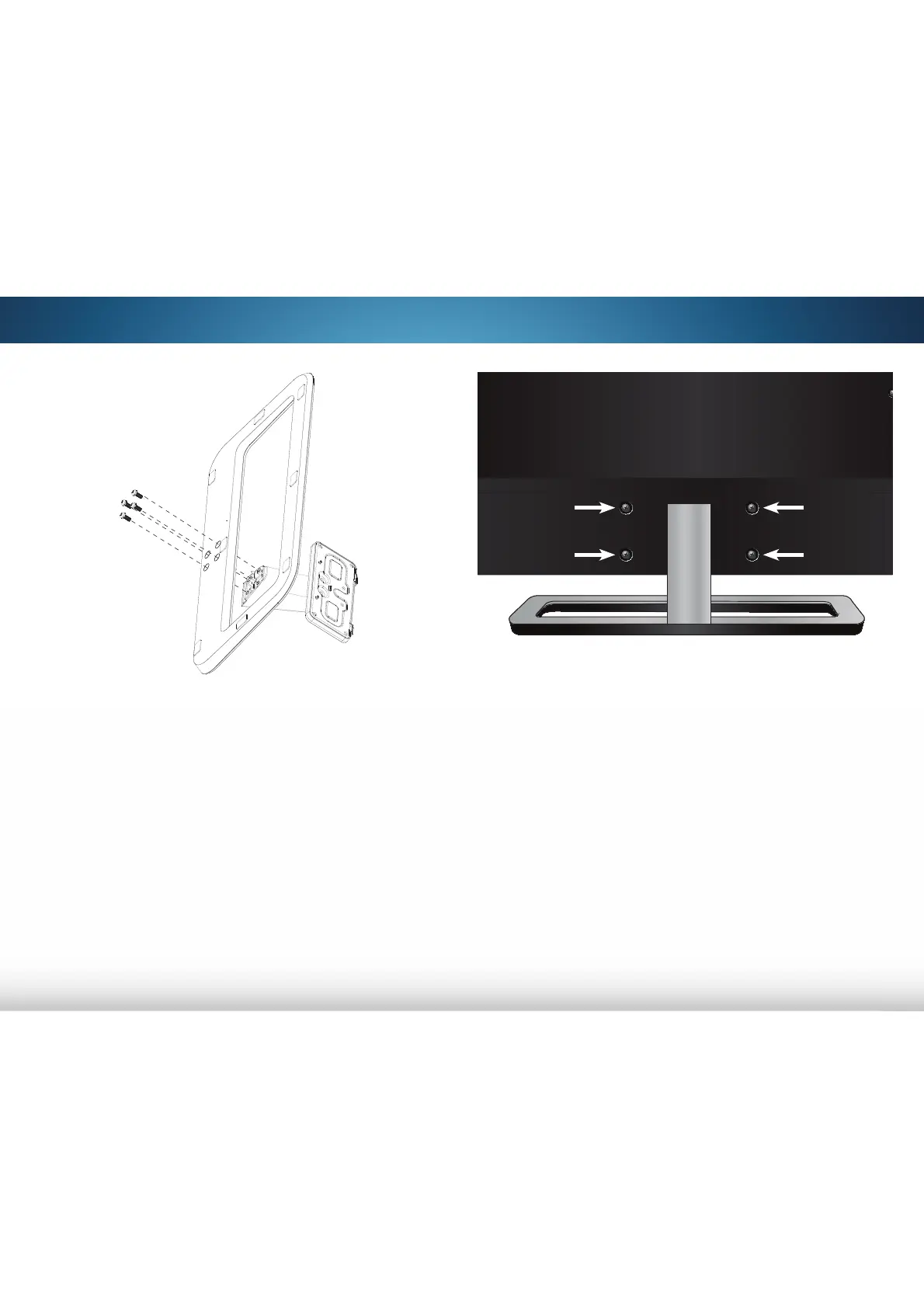
BACK OF TV
4. Align the Stand with the back of the TV.
M492i-B2 & M552i-B2: Use a Phillips screwdriver to insert and
tighten the four (4) included M6 x 18mm Phillips screws into the
holes on the back of the TV.
M652i-B2: Use a Phillips screwdriver to insert and tighten the
four (4) included M6 x 16mm Phillips screws into the holes on
the back of the TV.
5. When you are finished, place the TV on a stable, level surface.
2. Align the neck piece with the base.
3. Use a Phillips screwdriver to insert and tighten the four (4)
included M5 x 14mm Phillips screws into the holes on the
bottom of the Base.
Bekijk gratis de handleiding van Vizio M552i-B2, stel vragen en lees de antwoorden op veelvoorkomende problemen, of gebruik onze assistent om sneller informatie in de handleiding te vinden of uitleg te krijgen over specifieke functies.
Productinformatie
| Merk | Vizio |
| Model | M552i-B2 |
| Categorie | Televisie |
| Taal | Nederlands |
| Grootte | 12615 MB |


