
Handleiding
Je bekijkt pagina 28 van 83
5
21
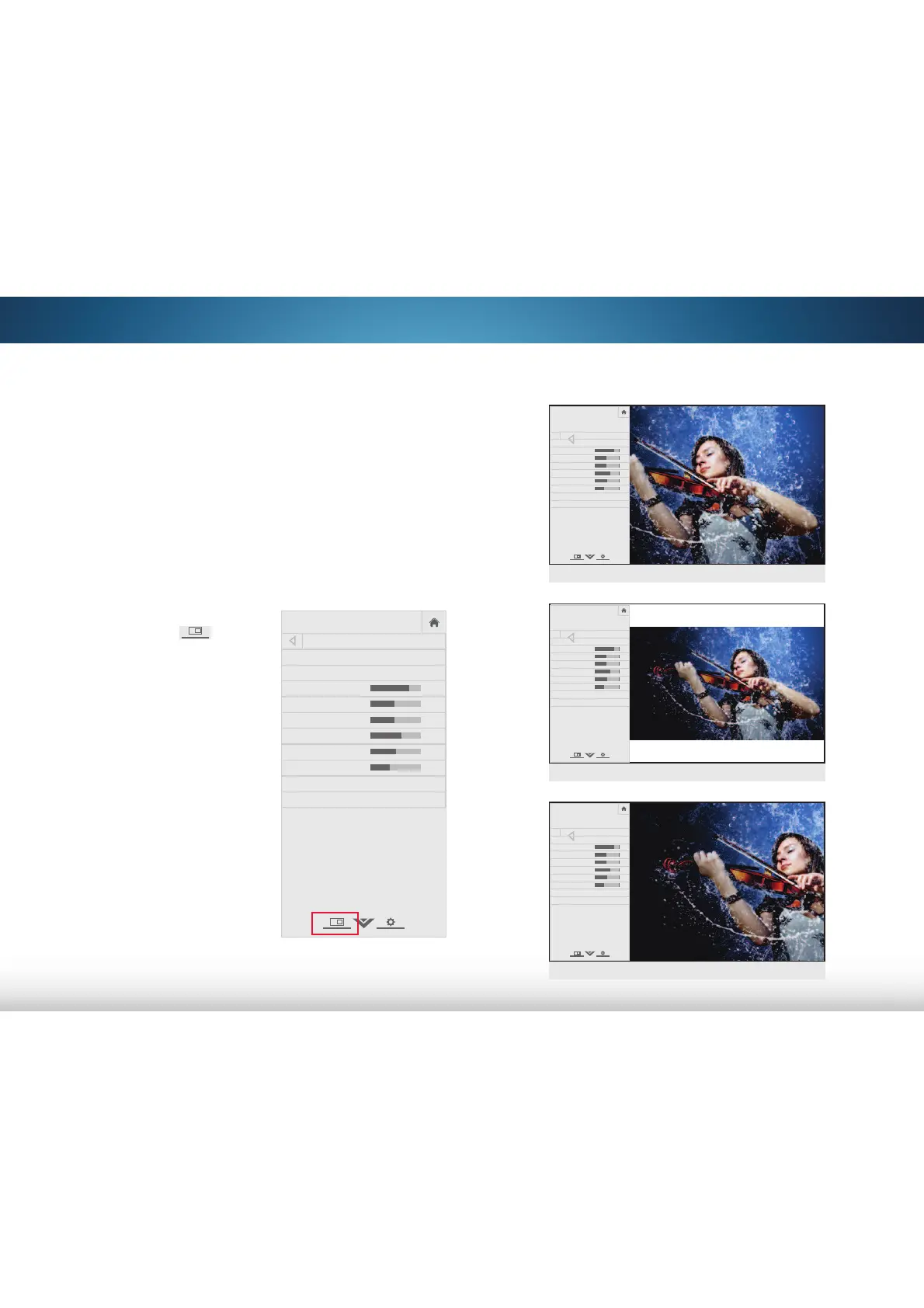
VIEWING VIDEO WITH THE MENU OPEN
When the on-screen menu opens, it covers the left-hand portion
of the picture. The picture can be displayed in three different
ways:
• Full-sized and centered on the screen - The left-hand
portion of the picture covered by the menu.
• Resized to fit - The entire picture is visible in the space to
the right of the menu.
• Full-sized and aligned to the right edge of the menu -
The picture extends off of the right side of the screen.
To change the position of the picture while the on-screen menu
is displayed:
1. Use the Arrow buttons on the
remote to highlight
Resize
Video.
2. Press OK to cycle through the
three display methods.
3. Press the Up Arrow button on
the remote to the menu.
VIZIO
PICTURE
Picture Mode Standard
Auto Brightness Control Medium
Backlight 85
Brightness 50
Contrast 50
Color 59
Tint 0
Sharpness 9
Advanced Picture
Professional Picture
-
+
+
-
-
+
-
+
-
+
-
+
Select from preset picture modes. Standard
picture mode meets ENERGY STAR
®
requirements. For the best picture, use
Calibrated mode. To reduce video delay
(lag) when gaming, use Game mode.
VIZIO
PICTURE
Picture Mode Standard
Backlight 85
Brightness 50
Contrast 50
Color 59
Tint 0
Sharpness 9
Advanced Picture
Professional Picture
-
+
+
-
-
+
-
+
-
+
-
+
Select from preset picture modes. Standard
picture mode meets ENERGY STAR
®
requirements. For the best picture, use
Calibrated mode. To reduce video delay
(lag) when gaming, use Game mode.
Full-sized and aligned to right of menu
VIZIO
PICTURE
Picture Mode Standard
Backlight 85
Brightness 50
Contrast 50
Color 59
Tint 0
Sharpness 9
Advanced Picture
Professional Picture
-
+
+
-
-
+
-
+
-
+
-
+
Select from preset picture modes. Standard
picture mode meets ENERGY STAR
®
requirements. For the best picture, use
Calibrated mode. To reduce video delay
(lag) when gaming, use Game mode.
Resized to fit
VIZIO
PICTURE
Picture Mode Standard
Backlight 85
Brightness 50
Contrast 50
Color 59
Tint 0
Sharpness 9
Advanced Picture
Professional Picture
-
+
+
-
-
+
-
+
-
+
-
+
Select from preset picture modes. Standard
picture mode meets ENERGY STAR
®
requirements. For the best picture, use
Calibrated mode. To reduce video delay
(lag) when gaming, use Game mode.
Full-sized and centered
Bekijk gratis de handleiding van Vizio M501d-A2R, stel vragen en lees de antwoorden op veelvoorkomende problemen, of gebruik onze assistent om sneller informatie in de handleiding te vinden of uitleg te krijgen over specifieke functies.
Productinformatie
| Merk | Vizio |
| Model | M501d-A2R |
| Categorie | Televisie |
| Taal | Nederlands |
| Grootte | 13706 MB |
Caratteristiche Prodotto
| Kleur van het product | Zwart |
| Gewicht verpakking | 23300 g |
| Breedte verpakking | 1291 mm |
| Diepte verpakking | 149.6 mm |
| Hoogte verpakking | 858.01 mm |


