
Handleiding
Je bekijkt pagina 68 van 81
3
68
Note: The images shown here are for illustrative purposes only and may be subject to change. The actual on-screen image and text may vary, depending on the model.
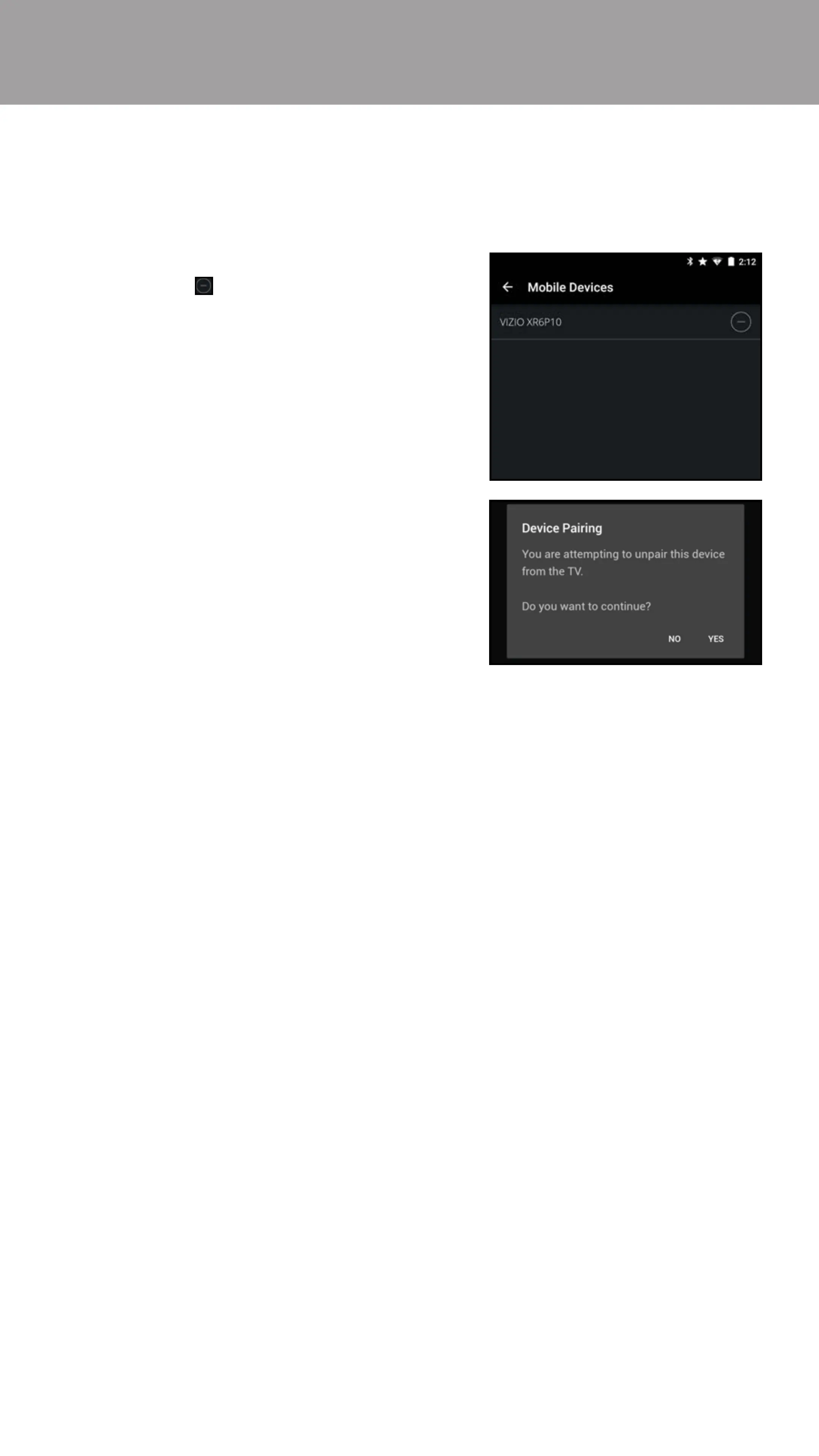
1. From the Mobile Devices menu,
tap the button next to the
device you want to delete.
2. A conrmation window appears,
tap YES to continue. The device is
deleted.
The Mobile Devices menu provides a list of mobile devices paired to the display.
You can use this menu to delete a pair device from display.
Paired Mobile Devices
To delete a paired device:
Bekijk gratis de handleiding van Vizio M50-D1, stel vragen en lees de antwoorden op veelvoorkomende problemen, of gebruik onze assistent om sneller informatie in de handleiding te vinden of uitleg te krijgen over specifieke functies.
Productinformatie
| Merk | Vizio |
| Model | M50-D1 |
| Categorie | Televisie |
| Taal | Nederlands |
| Grootte | 76417 MB |
Caratteristiche Prodotto
| Kleur van het product | Zwart |
| Gewicht verpakking | 18901.2 g |
| Breedte verpakking | 1266.95 mm |
| Diepte verpakking | 162.1 mm |
| Hoogte verpakking | 828.04 mm |


