
Handleiding
Je bekijkt pagina 52 van 67
6
45
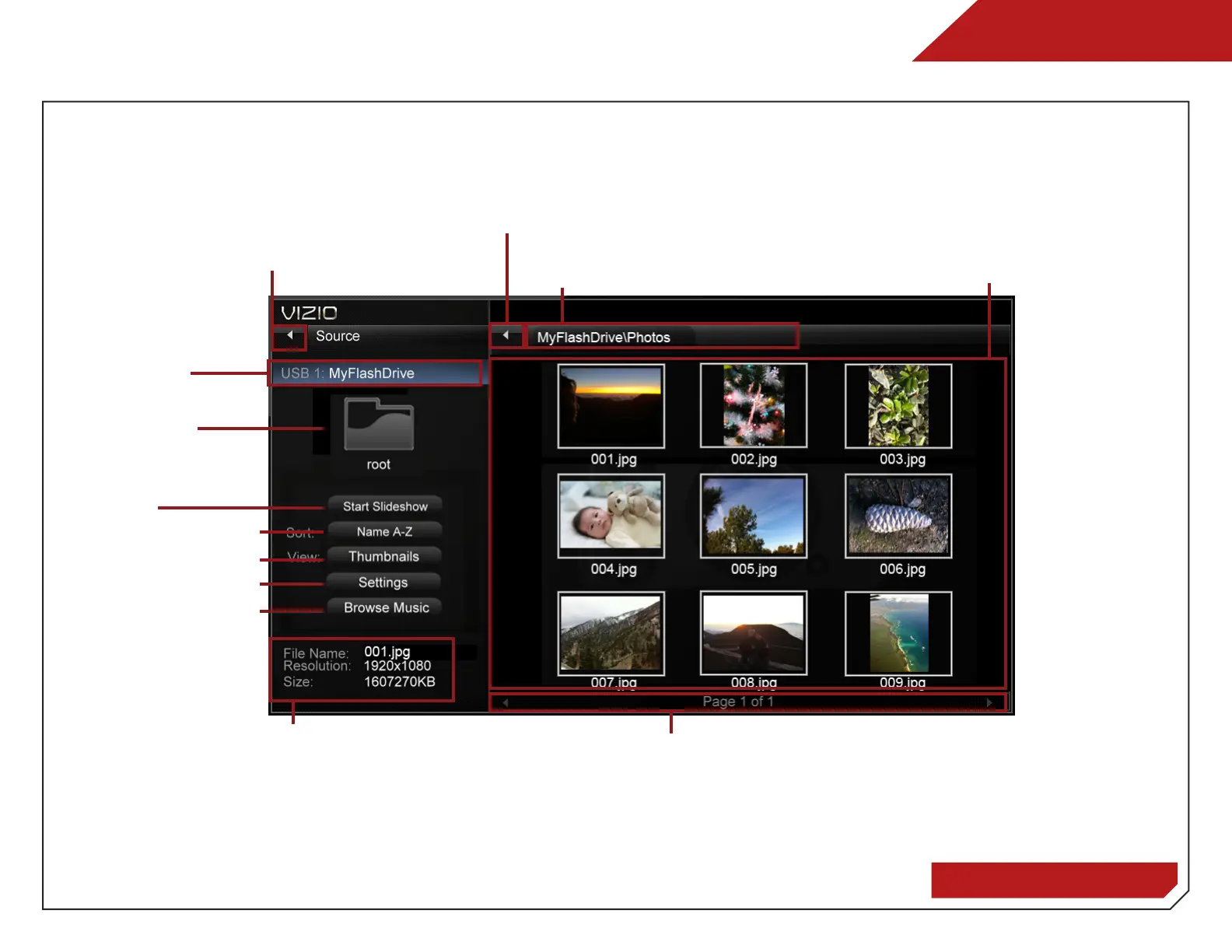
Folder Contents
This area displays the
contents of the currently
selected folder. You can
browse between files using
the Arrow and OK buttons
on the remote.
Current Folder
Displays the folder path.
Page Information
If your USB thumb drive has more
files than can be displayed on
a single screen, you can move
between pages by highlighting this
area and pressing Left/Right Arrow.
Back Button
Highlight and press OK to return to left column.
Connected
Sources
Displays
connected
USB devices. To
change source,
highlight it and
press OK.
Current Folder
Back Button
Highlight this button and
press OK if you would like
to return to the previous
screen.
Sort by Name or Date
View Thumbnails/List
View Folder Settings
Toggle Music/Photos
Start Fullscreen
Slideshow
Photo Infomation
Displays name,
resolution, and file
size for currently
selected photo.
PHOTO VIEWER
Bekijk gratis de handleiding van Vizio M470SL, stel vragen en lees de antwoorden op veelvoorkomende problemen, of gebruik onze assistent om sneller informatie in de handleiding te vinden of uitleg te krijgen over specifieke functies.
Productinformatie
| Merk | Vizio |
| Model | M470SL |
| Categorie | Televisie |
| Taal | Nederlands |
| Grootte | 11487 MB |
Caratteristiche Prodotto
| Kleur van het product | Zwart |
| Gewicht verpakking | 16012 g |
| Breedte verpakking | 1290 mm |
| Diepte verpakking | 117 mm |
| Hoogte verpakking | 785 mm |


