
Handleiding
Je bekijkt pagina 11 van 67
1
4
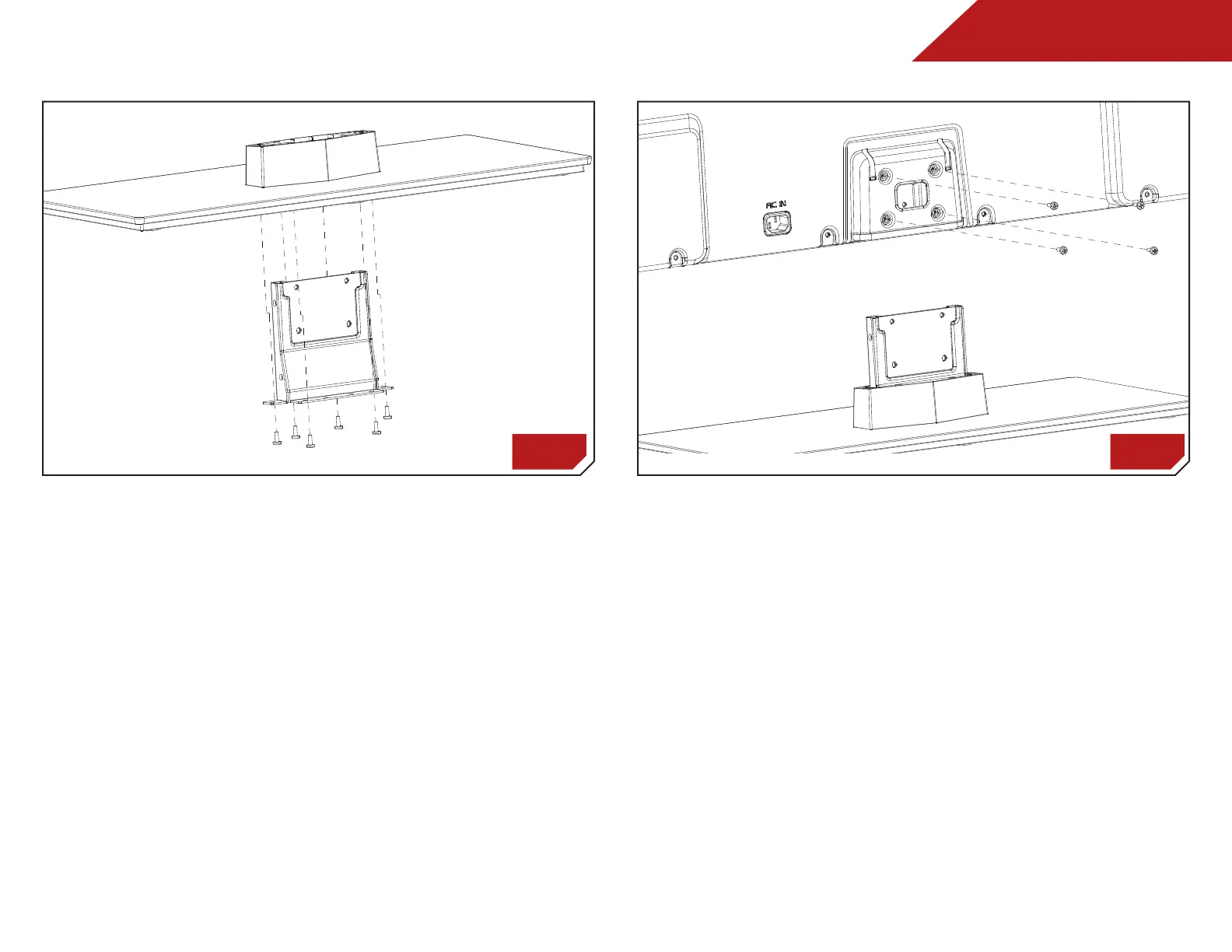
To install the TV stand (M420SL, M470SL, M550SL):
1. Place the TV screen-down on a clean, flat surface. To prevent
scratches or damage to the screen, place the TV on a soft
surface, such as carpet, rug, or blanket.
2. Push the neck up through the bottom of the stand.
3. Insert and tighten the six (6) screws as shown in illustration A.
4. Insert the assembled stand into the bottom of the TV. Tighten
the four (4) screws as shown in illustration B.
5. Move the TV with attached stand into an upright position
and place on a flat, level, and stable surface.
6. To ensure proper ventilation, leave at least 1” of space
between the back of the TV and any other objects (walls,
etc).
A B
Bekijk gratis de handleiding van Vizio M470SL, stel vragen en lees de antwoorden op veelvoorkomende problemen, of gebruik onze assistent om sneller informatie in de handleiding te vinden of uitleg te krijgen over specifieke functies.
Productinformatie
| Merk | Vizio |
| Model | M470SL |
| Categorie | Televisie |
| Taal | Nederlands |
| Grootte | 11487 MB |
Caratteristiche Prodotto
| Kleur van het product | Zwart |
| Gewicht verpakking | 16012 g |
| Breedte verpakking | 1290 mm |
| Diepte verpakking | 117 mm |
| Hoogte verpakking | 785 mm |


