
Handleiding
Je bekijkt pagina 15 van 51
VIZIO VA SERIES User Manual
Version 3/11/2010 15
www.VIZIO.com
Chapter 4 Getting Started
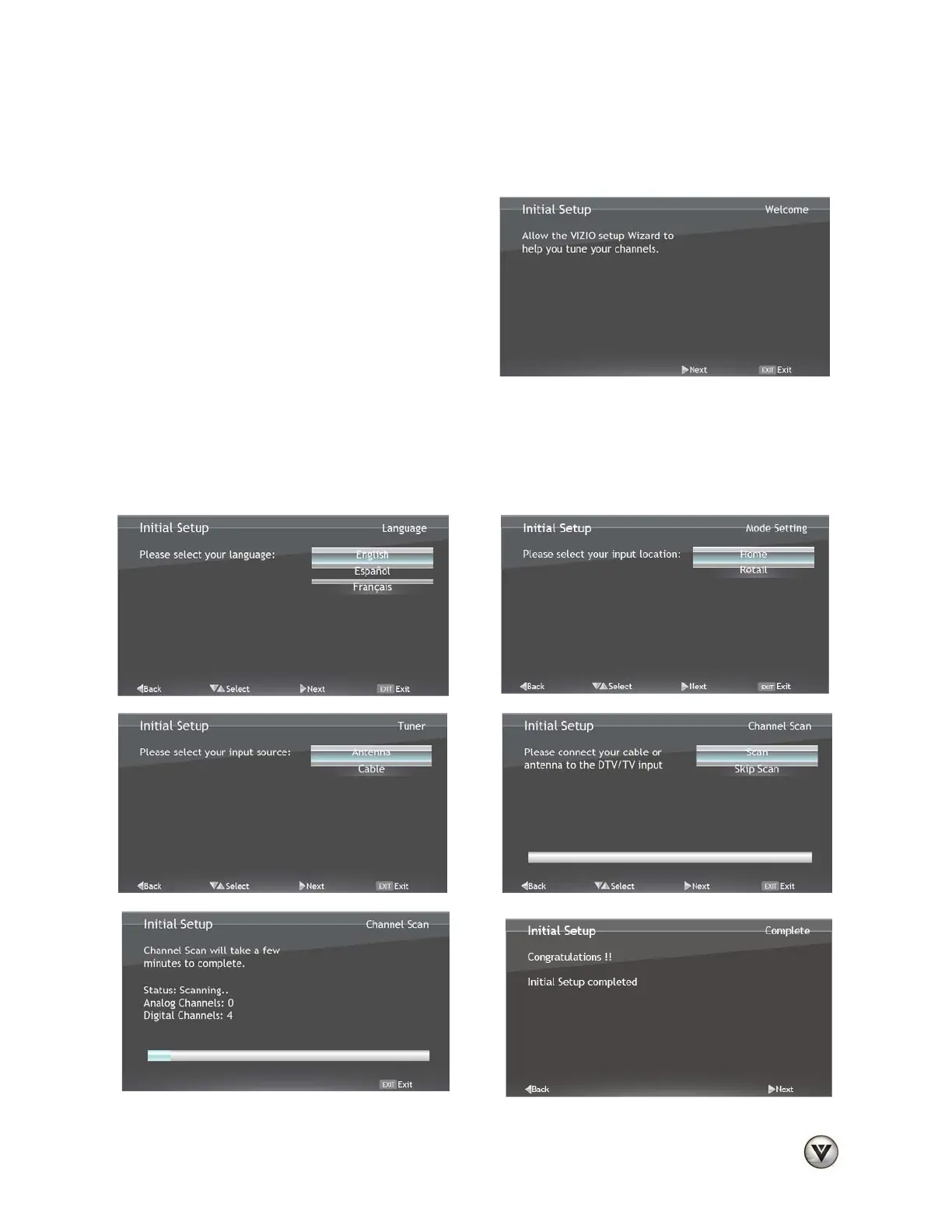
Your HDTV has a built-in setup Wizard that runs when you turn on your TV for the first time. Follow the
on-screen directions to easily setup your new HDTV.
1. Insert the batteries into the remote control.
2. Plug the attached power cord into an AC wall
socket.
3. Connect your devices to your HDTV (see
Chapter 6 for detailed steps).
4. Turn on your TV. The Setup Wizard will
automatically play and guide your thru the
initial setup of your HDTV. Use the Arrow and
MENU/OK buttons to navigate through the
setup App. During the setup process you will:
• Choose your Menu language
• Select the TV to Home Mode for the best picture and most efficient energy usage.
• Select the signal input (Antenna or Cable)
• Scan your TV channels (unless you have a Cable/Satellite Set-Top Box)
Bekijk gratis de handleiding van Vizio M220VA, stel vragen en lees de antwoorden op veelvoorkomende problemen, of gebruik onze assistent om sneller informatie in de handleiding te vinden of uitleg te krijgen over specifieke functies.
Productinformatie
| Merk | Vizio |
| Model | M220VA |
| Categorie | Televisie |
| Taal | Nederlands |
| Grootte | 8955 MB |


