
Handleiding
Je bekijkt pagina 41 van 86
5
35
6HWWLQJWKH$XWR3RZHU2)HDWXUH
7R KHOS VDYH HQHUJ\ \RXU 79 LV VHW E\ GHIDXOW WR WXUQ R DIWHU
10 minutes without a video or audio signal. This feature can be
deactivated.
7RVHWWKH$XWR3RZHU2IHDWXUH
1. From the TIMERS menu, use the Up/Down Arrow buttons on
the remote to highlight $XWR3RZHU2.
2. Use the /HIW5LJKW$UURZbuttons on the remote to change
ZKHWKHUWKH79ZLOOWXUQRΖI\RXGRQȇWZDQWWKH79WRWXUQR
when there is no signal, change the setting to 2. Otherwise,
select PLQXWHV
3. :KHQ\RXKDYHȴQLVKHGVHWWLQJWKHDXWRSRZHURWLPHSUHVV
the EXIT button on the remote.
(QDEOLQJWKH6FUHHQ6DYHU
If there is no on-screen content or static content when audio is
VWUHDPLQJWKH EDFNOLJKWLVWXUQHGR VDYLQJ HQHUJ\<RX FDQVHW
the time before the screen saver begins.
To set the screen saver delay:
1. From the TIMERS menu, use the Up/Down Arrow buttons on
the remote to highlight Screen Saver.
2. Use the /HIW5LJKW$UURZbuttons on the remote to change
the time before the screen saver begins. If you don’t want the
screen saver to activate, change the setting to 2. Otherwise,
select 2, 10, or PLQXWHV
3. :KHQ\RXKDYHȴQLVKHGVHWWLQJWKHVFUHHQVDYHUGHOD\SUHVV
the EXIT button on the remote.
SETTING TIMERS
7KLV79KDVWLPHUVWKDWVDYHHQHUJ\FDQWXUQRWKH79ZKHQ\RXJR
to sleep, and can blank the screen when you stream music.
6HWWLQJWKH6OHHS7LPHU
:KHQDFWLYDWHGWKH79ȇVVOHHSWLPHUZLOOWXUQWKH79RDIWHUDVHW
period of time.
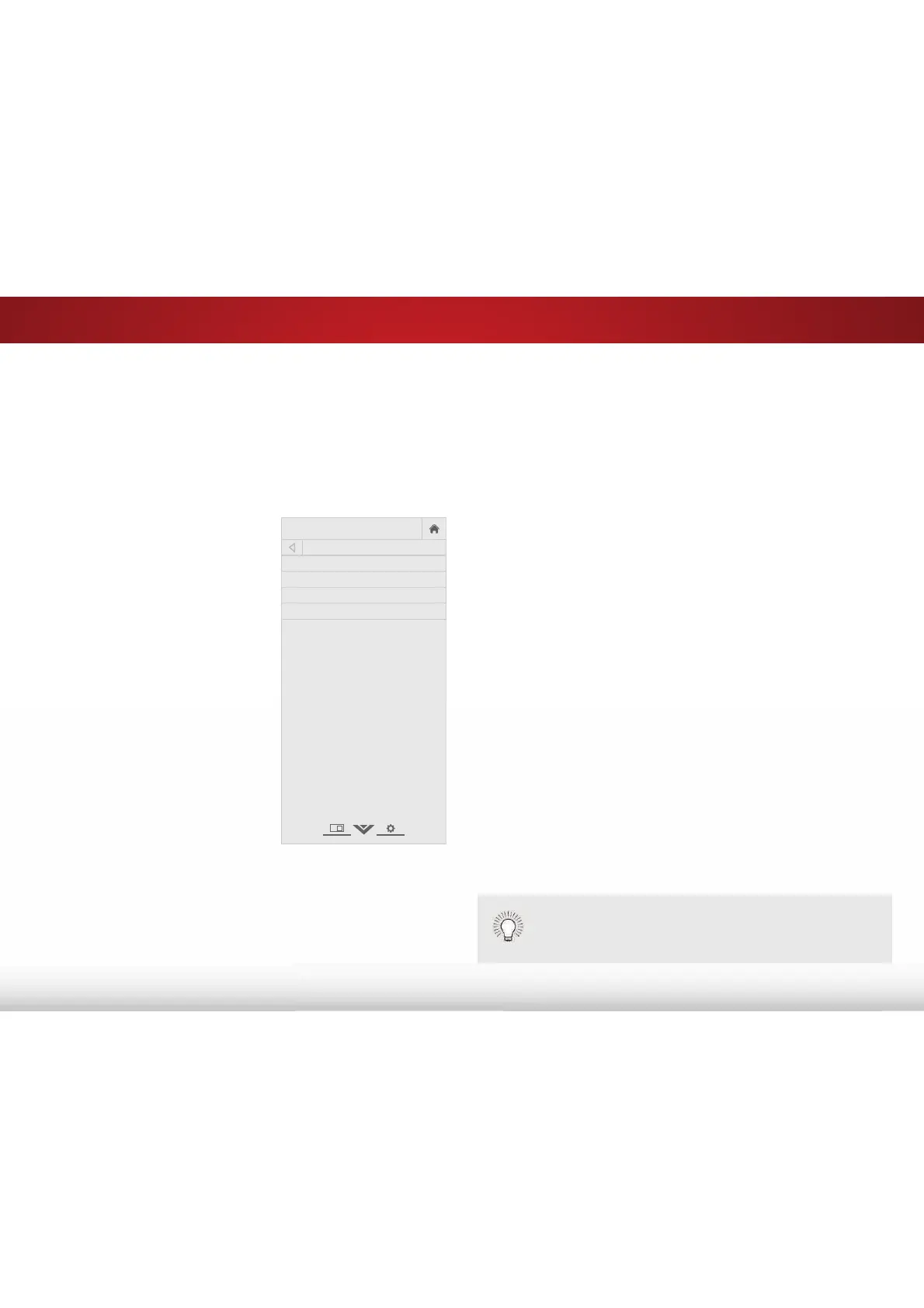
1. Press the MENU button on the
remote. The on-screen menu is
displayed.
2. Use the Arrow buttons on the
remote to highlight 7LPHUV and
press OK. The TIMERS menu is
displayed.
3. From the TIMERS menu, use the
Up/Down Arrow buttons on the
remote to highlight 6OHHS7LPHU.
4. Use the /HIW5LJKW$UURZ
buttons on the remote to
highlight the period of time after
which you want the TV to go to
sleep: 30, 60, 90, 120, or 180
PLQXWHVIf you don’t want the
sleep timer to activate, change
the setting to 2.
5. :KHQ\RXKDYHȴQLVKHGVHWWLQJ
the sleep timer, press the EXIT
button on the remote.
VIZIO
TIMERS
Sleep Timer Off
Auto Power Off 10 minutes
Screen Saver Off
Blank Screen
([LWLQJWKH6FUHHQ6DYHU
Press any button other than the Volume and Mute
buttons on the remote to exit the screen saver.
Bekijk gratis de handleiding van Vizio E60-C3, stel vragen en lees de antwoorden op veelvoorkomende problemen, of gebruik onze assistent om sneller informatie in de handleiding te vinden of uitleg te krijgen over specifieke functies.
Productinformatie
| Merk | Vizio |
| Model | E60-C3 |
| Categorie | Televisie |
| Taal | Nederlands |
| Grootte | 13880 MB |
Caratteristiche Prodotto
| Kleur van het product | Zwart |
| Gewicht verpakking | 25400 g |
| Breedte verpakking | 1447 mm |
| Diepte verpakking | 172 mm |
| Hoogte verpakking | 902 mm |


