
Handleiding
Je bekijkt pagina 60 van 76
3
60
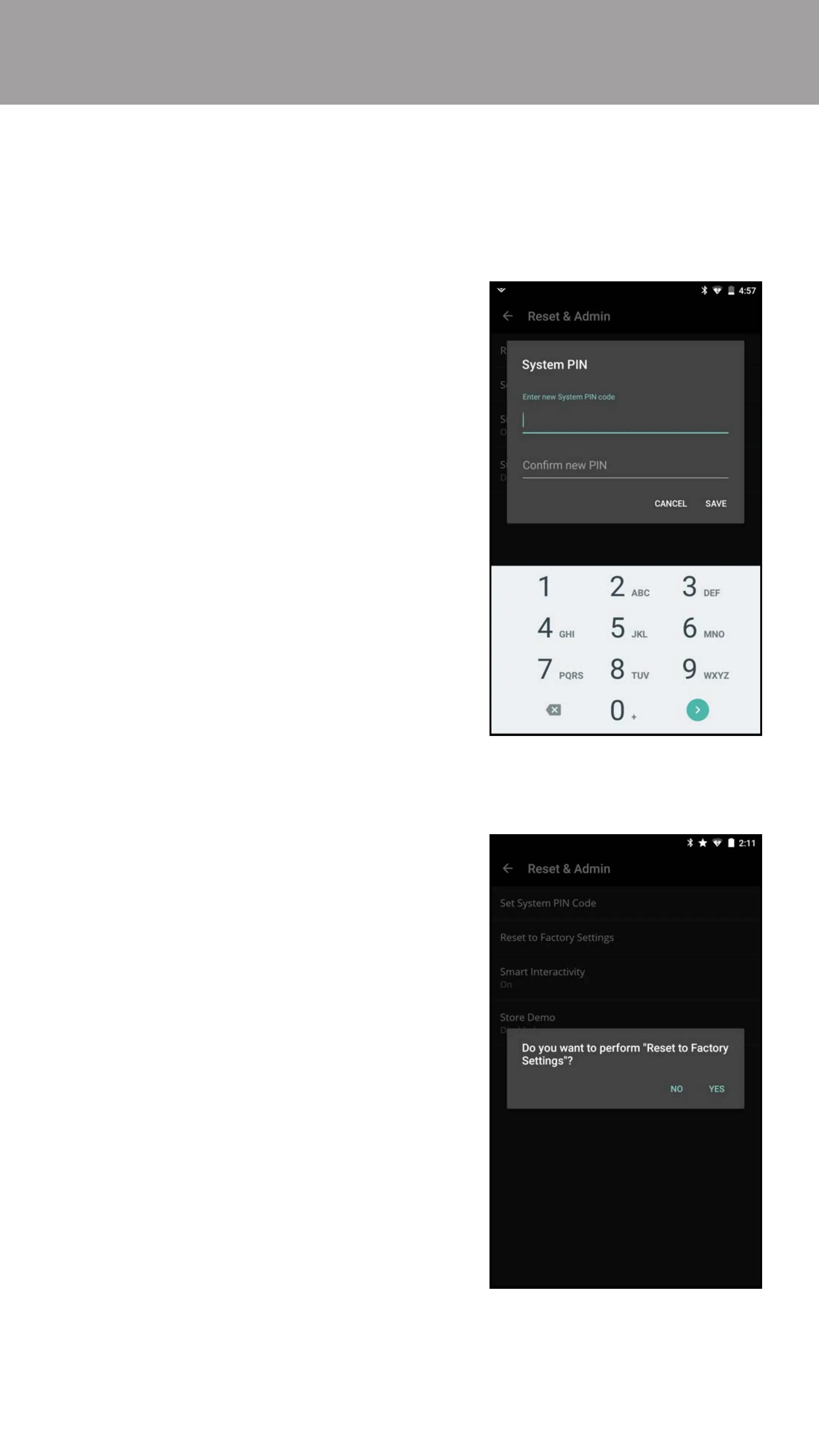
1. From the Reset & Admin menu,
tap Set System PIN Code.
2. Use the on-screen number pad
to enter a PIN code. Tap SAVE to
continue.
3. Conrm your PIN by entering it
again. Tap Submit when you are
done. A conrmation window
appears, tap CLOSE.
You can use the TV’s Reset & Admin menu to set a System PIN, restore the TV to
its factory default settings, enable/disable Smart Interactivity, and enable/disable
the Store Demo.
Adjusting the Reset & Admin Settings
To set a system PIN code:
1. From the Reset & Admin menu,
tap Reset to Factory Settings.
2. A conrmation window appears,
tap YES to continue. Your TV
resets to the factory default
settings.
Note: If you set a System PIN,
then you will need to enter it
before the TV resets.
To reset the TV to its factory default settings:
Bekijk gratis de handleiding van Vizio E55-D0, stel vragen en lees de antwoorden op veelvoorkomende problemen, of gebruik onze assistent om sneller informatie in de handleiding te vinden of uitleg te krijgen over specifieke functies.
Productinformatie
| Merk | Vizio |
| Model | E55-D0 |
| Categorie | Televisie |
| Taal | Nederlands |
| Grootte | 77325 MB |
Caratteristiche Prodotto
| Kleur van het product | Zwart |
| Omgevingslichtsensor | Ja |
| Aan/uitschakelaar | Ja |
| Afstandsbediening | XRT133 |
| Beeldschermdiagonaal | 54.6 " |


