
Handleiding
Je bekijkt pagina 17 van 45
4
9
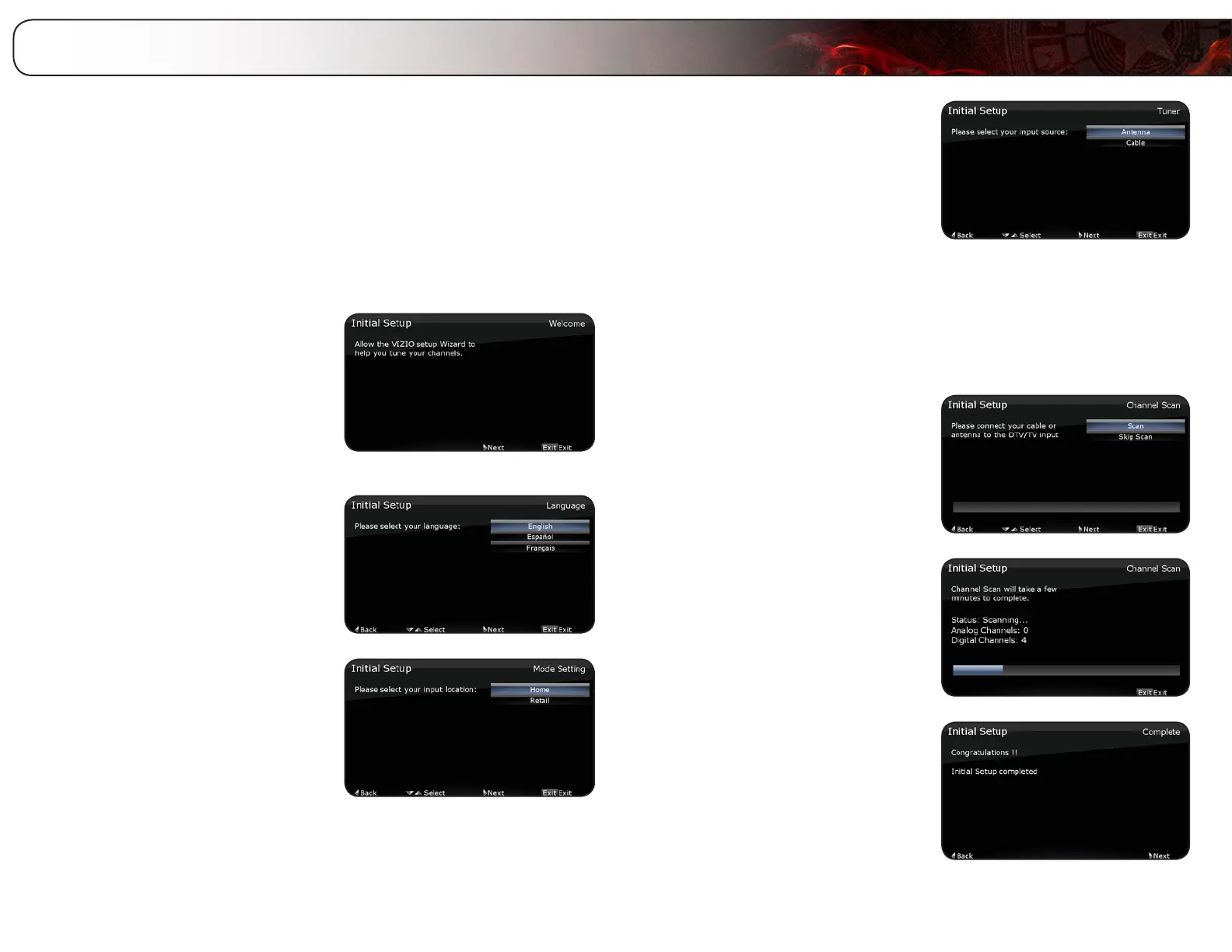
The rst time you turn on the TV, the Setup App will guide you through each of
the steps necessary to get your TV ready for use.
Before you begin the rst-time setup:
• Your TV should be installed and the power cord should be connected
to an electrical outlet.
• Have your remote ready. Ensure the batteries are inserted.
• Your devices should be connected.
To complete the rst-time setup:
1. Turn the TV on by pressing the
Power/Standby button on the
remote.
The Setup App is displayed.
Press the Right Arrow button on the
remote to go to the next screen.
2. Use the Up/Down Arrow buttons on
the remote to highlight your preferred
language, then press Right Arrow.
3. Use the Up/Down Arrow buttons on
the remote to highlight Home and
press Right Arrow.
4. If the TV is connected to an external
antenna, select Antenna, then press
Right Arrow and go to step 5.
If the TV is connected to a cable
service without a set-top box (cable is
connected directly from the wall outlet)
select Cable, then press Right Arrow
and go to step 5.
If the TV is connected to a cable or
satellite set-top box, press the EXIT
button on the remote, then select the
input to which your set-top box is
connected (HDMI, COMP, or AV).
5. Use the Up/Down Arrow buttons on
the remote to highlight Scan, then
press Right Arrow.
The TV begins a channel scan.
6. Wait for the channel scan to nish.
7. When the channel scan is complete,
the Congratulations screen is
displayed.
The first-time setup is complete.
Completing the First-Time Setup
Bekijk gratis de handleiding van Vizio E460ME, stel vragen en lees de antwoorden op veelvoorkomende problemen, of gebruik onze assistent om sneller informatie in de handleiding te vinden of uitleg te krijgen over specifieke functies.
Productinformatie
| Merk | Vizio |
| Model | E460ME |
| Categorie | Televisie |
| Taal | Nederlands |
| Grootte | 16914 MB |


