
Handleiding
Je bekijkt pagina 15 van 54
VIZIO E421VO User Manual
14
www.VIZIO.com
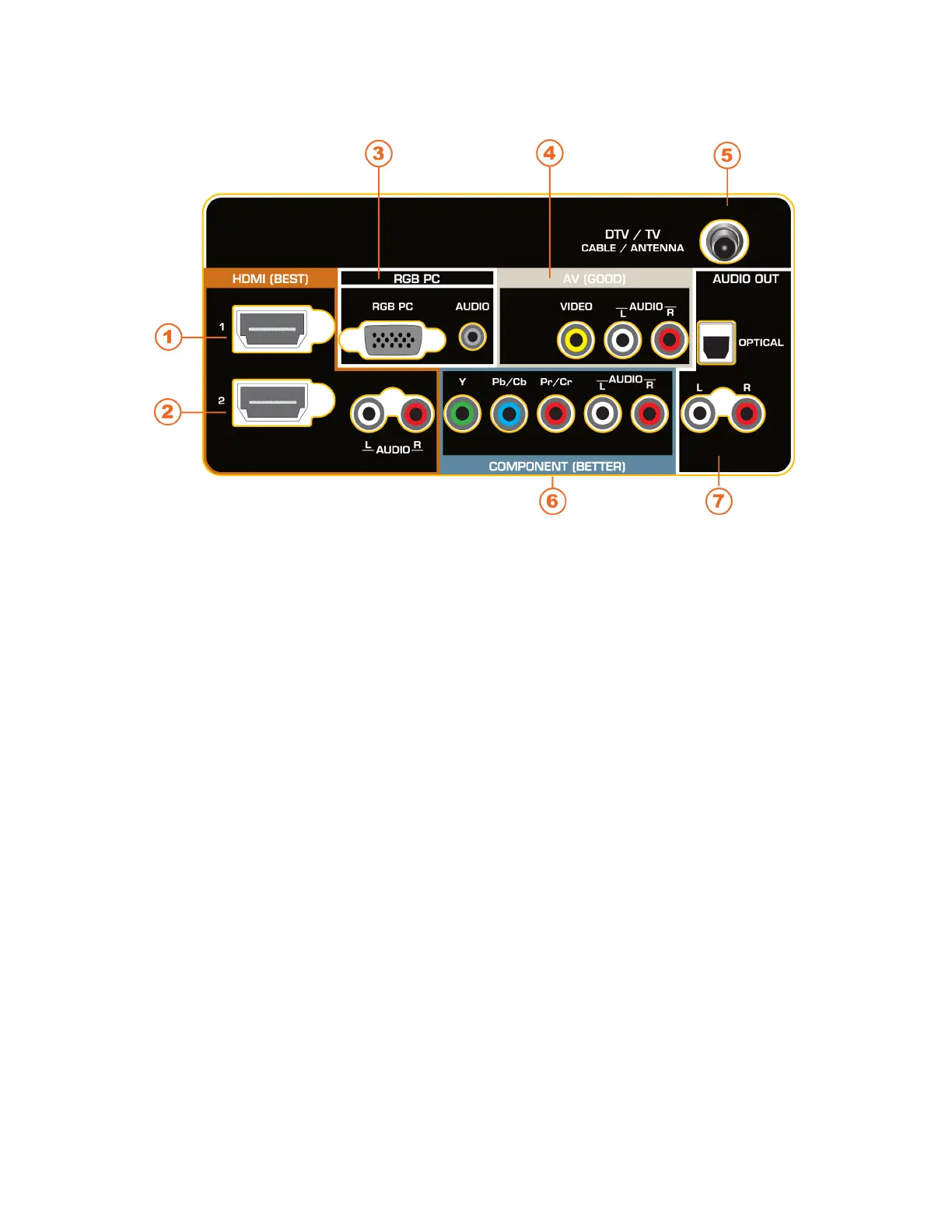
Rear Panel Connections
1. HDMI 1—Connect digital video devices such as a DVD player or Set-Top Box through this
all digital connector.
2. HDMI 2 with L/R Audio—Connect another digital video device such as a DVD player or
Set-Top Box through this all digital connector. For users who want to connect to a DVI
enabled device, use a DVI-HDMI cable and connect the analog audio output of the device to
the L / R AUDIO here. Your VIZIO Certified HDMI-DVI cables are available for purchase
from www.VIZIO.com or by calling 877-MYVIZIO (877-698-4946).
3. RGB PC—Connect the video and audio from a computer here. Connect a 1/8” mini plug
stereo connector from the computer to the TV if you want the sound to come from the HDTV
speakers.
4. AV—Connect composite video devices, such as a VCR or game console. Use the white and
red connectors to connect the external audio from the same source.
5. DTV/TV— Connect to an antenna or digital cable source. For digital TV stations in your area
visit www.antennaweb.org. For Cable and Satellite Set-Top boxes, we recommend that you
use a HDMI or component cable connection for high definition image quality.
6. COMPONENT (Y Pb/Cb Pr/Cr with L/R Audio)—Connect component video devices such
as a DVD Player or set top box here.
7. AUDIO OUT:
OPTICAL—When digital TV is selected for viewing, the audio associated with the
programming will be available on the S/PDIF Optical connector for connection to a
VIZIO Sound Bar or your Home Theater system.
ANALOG L/R—Connect the audio from the HDTV to an external device, such as a
home theater system, external amplifier, or stereo. Speakers cannot be connected
directly here.
Bekijk gratis de handleiding van Vizio E421VO, stel vragen en lees de antwoorden op veelvoorkomende problemen, of gebruik onze assistent om sneller informatie in de handleiding te vinden of uitleg te krijgen over specifieke functies.
Productinformatie
| Merk | Vizio |
| Model | E421VO |
| Categorie | Televisie |
| Taal | Nederlands |
| Grootte | 8377 MB |
Caratteristiche Prodotto
| Kleur van het product | Zwart |
| Gebruikershandleiding | Ja |
| LED-indicatoren | Ja |
| Bluetooth | Nee |
| Beeldschermdiagonaal | 42 " |


