
Handleiding
Je bekijkt pagina 26 van 48
6
18
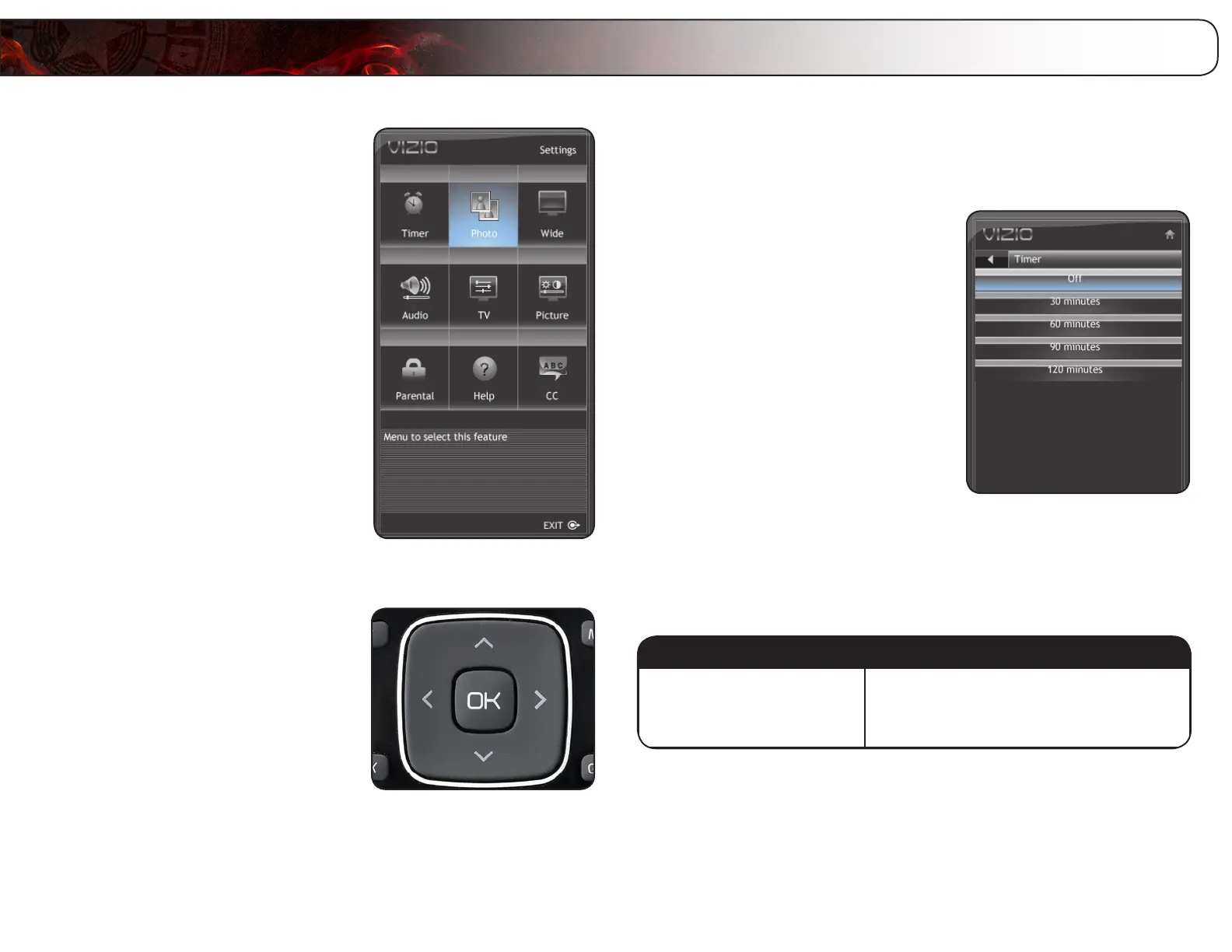
Your TV features an easy-to-use on-screen menu. Using this menu, you can:
• Setthesleeptimer
• ViewaUSBphotoslideshow
• Setthescreenaspectratio
• Adjusttheaudiosettings
• Adjustthepicturesettings
• Settheparentalcontrols
• Getsysteminfoorresetto
factorydefaults
• Setupclosedcaptions
Navigating the On-Screen Menu
To open the on-screen menu, press the OK
button on the remote.
Use the Arrow buttons to highlight a menu
option, and press the OK button to select
that option.
Setting the Sleep Timer
When activated, the TV’s sleep timer will turn the TV off after a set period of time.
To use the sleep timer:
1. Press the MENU button on the remote.
The on-screen menu is displayed.
2. Use the Arrow buttons on the remote
to highlight the Timer icon and press
OK. The Timer menu is displayed.
3. Use the Up/Down Arrow buttons on
the remote to highlight the period of
time after which you want the TV to
power off (30, 60, 90, or 120 minutes).
4. Press OK, then press EXIT.
Viewing a USB Photo Slideshow
Your player features a USB port where you can connect and share a USB thumb
drive containing your photos.
The TV supports the following file types:
MediaType FileTypes
Images
.jpeg
.jpg
To play USB media, you must first save your images onto a USB thumb drive.
Using the Other Menu Settings
Bekijk gratis de handleiding van Vizio E420VT, stel vragen en lees de antwoorden op veelvoorkomende problemen, of gebruik onze assistent om sneller informatie in de handleiding te vinden of uitleg te krijgen over specifieke functies.
Productinformatie
| Merk | Vizio |
| Model | E420VT |
| Categorie | Televisie |
| Taal | Nederlands |
| Grootte | 17802 MB |
Caratteristiche Prodotto
| Kleur van het product | Zwart |
| Kinderslot | Nee |
| Gebruikershandleiding | Ja |
| LED-indicatoren | Ja |
| Bluetooth | Nee |


