
Handleiding
Je bekijkt pagina 13 van 45
2
5
E321ME / E420ME / E460ME
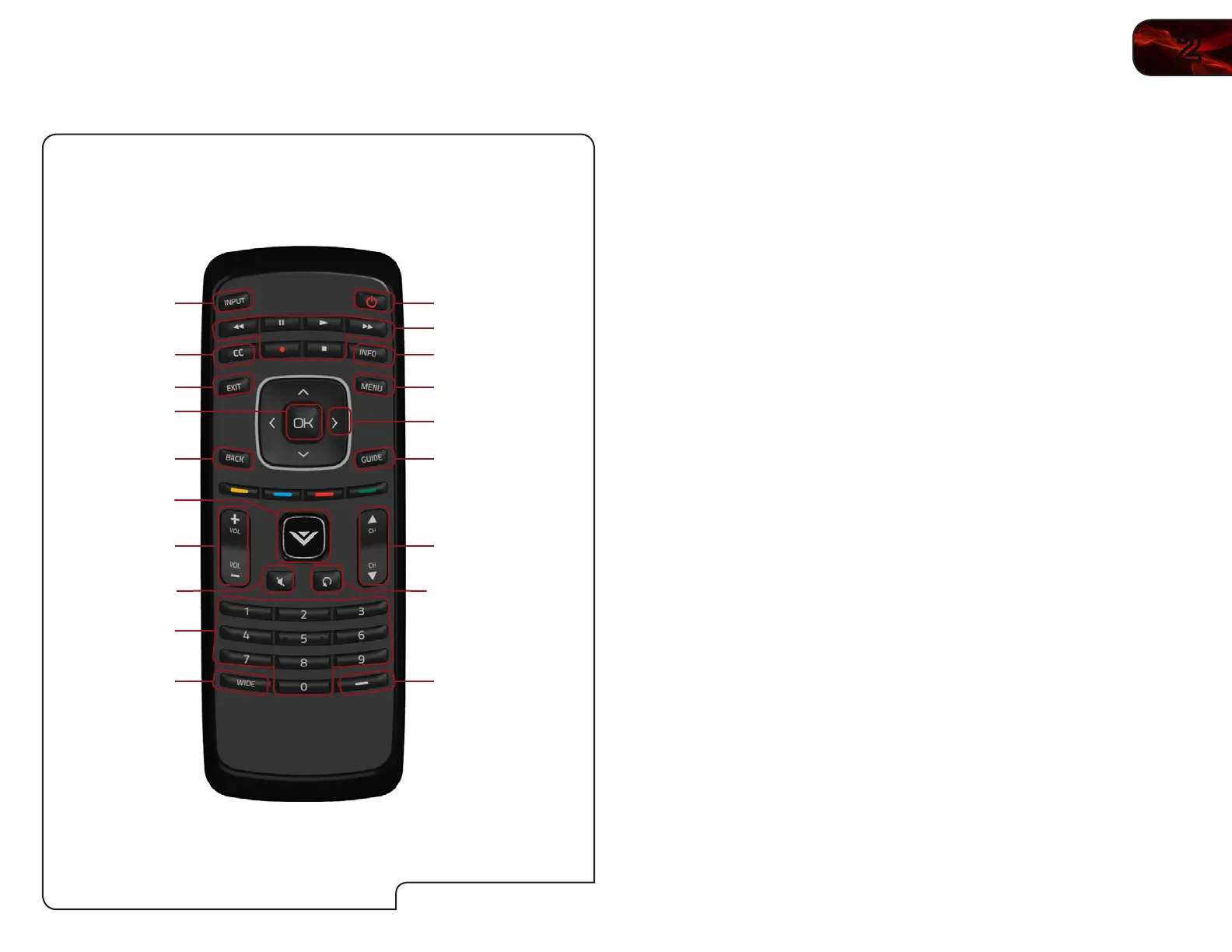
Remote Control
Power/Standby
A/V Controls
Info
Menu
Arrow
Channel
Up/Down
Last
Number Pad
Wide
Mute
Volume
Up/Down
OK
Exit
Input
GuideBack
Dash (-)
CC
V Button
Remote Control
Power/Standby: Turn the TV on or off.
Input: Change the input device.
A/V Controls: Control external device (CEC-enabled devices only).
Info: Display the Info Window.
CC: Open the Closed Captioning menu.
Menu: Display the on-screen menu.
Exit: Close the on-screen menu.
Arrow: Navigate the on-screen menu and episode guide.
OK: Select highlighted menu option.
Guide: Display the episode guide (digital channels only).
Back: Go to the previous on-screen menu options.
V Button: Launch the USB photo viewer.
Channel Up/
Down:
Change the channel. With each press of the button, the
channel will increase or decrease by one.
Volume Up/
Down:
Increase or decrease the loudness of the TV’s audio.
Mute: Turn the sound off or on. When mute is activated, the
TV’s audio is turned off.
Last: Return to the channel last viewed.
Number Pad: Use the number pad to manually enter a channel.
Dash (-): Use with number pad to manually enter a digital
sub-channel. (For example, 18-4 or 18-5.)
Wide: Switch between display modes.
Bekijk gratis de handleiding van Vizio E420ME, stel vragen en lees de antwoorden op veelvoorkomende problemen, of gebruik onze assistent om sneller informatie in de handleiding te vinden of uitleg te krijgen over specifieke functies.
Productinformatie
| Merk | Vizio |
| Model | E420ME |
| Categorie | Televisie |
| Taal | Nederlands |
| Grootte | 16914 MB |


