
Handleiding
Je bekijkt pagina 28 van 79
4
28
VIZIO
TV SETTINGS
Picture
Audio
Timers
Network
Channels
Closed Captions
Devices
System
Guided Setup
User Manual
CC
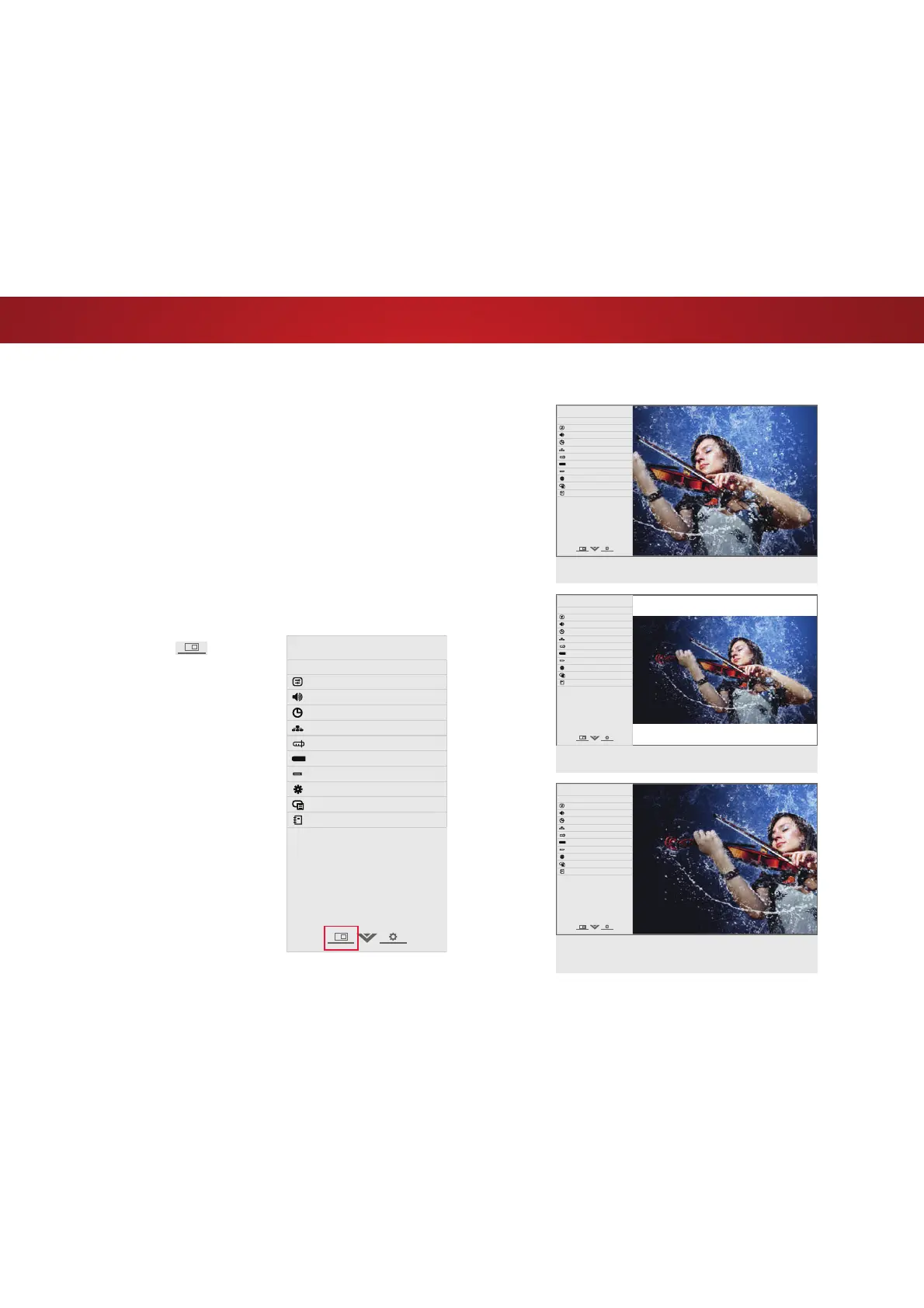
VIEWING VIDEO WITH THE MENU OPEN
When the on-screen menu opens, it covers the left-hand portion of
WKHSLFWXUH7KHSLFWXUHFDQEHGLVSOD\HGLQWKUHHGLHUHQWZD\V
• Overlay - The picture stays in its normal position and the
menu covers the left-hand portion of the picture. (The
picture is full-sized.)
• Viewport7KHHQWLUHSLFWXUHLVUHVL]HGWRȴWLQWRWKHVSDFH
to the right of the menu.
• Centered Overlay - The picture is full-sized and centered in
the area next to the menu, so that the right and left edges
DUHFXWR
To change the position of the picture while the on-screen menu is
displayed:
1. Use the Arrow buttons on the
remote to highlight
Resize
Video.
2. Press OK to cycle through the
three display methods.
3. Press the Up Arrow button on
the remote to the menu.
OVERLAY
VIEWPORT
CENTERED OVERLAY
VIZIO
TV SETTINGS
Picture
Audio
Timers
Network
Channels
Closed Captions
Devices
System
Guided Setup
User Manual
CC
VIZIO
TV SETTINGS
Picture
Audio
Timers
Network
Channels
Closed Captions
Devices
System
Guided Setup
User Manual
CC
VIZIO
TV SETTINGS
Picture
Audio
Timers
Network
Channels
Closed Captions
Devices
System
Guided Setup
User Manual
CC
Bekijk gratis de handleiding van Vizio E40x-C2, stel vragen en lees de antwoorden op veelvoorkomende problemen, of gebruik onze assistent om sneller informatie in de handleiding te vinden of uitleg te krijgen over specifieke functies.
Productinformatie
| Merk | Vizio |
| Model | E40x-C2 |
| Categorie | Televisie |
| Taal | Nederlands |
| Grootte | 12737 MB |


