
Handleiding
Je bekijkt pagina 11 van 76
1
5
E400i-B2
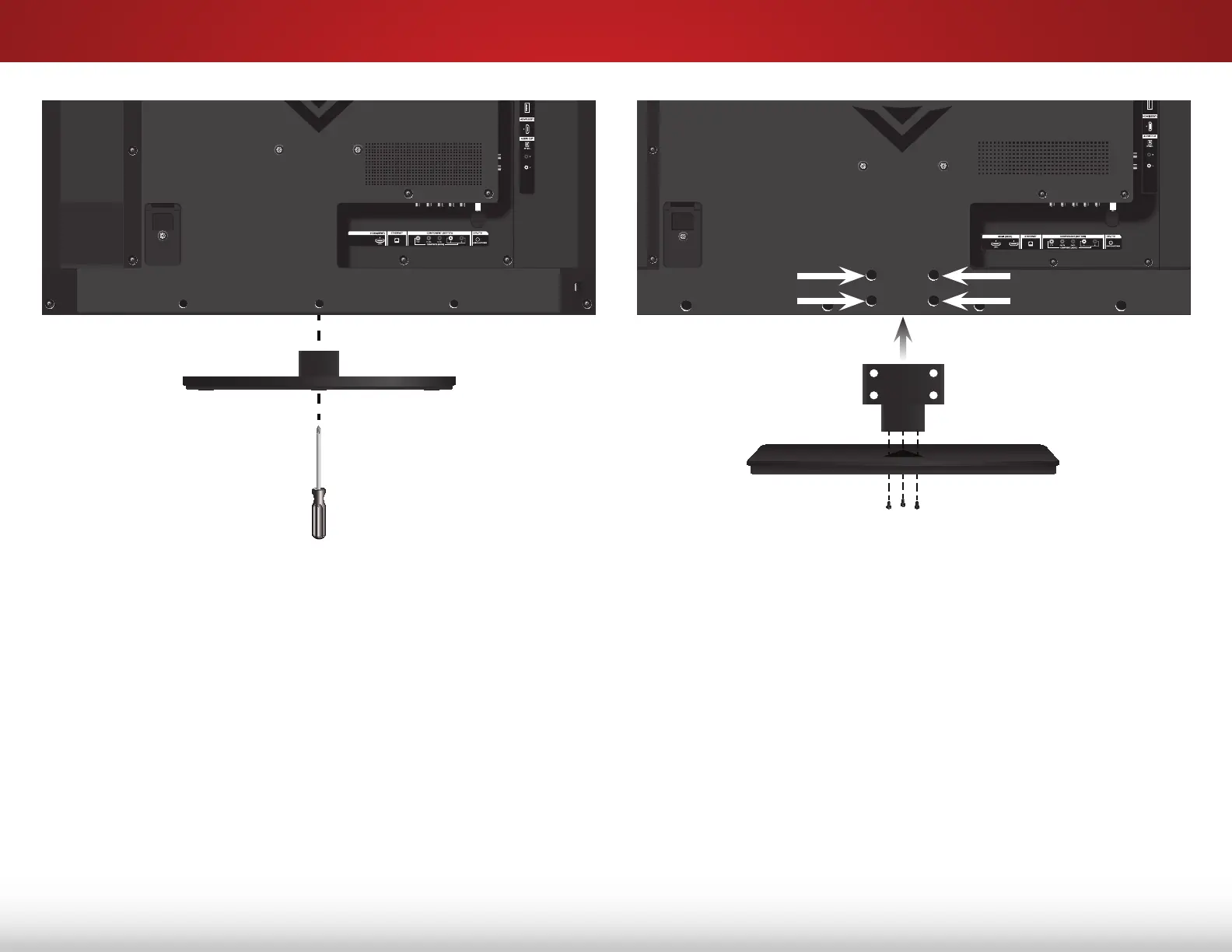
To install the stand:
1. Align the base with the neck piece and tighten three (3)
of the included Phillips screws with a Phillips screwdriver as
shown.
2. Align the stand with the TV and slide it into place as shown.
3. Tighten the remaining four (4) Phillips screws into the back
of the TV as shown.
4. When you are finished, place the TV on a stable, level
surface.
E320i-B2
To install the stand:
1. Align the stand with the bottom of the TV and slide it into
place as shown.
2. Using a Phillips screwdriver, tighten the pre-installed screw in
the center of the base to secure the stand to the TV.
3. When you are finished, place the TV on a stable, level
surface.
Bekijk gratis de handleiding van Vizio E400i-B2, stel vragen en lees de antwoorden op veelvoorkomende problemen, of gebruik onze assistent om sneller informatie in de handleiding te vinden of uitleg te krijgen over specifieke functies.
Productinformatie
| Merk | Vizio |
| Model | E400i-B2 |
| Categorie | Televisie |
| Taal | Nederlands |
| Grootte | 12917 MB |


