
Handleiding
Je bekijkt pagina 21 van 53
3
14
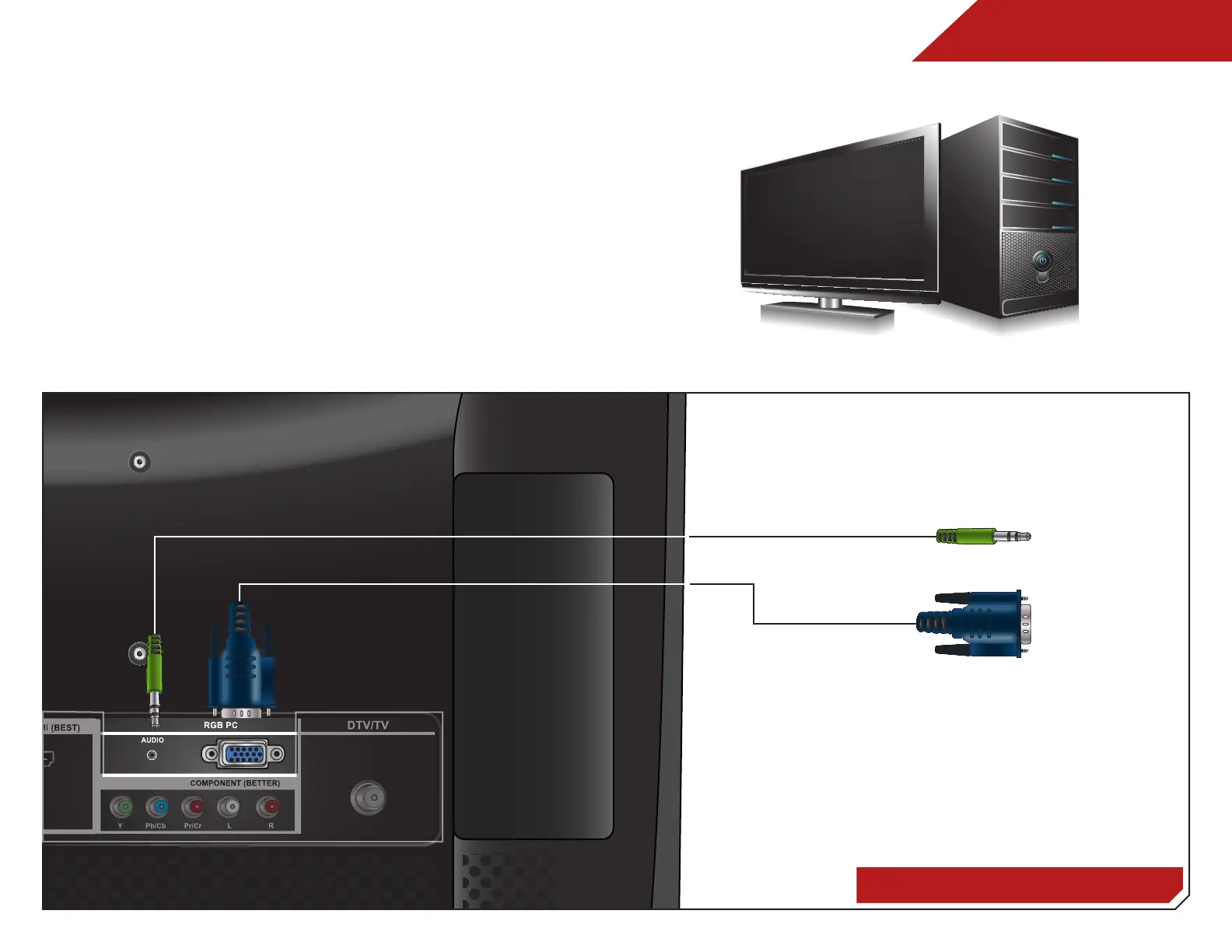
CONNECTING A PC
ConnECTInG a PC
RGB Cable (For Video)
3.5mm Cable (For Audio)
Your TV can be used to display output from a personal computer.
To use your TV as a PC display:
1. Connect an RGB cable (not included) to your PC and the
RGB port on the back of the TV. This cable transmits video.
2. Connect a 3.5mm cable (not included) to your PC and the
PC Audio In port on the back of the TV. This cable transmits
audio.
3. Set your PC’s resolution to match the resolution of your TV.
See
Appendix B - Specifications.
Personal Computer
Bekijk gratis de handleiding van Vizio E191VA, stel vragen en lees de antwoorden op veelvoorkomende problemen, of gebruik onze assistent om sneller informatie in de handleiding te vinden of uitleg te krijgen over specifieke functies.
Productinformatie
| Merk | Vizio |
| Model | E191VA |
| Categorie | Televisie |
| Taal | Nederlands |
| Grootte | 8379 MB |
Caratteristiche Prodotto
| Kleur van het product | Zwart |
| Gebruikershandleiding | Ja |
| Aan/uitschakelaar | Ja |
| Beeldschermdiagonaal | 19 " |
| Resolutie | 1366 x 768 Pixels |


