
Handleiding
Je bekijkt pagina 24 van 68
4
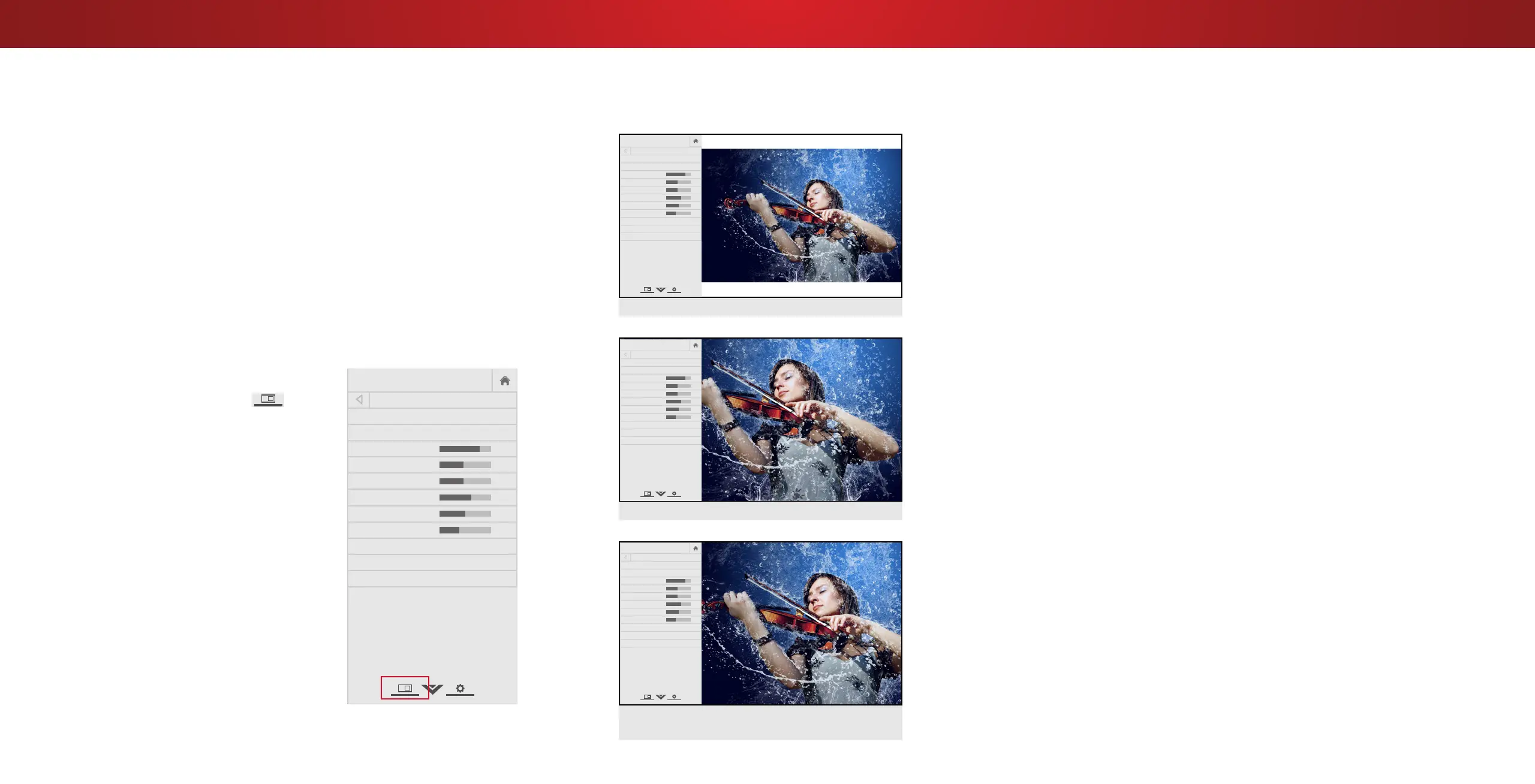
VIEWING VIDEO WITH THE MENU OPEN
When the on-screen menu opens, it covers the left-hand portion of
the picture. The picture can be displayed in three dierent ways:
• Viewport - The entire picture is resized to t into the space
to the right of the menu
• Overlay - The picture stays in its normal postion and the
menu covers the left-hand portion of the picture. (The picture
is full-sized)
• Centered Overlay - The picture is full-sized and centered in
the area next to the menu, so that the right and left edges
are cut o.
To change the position of the picture while the on-screen menu is
displayed:
1. Use the Arrow buttons on the
remote to highlight
Help
VIZIO
Network
Sleep
Timer
Input CC
ABC
Audio
Wide
Normal
Picture
Settings
PanoramicWide Zoom
2D 3DExit
Resize
Video.
2. Press OK to cycle through the
three display methods.
3. Press the Up Arrow button on
the remote to the menu.
Help
VIZIO
Network
Sleep
Timer
Input CC
ABC
Audio
Wide
Normal
Picture
Settings
PanoramicWide Zoom
2D 3DExit
PICTURE
Picture Mode Standard
Auto Brightness Control Medium
Backlight 85
Brightness 50
Contrast 50
Color 59
Tint 0
Sharpness 9
More Picture
Picture Mode EDIT
Color Calibration
-
+
+
-
-
+
-
+
-
+
-
+
CENTERED OVERLAY
OVERLAY
Help
VIZIO
Netw ork
Sleep
Timer
Input CC
AB C
Audio
Wide
Normal
Picture
Settings
PanoramicWide Zoom
2D 3DExit
VIEWPORT
-
+
+
-
-
+
-
+
-
+
-
+
PICTURE
Picture Mode Standard
Auto Brightness Control Off
Backlight 85
Brightness 50
Contrast 50
Color 59
Tint 0
Sharpness 9
More Picture
Picture Mode Edit
Color Calibration
Help
VIZIO
Netw ork
Sleep
Timer
Input CC
AB C
Audio
Wide
Normal
Picture
Settings
PanoramicWide Zoom
2D 3DExit
Help
VIZIO
Netw ork
Sleep
Timer
Input CC
AB C
Audio
Wide
Normal
Picture
Settings
PanoramicWide Zoom
2D 3DExit
-
+
+
-
-
+
-
+
-
+
-
+
PICTURE
Picture Mode Standard
Auto Brightness Control Off
Backlight 85
Brightness 50
Contrast 50
Color 59
Tint 0
Sharpness 9
More Picture
Picture Mode Edit
Color Calibration
-
+
+
-
-
+
-
+
-
+
-
+
PICTURE
Picture Mode Standard
Auto Brightness Control Off
Backlight 85
Brightness 50
Contrast 50
Color 59
Tint 0
Sharpness 9
More Picture
Picture Mode Edit
Color Calibration
24
Bekijk gratis de handleiding van Vizio D65U-D2, stel vragen en lees de antwoorden op veelvoorkomende problemen, of gebruik onze assistent om sneller informatie in de handleiding te vinden of uitleg te krijgen over specifieke functies.
Productinformatie
| Merk | Vizio |
| Model | D65U-D2 |
| Categorie | Televisie |
| Taal | Nederlands |
| Grootte | 18054 MB |
Caratteristiche Prodotto
| Kleur van het product | Zwart |
| Gewicht verpakking | 28500 g |
| Breedte verpakking | 1648 mm |
| Diepte verpakking | 170 mm |
| Hoogte verpakking | 950 mm |


