Valberg WF 1810 D W566C2 handleiding
Handleiding
Je bekijkt pagina 51 van 158
51
EN
Product usage
B
Washer use
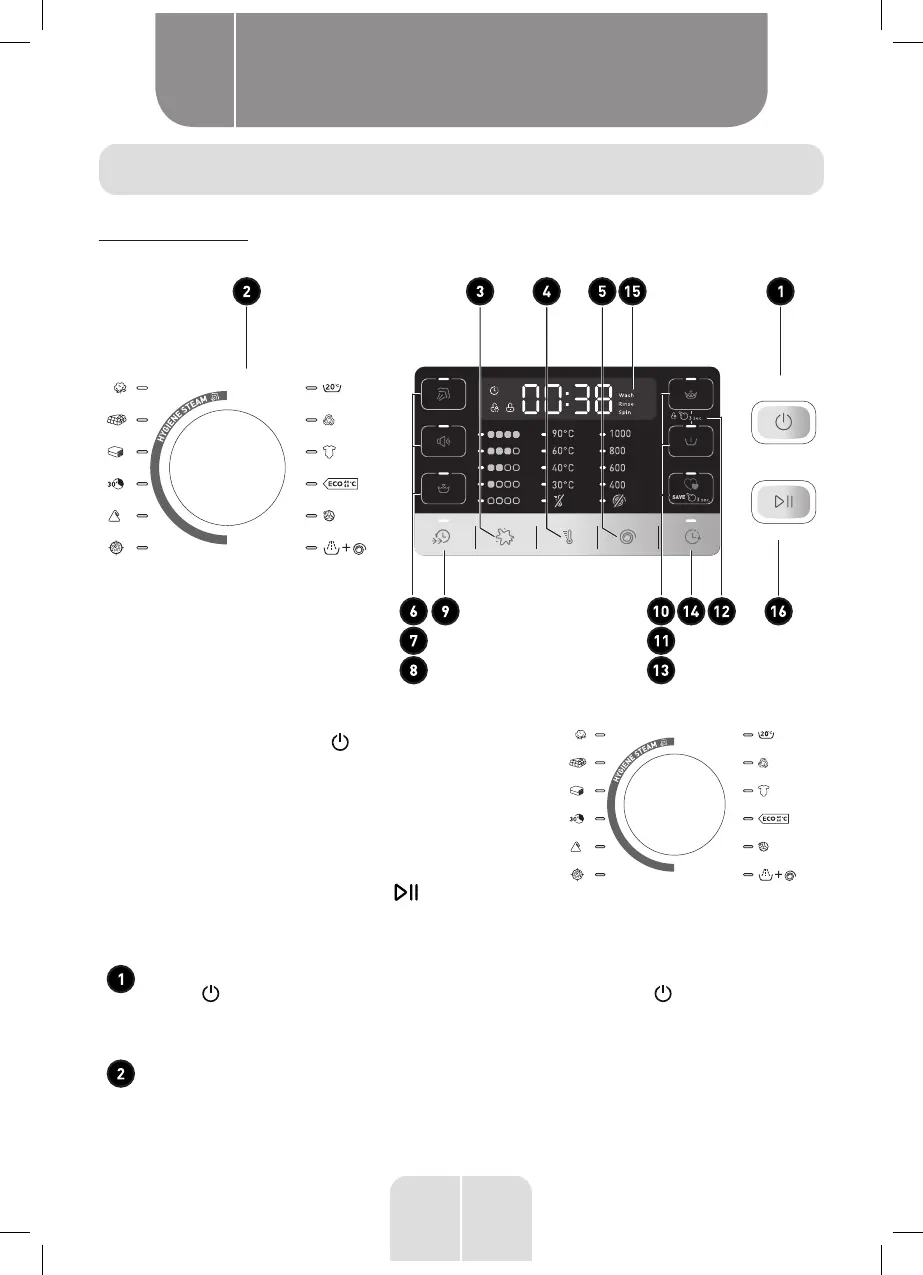
Control Panel
Models: WF 1810 D W566C2
Quick Start
1. Press the Power button .
If the screen is dark, a press of the Power button
will "wake up" the display.
2.
Select a wash cycle. (Defaults are set for each cycle.
These default settings can be changed. See Control
setting for more information).
3. WF 1810 D W566C2:
Press the SATRT/PAUSE button .
Control Setting
Power
Press to "wake up" the display. If the display is active, press to put the washer
into standby mode.
NOTE: Pressing Power does not disconnect the appliance from the power supply.
Wash Cycles
The wash cycles are optimized for specific types of wash loads. The chart below will
help you match the setting with the loads.
Bekijk gratis de handleiding van Valberg WF 1810 D W566C2, stel vragen en lees de antwoorden op veelvoorkomende problemen, of gebruik onze assistent om sneller informatie in de handleiding te vinden of uitleg te krijgen over specifieke functies.
Productinformatie
| Merk | Valberg |
| Model | WF 1810 D W566C2 |
| Categorie | Wasmachine |
| Taal | Nederlands |
| Grootte | 12763 MB |