Toshiba TW-BL100S2PLSK handleiding
Handleiding
Je bekijkt pagina 27 van 35
Spin Speed
When needed, the spinning speed can be adjusted pressing the Speed button in the
following steps: 1400:0-600-800-1000-1200-1400
Spin
DELAY END
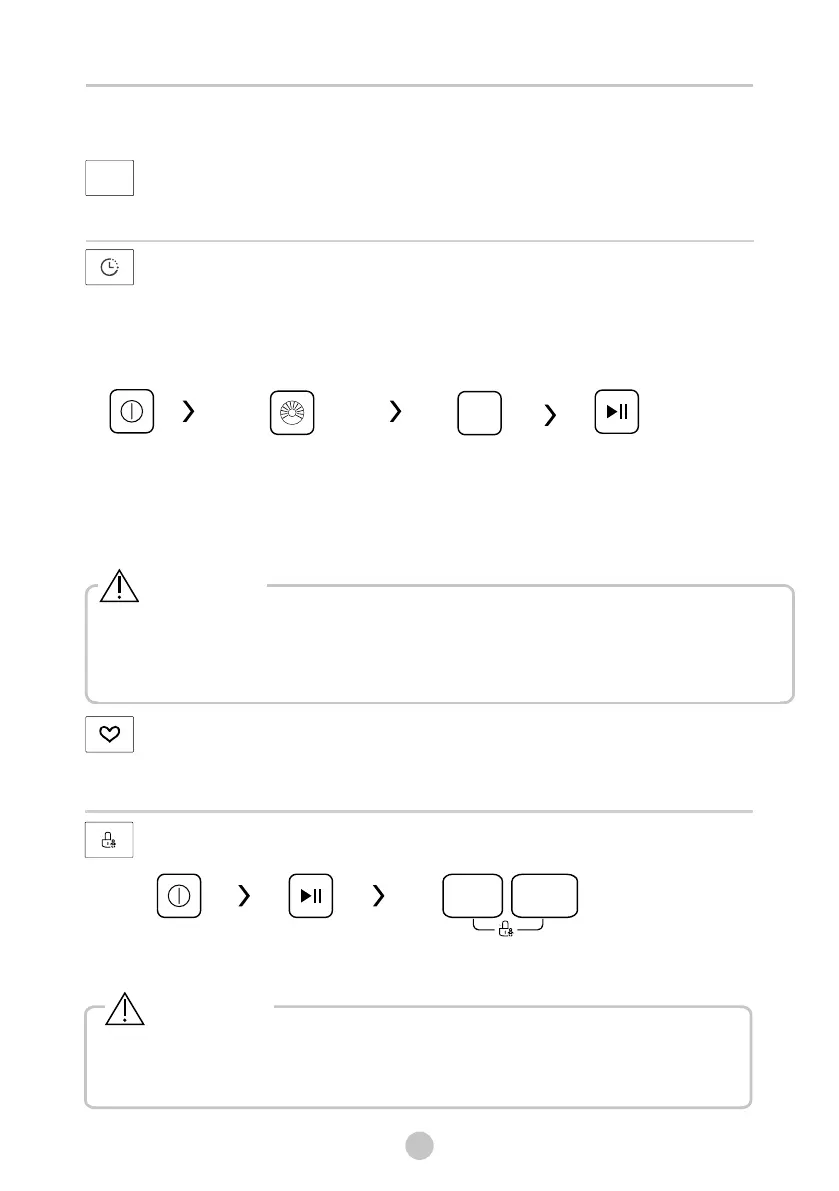
Set the Delay function:
1. Select a programme
2.Press the Delay End button to choose the time(the delaying end time is 1-24 H.)
3.Press [Start/Pause] to commence the delay operation
Choose the Programme
Start
On/Off
Setting time
Delay
End
[ ]/[ ]
[On/Off]
Cancel the Delay function:
Press the DELAY END DELAY button until the display be 0H.It should be pressed
before starting the programme. If the programme already started, should press the
button to reset the programme.
Caution!
• If there is any break in the power supply while the machine is operating, a special
memory stores the selected programme and when the power is restarted, press the
[Start/Pause]button the program will continue(some machines you can directly
run the previous program without pressing [Start/Pause] button ).
MEMORY
Memorizes the frequently used program.
Select program and options and Press [TEMP.] and [SPIN] 3 sec. to memorize the
selected settings.The default is ECO 40-60
• Press the two buttons 3 sec. to cancel the function.
• The “CHILD LOCK” will lock all buttons except ON/OFF .
• Cut off the power supply , the kid’s protection is to be released.
[ ]
Caution!
OPERATIONS
Child Lock
To avoid mis operation by children.
Press RINSE] and [SOIL LEVEL]
3 sec. till buzzer beep.
[
RINSE
SOIL LEVEL
On/Off
Start/Pause
27
DZIAŁANIE
Szybkość wirowania
W razie potrzeby prędkość wirowania można regulować, wciskając przycisk Prędkość w na-
stępującej kolejności: 1400℃0-600-800-1000-1200-1400
OPÓŹNIENIE ZAKOŃCZENIA
Ustaw funkcję opóźnienia:
1. Wybierz program
2. Naciśnij przycisk Opóźnienie zakończenia w celu określenia czasu (pranie można opóźnić
w zakresie 1-24 godz.)
3. Naciśnij przycisk [Start/Pauza], aby uruchomić funkcję
Anulowanie funkcji opóźnienia:
Naciskaj przycisk [OPÓŹNIENIE ZAKOŃCZENIA]/[OPÓŹNIENIE], do momentu wyświetlenia się
0H. Należy go nacisnąć przed uruchomieniem programu. Jeśli program już się rozpoczął, wciśnij
przycisk [On/O], aby go zresetować.
PAMIĘĆ
Zapamiętuje często używany program.
Wybierz program i opcje, a następnie naciśnij i przytrzymaj przycisk [TEMP.] i [SPIN] przez 3 sek.
aby zapamiętać wybrane ustawienia. Ustawienie domyślne to program ECO 40-60
Zabezpieczenie przed dziećmi
Aby zapobiec zmianie ustawień przez dzieci.
Włącz/Wyłącz
Wł/Wył Start/Pauza Wciśnij [PŁUKANIE] i [POZIOM ZABRUDZENIA]
na 3 sek. do usłyszenia sygnału.
Wybierz program Ustaw czas Start
Uwaga!
Uwaga!
Jeśli w trakcie prania, dojdzie do przerwania zasilania, specjalna pamięć pralki zachowa wy-
konywany program i umożliwi kontynuowanie go po przywróceniu zasilania po wciśnięciu
przycisku [Start/Pauza] (niektóre modele mogą przywrócić program automatycznie)
• Naciśnij oba przyciski przez 3 sek. aby anulować funkcję.
• „BLOKADA PRZED DZIEĆMI” zablokuje wszystkie przyciski z wyjątkiem [ ON/OFF ].
• Odłącz zasilanie, aby zabezpieczenie przed dziećmi mogło zostać aktywowane.
26
Bekijk gratis de handleiding van Toshiba TW-BL100S2PLSK, stel vragen en lees de antwoorden op veelvoorkomende problemen, of gebruik onze assistent om sneller informatie in de handleiding te vinden of uitleg te krijgen over specifieke functies.
Productinformatie
| Merk | Toshiba |
| Model | TW-BL100S2PLSK |
| Categorie | Wasmachine |
| Taal | Nederlands |
| Grootte | 3569 MB |