Toshiba DW-14F1SS-NZ handleiding
Handleiding
Je bekijkt pagina 11 van 34
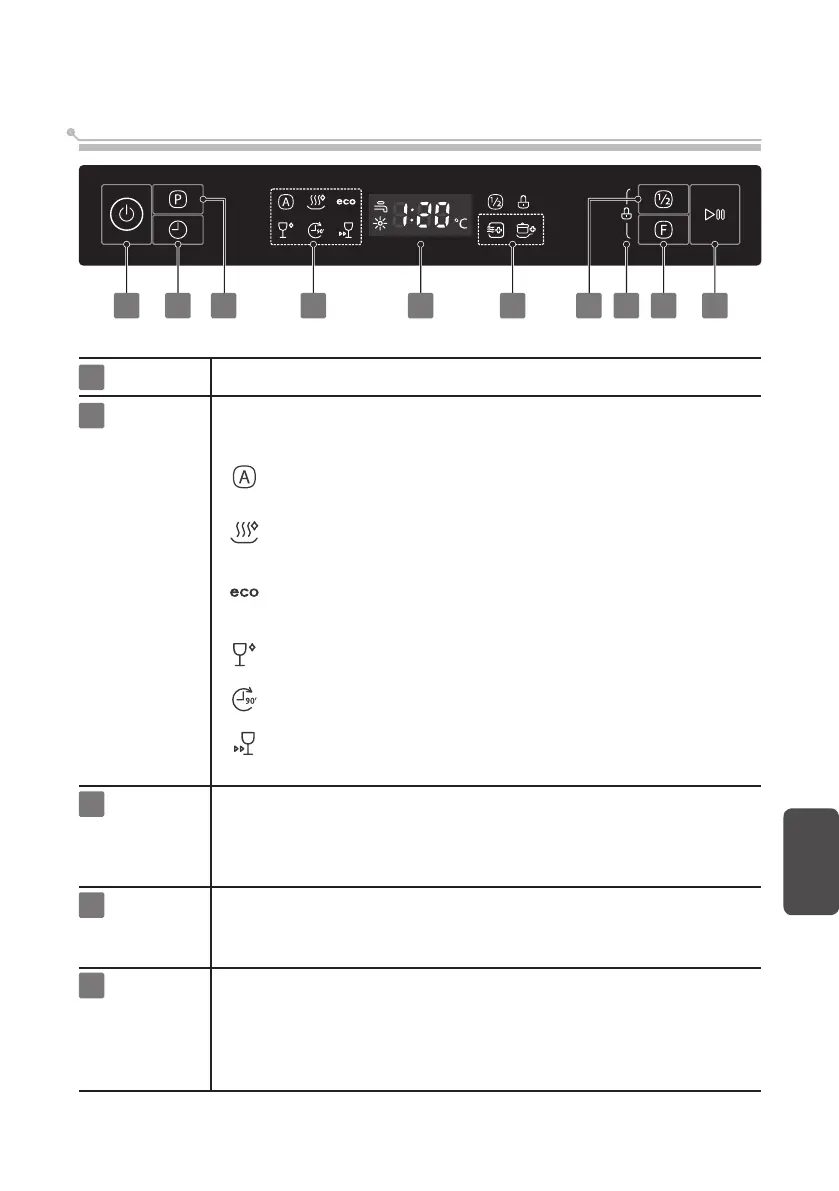
Control panel
1
Power
Press this button to turn on your dishwasher.
Delay start3
2
Program
Select the appropriate washing program and corresponding icon will
light up.
AUTO
Light to heavily soiled daily used items, automatic
detection of the amount of soils.
ECO This is standard program. For general dirty dishes
and utensils (such as pots, plates, glasses, pans).
GLASS For slight dirty dishes and glasses.
90 MIN For normally soiled loads that need quick wash.
RAPID For slight dirty dishes, the required cleaning time
is relatively short.
English
11
1 3 2 764 562 8
Touch this button to set the delayed hours for washing. You can delay
the star of washing up to 24 hours. One touch on this button delays the
star of washing by one hour.
After setting the delay time, touch the Start/Pause button to start.
Half load4 When you have about or less than 6 place setting dishware to wash,
you can choose this function to save energy and water.
(It can only be used with Hygiene, ECO, Glass and 90 min.)
This option allows you to lock the buttons on the control panel, so
children cannot accidently start the dishwasher by pressing the buttons
on the panel. Only the Power button remains active.
To lock or unlock the buttons on the control panel, press and hold
the Half load button + Function button for 3 seconds simultaneously.
Child lock
5
HYGIENE
Use to sanitize your dishes and glassware.
The highest water temperature is 75˚C.
Bekijk gratis de handleiding van Toshiba DW-14F1SS-NZ, stel vragen en lees de antwoorden op veelvoorkomende problemen, of gebruik onze assistent om sneller informatie in de handleiding te vinden of uitleg te krijgen over specifieke functies.
Productinformatie
| Merk | Toshiba |
| Model | DW-14F1SS-NZ |
| Categorie | Wasmachine |
| Taal | Nederlands |
| Grootte | 2840 MB |