Svan SL6000E handleiding
Handleiding
Je bekijkt pagina 40 van 56
11
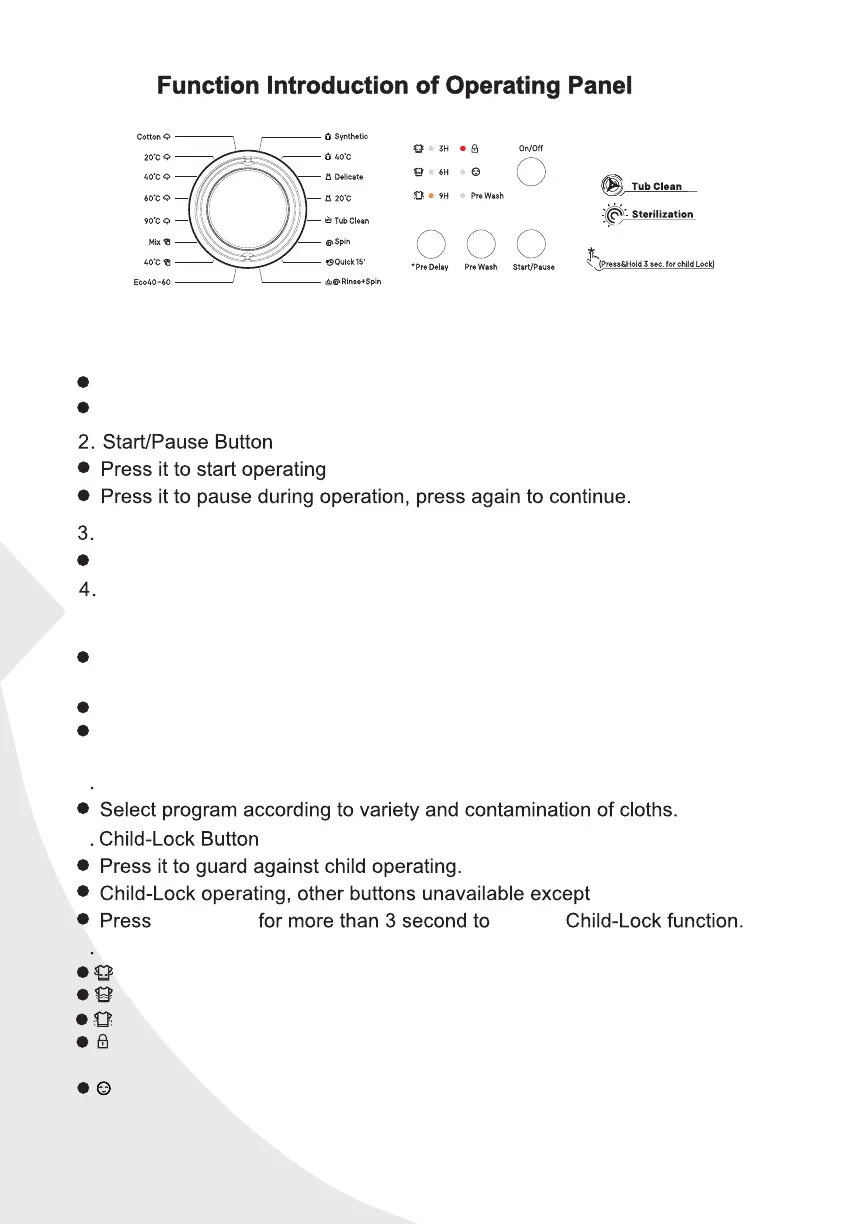
Image shown here is indicative only. Actual product you receive may differ.
Pre Wash Button
If the cloths are too dirty, you can choose this program before washing.
Pre Delay Button
When use “Pre Delay” function for washing, the delay time is
If want to cancel the pre delay function, press “power” button or press one
cycle of “Pre Delay” button.
The Pre Delay time means from wash start to wash ending time.
You should operate the pre delay function after selecting the program
Program Konb
5
6
3hours 、 6hours、 9hours、 12hours 、15hours 、18hours .
7 Status Indicator
1.
On/Off Button
On/Off
Turn power On/Off.
When procedure finish, press power to cut off power.
Wash:This icon indicates the opening and the closing state of the wash.
Rinse:This icon indicates the opening and the closing state of the Rinse.
and before press the button of “Start/Pause”.
Pre Delay
on/off.
Door Lock:This icon indicates the condition of opening and
closing of the door lock.
Spin:This icon indicates the opening and the closing state of the spin.
Child Lock:Icon on the upper left is used to control the opening
and closing of the child lock,the right side displays the condition
of closing of the child lock.
Bekijk gratis de handleiding van Svan SL6000E, stel vragen en lees de antwoorden op veelvoorkomende problemen, of gebruik onze assistent om sneller informatie in de handleiding te vinden of uitleg te krijgen over specifieke functies.
Productinformatie
| Merk | Svan |
| Model | SL6000E |
| Categorie | Wasmachine |
| Taal | Nederlands |
| Grootte | 5675 MB |
Caratteristiche Prodotto
| Apparaatplaatsing | Vrijstaand |
| Soort bediening | Buttons, Rotary |
| Kleur van het product | Wit |
| Deurscharnieren | Links |
| Ingebouwd display | Nee |