Handleiding
Je bekijkt pagina 18 van 36
English-6
FOR BRAZIL MODELS ONLY:
NOTE: Your blender has an interlock system on the motor unit. This will prevent the motor from
starting if the blender jar is not properly placed on the motor unit. If the jar is removed from the
motor unit during operation the blender will stop, and the lights will ash continuously. If the lights
are blinking, the jar should be removed and placed onto the motor base once again. When the jar is
correctly in place, the lights will stop blinking and the blender will be ready for use.
USING THE AUTOMATIC PROGRAMS WITH
TEXTURE CONTROL
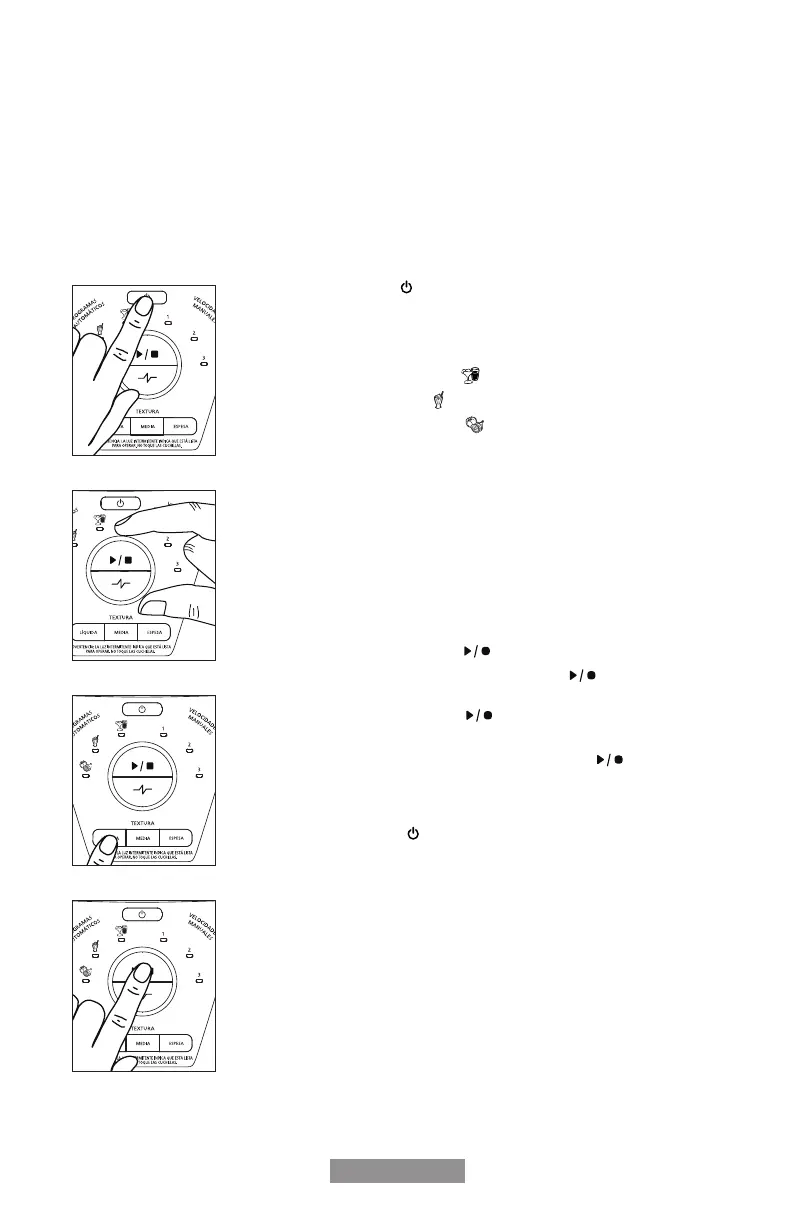
1. Press the power button to turn the blender on (Fig. 19). The power light
will blink, meaning the blender is active and ready to use.
2. Turn the dial to select the appropriate automatic program for your recipe
(Fig. 20).
• Juice/smoothie program
• Milkshake program
• Food processor program
Note: Automatic programs work in conjunction with the texture control. Once
an automatic program is chosen, the default texture selection will be ‘media’
(medium).
3. To change the texture selection, press one of the three texture selection
buttons appropriate for your recipe (Fig. 21).
• Líquida (Thin)
• Media (Medium)
• Espesa (Thick)
4. Once you have chosen the automatic program and the desired texture
selection, press start/stop button (Fig. 22).
5. To change your selection, press start/stop button to cancel the
program (Fig. 22). Choose the desired automatic program and texture
selection. Press start/stop button to start the program (Fig. 22).
6. Once the program is nished, the blender automatically stops.
PLEASE NOTE: You may press the start/stop button to cancel the
program at any time. The blinking blue light indicates that the blender is
ready.
7. Press the power button to turn the blender off (Fig. 19).
Note: This blender is pre-programmed to turn off automatically if not
used for a period of several minutes. All lights will turn off when the unit
automatically powers down.
Fig. 19
Fig. 21
Fig. 22
Fig. 20
BLST3B-CAG_BLST3B-CPG_BLST3B-RPG_BLST3B-C2T_BLST3B-R2T_21SEPM1 (LA).indd 6BLST3B-CAG_BLST3B-CPG_BLST3B-RPG_BLST3B-C2T_BLST3B-R2T_21SEPM1 (LA).indd 6 5/19/21 16:025/19/21 16:02
Bekijk gratis de handleiding van Oster BLST3B-CPG, stel vragen en lees de antwoorden op veelvoorkomende problemen, of gebruik onze assistent om sneller informatie in de handleiding te vinden of uitleg te krijgen over specifieke functies.
Productinformatie
| Merk | Oster |
| Model | BLST3B-CPG |
| Categorie | Blender |
| Taal | Nederlands |
| Grootte | 3739 MB |