Midea WBMF310 handleiding
Handleiding
Je bekijkt pagina 42 van 67
ROBOT OPERATION INSTRUCTIONS
NOTE
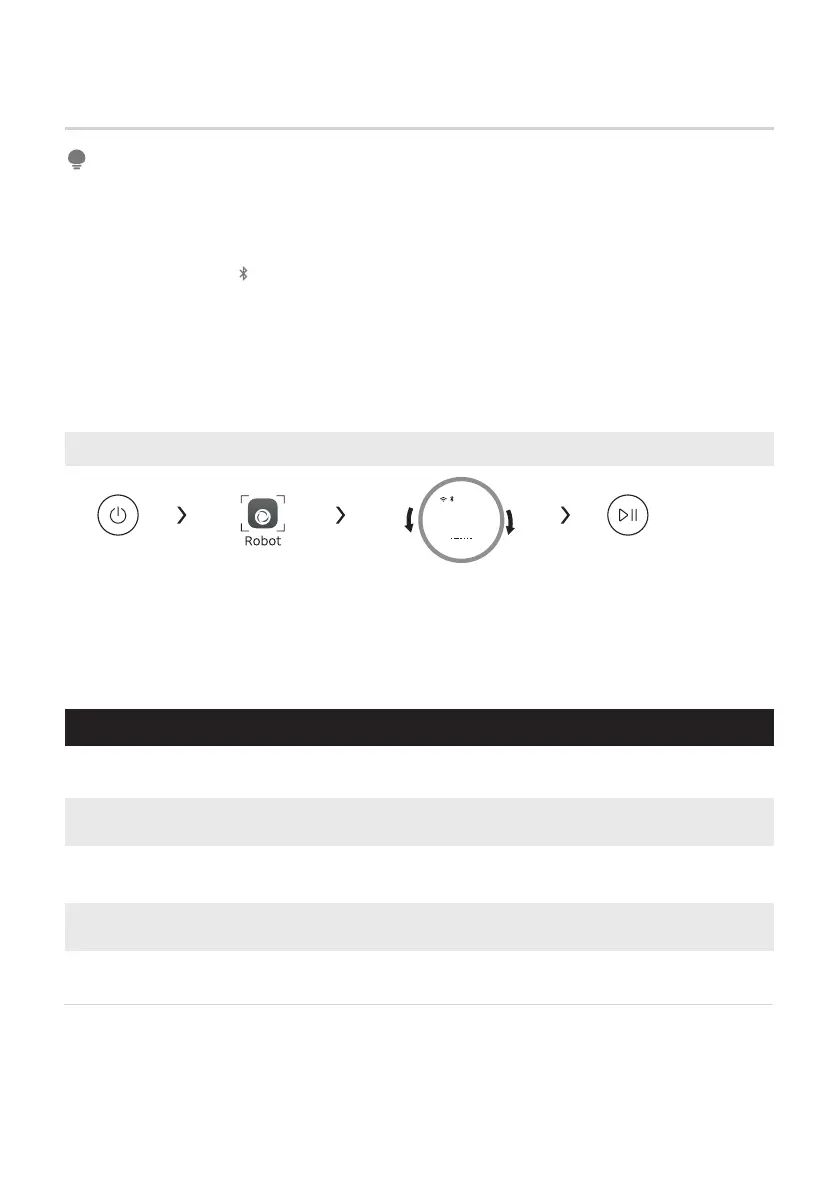
Panel control of dual washing station
RECHARGE
VACUUM & MOP
Programmes
VACUUM THEN
MOP
VACUUM ONLY
Choose programme StartPower on Select robot mode
MOP ONLY
41
• Manually place the robot into the base station with the charging terminal facing
inward, and the robot will automatically start up;
• After startup, the robot needs to be paired with the washing machine. Please refer to
Page 28 of this manual for the pairing method;
• The base station " " indicator is normally on, indicating that the communication
between the base station and the robot is normal;
• Make sure the robot is fully charged to 100% before cleaning for the frst time;
• This product is mainly used for indoor household cleaning. Please do not use it for
outdoor cleaning;
• Do not soak the robot in water; otherwise, it may cause damage such as short circuit
or electric leakage.
Select and start this programme. The robot will end the current
task and automatically return to the base station for charging.
Select and start this programme. The robot will start whole house
cleaning in "VACUUM & MOP" mode.
Select and start this programme. The robot will start whole house
cleaning in "VACUUM THEN MOP" mode.
Select and start this programme. The robot will start whole house
cleaning in "VACUUM ONLY" mode.
Select and start this programme. The robot will start whole house
cleaning in "MOP ONLY" mode.
ROBOT
Vacuum & Mop
Bekijk gratis de handleiding van Midea WBMF310, stel vragen en lees de antwoorden op veelvoorkomende problemen, of gebruik onze assistent om sneller informatie in de handleiding te vinden of uitleg te krijgen over specifieke functies.
Productinformatie
| Merk | Midea |
| Model | WBMF310 |
| Categorie | Wasmachine |
| Taal | Nederlands |
| Grootte | 6329 MB |