
Handleiding
Je bekijkt pagina 23 van 24
22
Home Screen
1) Software Setup
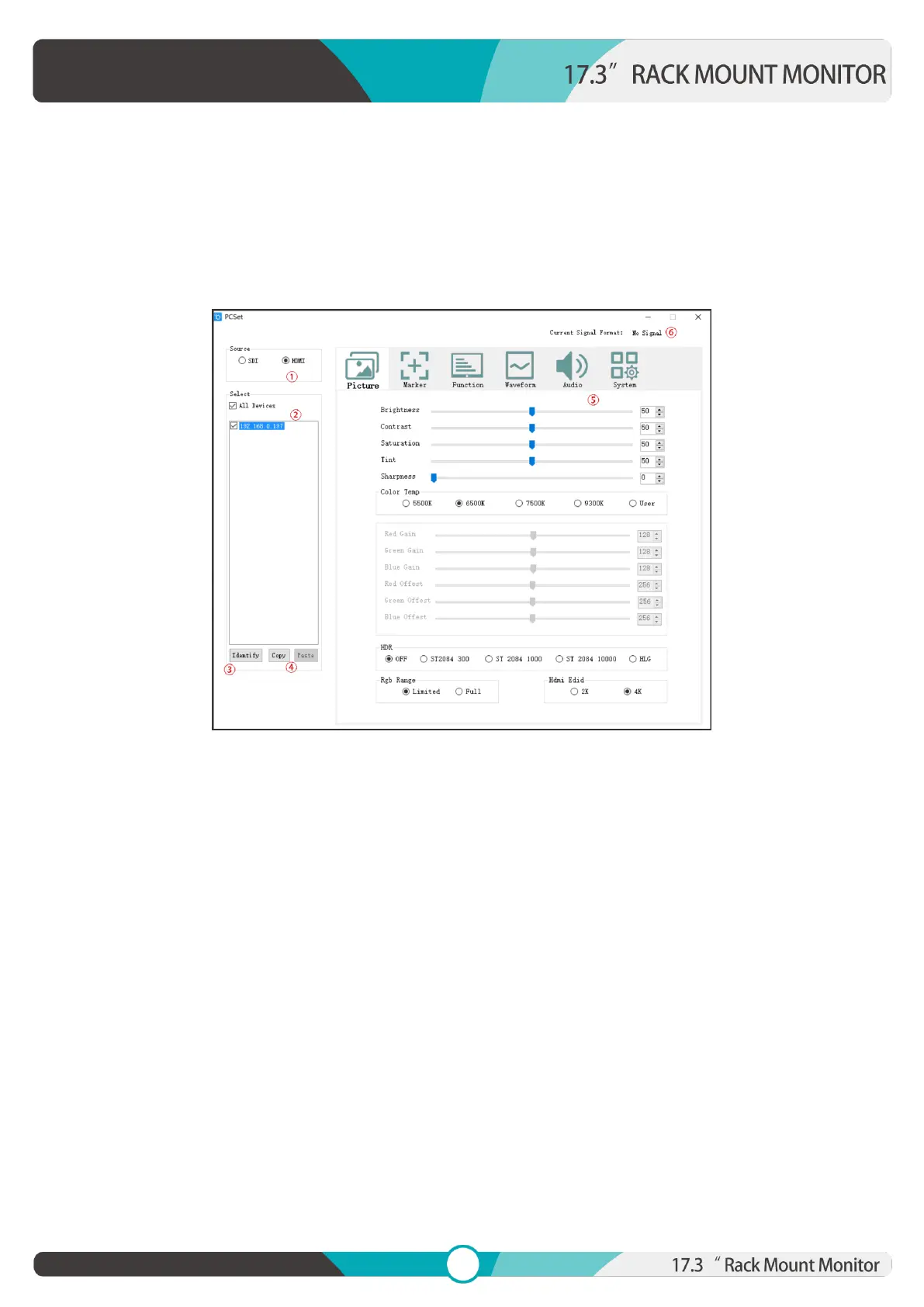
Open the software, it displays related IP address on the left of pop-up window if the device is
connected successfully.
Picture: The home screen of the application
2) Software Setup
1. Source Zone:
To check and setup the selected Source. The settable parameters will be different for different
Sources.
2. Select Zone:
The software will read the data from the device which IP address marks as blue. Left click this IP
address to select which device to be read. After selection, the user can change the Settings to setup
the selected device. (Send to multiple devices is unavailable.)
3. Identify Button:
Click to send the Identify to the selected device. The display screen will display the IP address. (Send
to multiple devices is available.)
Bekijk gratis de handleiding van Lilliput RM-1731S, stel vragen en lees de antwoorden op veelvoorkomende problemen, of gebruik onze assistent om sneller informatie in de handleiding te vinden of uitleg te krijgen over specifieke functies.
Productinformatie
| Merk | Lilliput |
| Model | RM-1731S |
| Categorie | Monitor |
| Taal | Nederlands |
| Grootte | 7027 MB |
