
Handleiding
Je bekijkt pagina 23 van 42
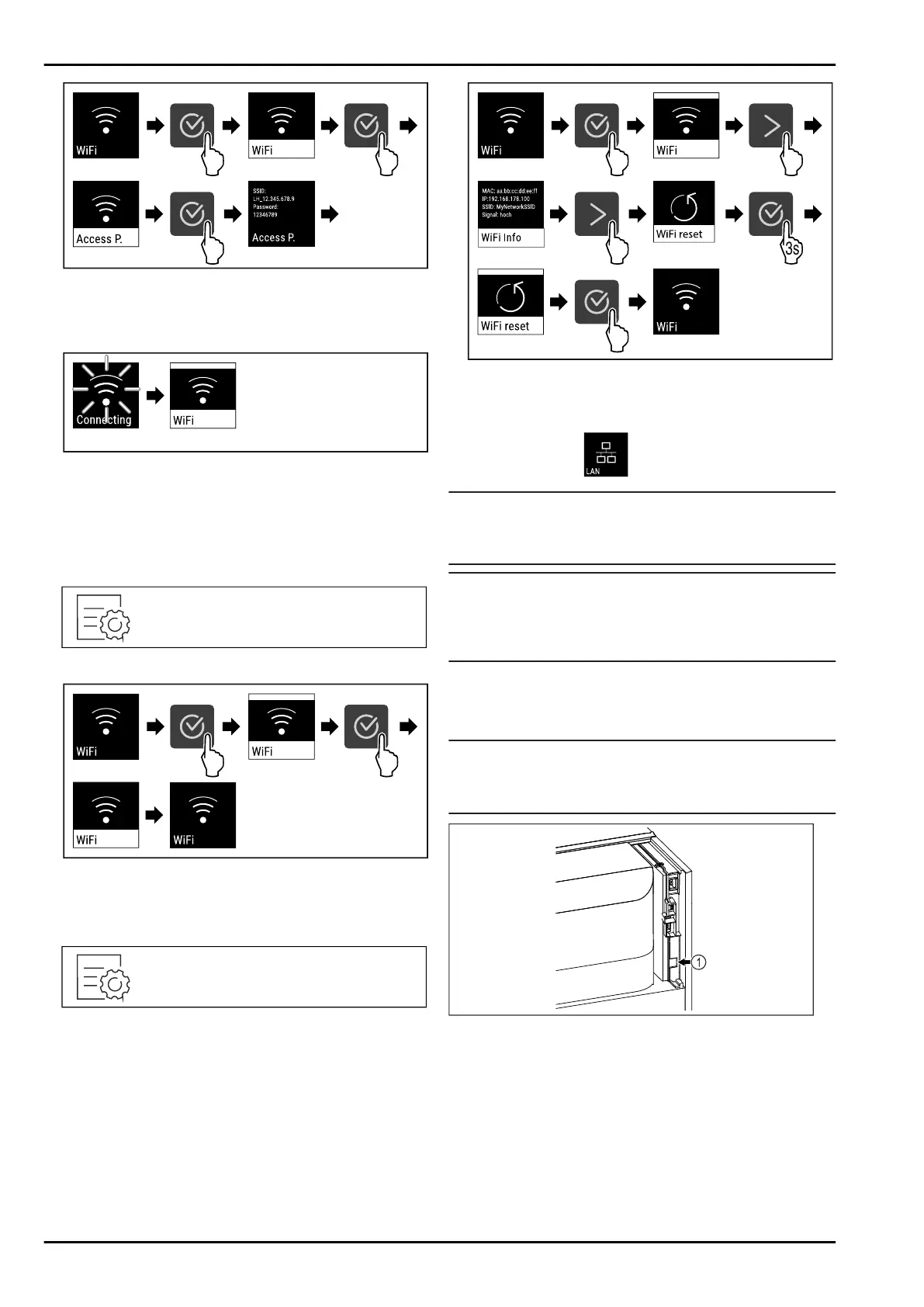
Fig. 103
u
按图执行操作步骤。
u
在 支 持 互 联 网 的终端设备上继续设置过程: Liebherr
SmartMonitoring Dashboard
Fig. 104
u
正在建立连接。
w
显示 WiFi connecting。此符号跳动。
u
按照 Liebherr SmartMonitoring Dashboard 说明进行操
作。
w
连接已建立。
断开连接
Fig. 105
Fig. 106
u
按图执行操作步骤。
w
连接已断开。
重置连接
Fig. 107
Fig. 108
u
按图执行操作步骤。
w
WiFi 设置重置为交付状态。
6.2.15 LAN 连接
提示
Liebherr SmartMonitoring Dashboard 并非在所有国家和地区
均可用。请先扫描二维码,接着输入冰箱的型号检查是否可
用。
提示
使用 Liebherr SmartMonitoring Dashboard , 在 https://
smartmonitoring.liebherr.com 上,需要安装 SmartModule
和商业 MyLiebherr 账户。您可以在在线调试期间使用现有的登
录数据直接登录,也可以重新注册并创建公司帐户。
通过此设置可以在冰箱和互联网之间建立有线连接。连接通过
SmartModule 控制。 冰箱可以通过基于浏览器的 Liebherr
SmartMonitoring Dashboard 集成,并且可以使用扩展选项以
及用于控制、管理和监控的单独选项。
提示
您 可 以 通 过 客 服 (参 见 9.3 客 户服务部 门 ) 和 Liebherr-
Hausgeräte 网 店 购买附件,网址为 home.liebherr.com/
shop/de/deu/zubehor.html。
Fig. 109
确保满足下列前提条件:
q
SmartModule Fig. 109(1) 已使用。
q
网线已连接。
建立连接
调试和设置 您 的 SmartModule 可 以 在线通过 Liebherr
SmartMonitoring Dashboard 在支持互联网的终端设备上进
行。
在 Liebherr SmartMonitoring Dashboard 上,您还可以找到有
关后续安装 SmartModule 的信息。
操作
* 按冰箱型号配置 23
Bekijk gratis de handleiding van Liebherr SFPvg 1402 Performance, stel vragen en lees de antwoorden op veelvoorkomende problemen, of gebruik onze assistent om sneller informatie in de handleiding te vinden of uitleg te krijgen over specifieke functies.
Productinformatie
| Merk | Liebherr |
| Model | SFPvg 1402 Performance |
| Categorie | Vriezer |
| Taal | Nederlands |
| Grootte | 8846 MB |


