LG WTP22BK handleiding
Handleiding
Je bekijkt pagina 23 van 40
23
OPERATION
ENGLISH
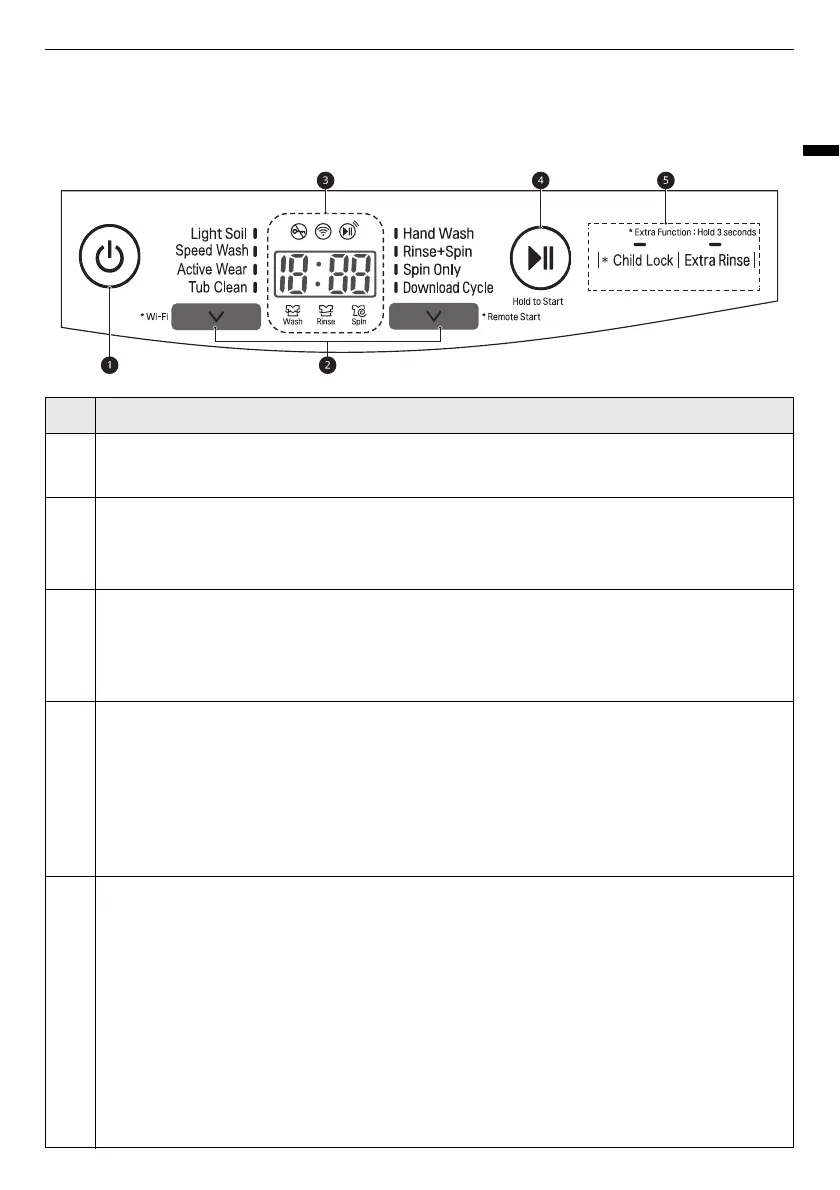
Control Panel and Programme Table
Control Panel Features
Description
a
Power
On/Off Button
• Press this button to turn the washing machine on.
b
Programme Button
• Programmes are available according to the clothes type.
• The lamp will light up to indicate the selected programme.
c
Display
• The display shows the settings, estimated remaining time, options, and status messages.
When the appliance is turned on, the default settings in the display will illuminate.
• While the load weight is sensed automatically, the display on the control panel blinks.
d
Start/Pause
Button
• This button is used to start the wash cycle or pause the wash cycle.
• If a temporary stop of the wash cycle is needed, press this button.
NOTE
• If you do not press the
Start/Pause
button within a certain time, the Mini Washer
automatically turns off and all cycle settings are lost.
e
Extra Options and Functions
• To use the extra functions, press and hold the corresponding button for 3 seconds. The
corresponding symbol lights up in the display.
• This allows you to select an additional programmes and will light when selected.
Remote Start
With the
LG ThinQ
app, you can use a smartphone to control your appliance remotely.
• In order to use this function, refer to
SMART FUNCTIONS
.
Wi-Fi
Press and hold the
K
button for 3 seconds to initiate the connection of the appliance to the
LG
ThinQ
application.
Bekijk gratis de handleiding van LG WTP22BK, stel vragen en lees de antwoorden op veelvoorkomende problemen, of gebruik onze assistent om sneller informatie in de handleiding te vinden of uitleg te krijgen over specifieke functies.
Productinformatie
| Merk | LG |
| Model | WTP22BK |
| Categorie | Wasmachine |
| Taal | Nederlands |
| Grootte | 3474 MB |