LG WTP22BK handleiding
Handleiding
Je bekijkt pagina 12 van 40
12
INSTALLATION
4
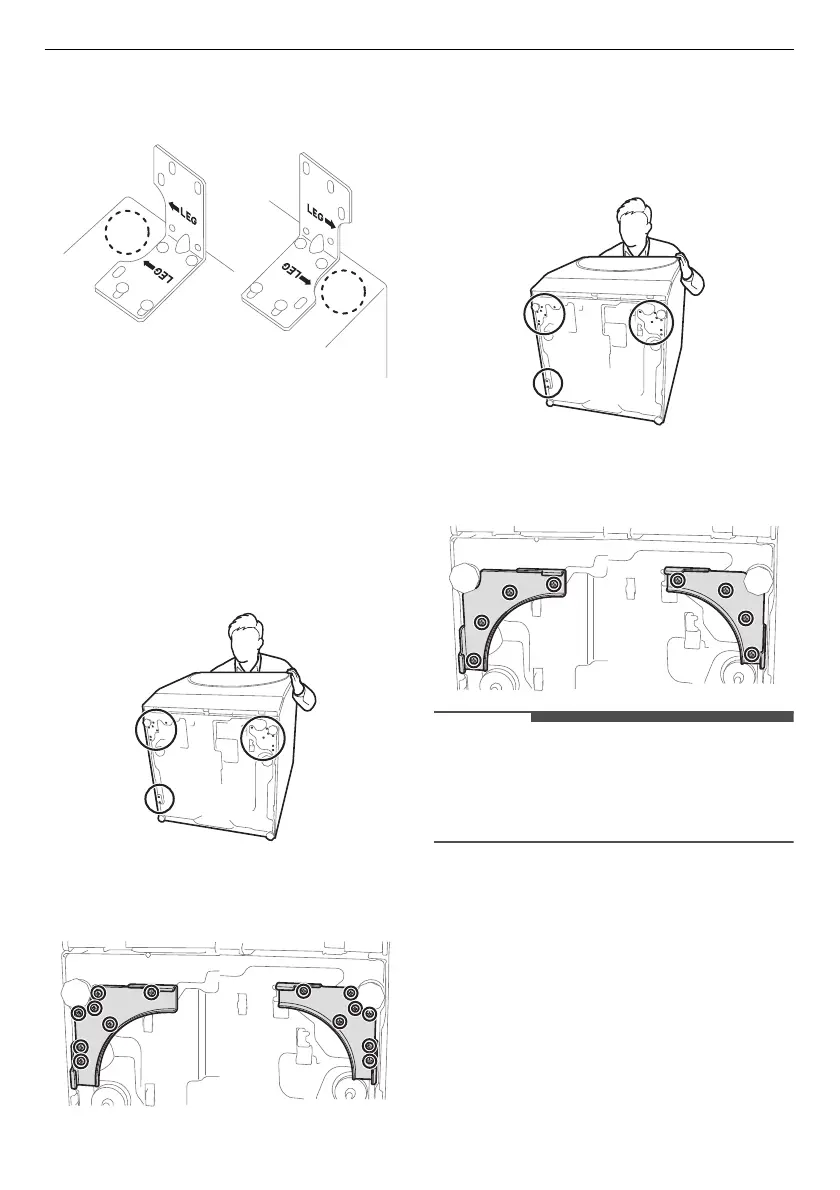
Attach the two back brackets on the rear top of
the Mini Washer by inserting 4 machine screws
in each bracket.
Screwing up Front Brackets on
the Main Washer
Type 1: The bottom of the Main
Washer is steel and its colour is
silver.
1
Tilt and hold the Main Washer.
2
Attach the two front brackets to the bottom of
the Main Washer and screw up each bracket
using machine screws(7 EA).
Type 2: The bottom of the Main
Washer is plastic and its colour is
white.
1
Tilt and hold the Main Washer.
2
Attach the two front brackets to the bottom of
the Main Washer and screw up each bracket
using machine screws(4 EA).
NOTE
• If the front brackets are assembled in the Main
Washer, or there is stacking feature on the base
of Main Washer, do not install the front brackets
provided with the Mini Washer.
Stacking Main Washer on Mini
Washer
1
Place the Main Washer on top of the Mini
Washer.
Bekijk gratis de handleiding van LG WTP22BK, stel vragen en lees de antwoorden op veelvoorkomende problemen, of gebruik onze assistent om sneller informatie in de handleiding te vinden of uitleg te krijgen over specifieke functies.
Productinformatie
| Merk | LG |
| Model | WTP22BK |
| Categorie | Wasmachine |
| Taal | Nederlands |
| Grootte | 3474 MB |