LG WT17BPBK handleiding
Handleiding
Je bekijkt pagina 18 van 40
18
OPERATION
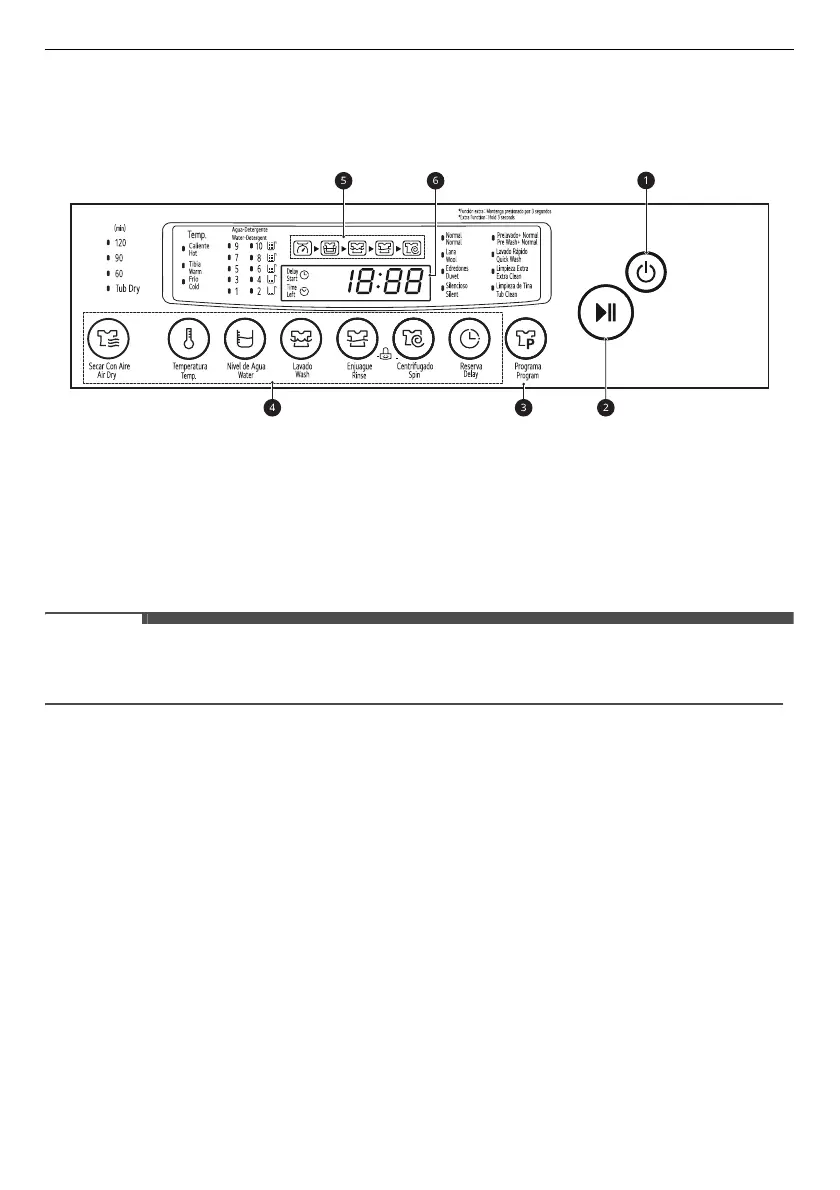
Control Panel
Control Panel Features
a
POWER
Button
• Press the
POWER
button to turn on or off the appliance.
• The appliance automatically turns off once a certain time has passed after the wash has completed.
b
START/PAUSE
Button
• Press the
START/PAUSE
button to start or pause a wash cycle.
• Press the
START/PAUSE
button to stop a wash cycle temporarily.
NOTE
• If the wash is not recommenced within
60 minutes
when in pause, then the appliance will automatically
turn off.
c
Program
Button
• Programmes are available according to the laundry type.
• The lamp will light up to indicate the selected programme.
d
Extra Options and Functions
• You can use the extra options and functions to customize the programmes.
e
Cycle Status Indicator
• The cycle status indicator is turned on before the start.
• The cycle status indicator blinks during that process, and then the indicator turns off when that
process has completed.
f
Display
• The display shows the settings, remaining estimated time, options, and status messages. When the
appliance is turned on, the default settings in the display will light up.
•
18:88
: When a programme is selected, the default time for that programme is displayed. The time
can change as options are selected.
- If the display shows
-:--
, then the time will be displayed after the load sensing has detected the
laundry size.
*
Bekijk gratis de handleiding van LG WT17BPBK, stel vragen en lees de antwoorden op veelvoorkomende problemen, of gebruik onze assistent om sneller informatie in de handleiding te vinden of uitleg te krijgen over specifieke functies.
Productinformatie
| Merk | LG |
| Model | WT17BPBK |
| Categorie | Wasmachine |
| Taal | Nederlands |
| Grootte | 2902 MB |