LG WF9014WB handleiding
Handleiding
Je bekijkt pagina 20 van 48
20
OPERATION
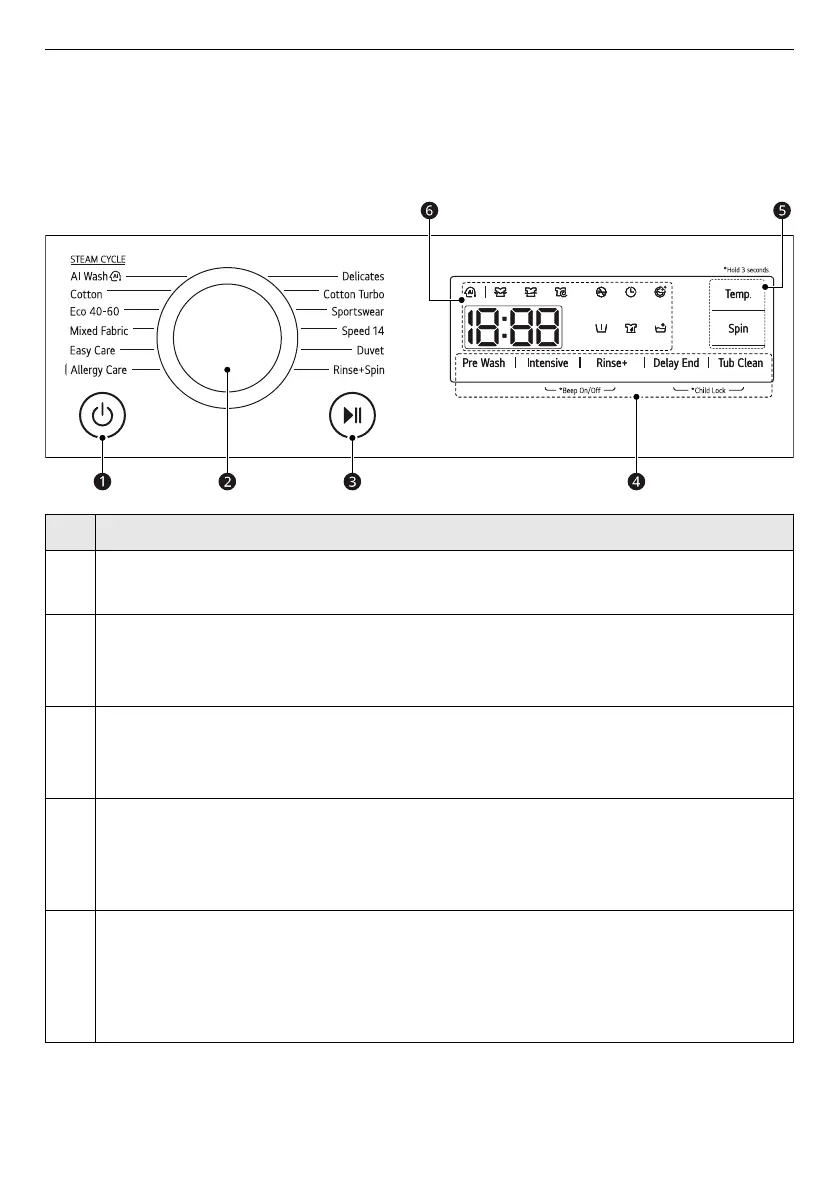
Control Panel
The actual control panel may differ from model to model.
Control Panel Features
Description
a
Power
On/Off Button
• Press this button to turn the washing machine on or off.
b
Programme Knob
• Programmes are available according to the clothes type.
• The lamp will light up to indicate the selected programme.
c
Start/Pause
Button
• This button is used to start the wash programme or pause the wash programme.
• If a temporary stop of the wash programme is needed, press this button.
d
Extra Options and Functions
• To use the extra functions, press and hold the corresponding button for 3 seconds. The
corresponding symbol lights up in the display.
• This allows you to select an additional programmes.
e
Customizing Washing Programme Buttons
Use these buttons to adjust the water temperature or spin speed settings for the selected
programme.
• The current settings are shown in the display.
• Press the button for that option to select other settings.
Bekijk gratis de handleiding van LG WF9014WB, stel vragen en lees de antwoorden op veelvoorkomende problemen, of gebruik onze assistent om sneller informatie in de handleiding te vinden of uitleg te krijgen over specifieke functies.
Productinformatie
| Merk | LG |
| Model | WF9014WB |
| Categorie | Wasmachine |
| Taal | Nederlands |
| Grootte | 3657 MB |