
Khind WM80A handleiding
Handleiding
Je bekijkt pagina 4 van 29
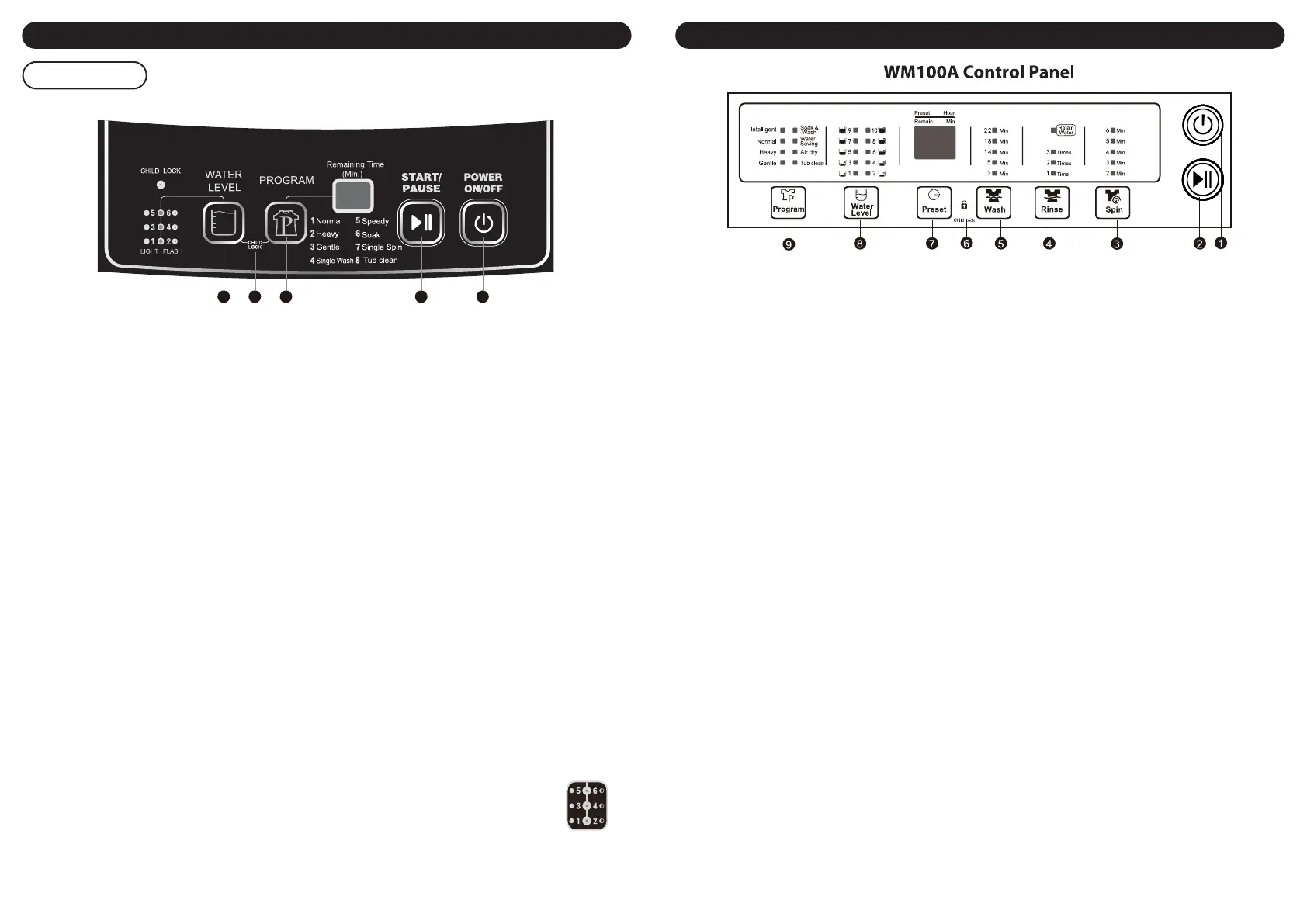
Parts Identication
Control Panel
5 6
1. Power On/O button
Use this button to turn the washing machine on and o. If a set program is not start within 5 minutes of
turning the machine on, it will switch o automatically.
2. Start/pause button
Press this button to begin a wash program, or to pause/resume a program that is currently in progress.
3. Program selection
Press this button repeatedly to set the desired wash program. You can choose from the following options.
Normal: to wash according to the weight of clothes adjusting the water level.
Heavy: to wash the coverlet, jeans and other big clothes.
Gentle: for washing of wool or underwear.
Single wash: to wash the clothes.
Speedy: to wash the slight dirty clothes.
Soak: soak for some time before washing.
Single Spin: to spin the clothes.
Tub clean: clean the inner tub automatically.
4. Child lock function
Press and hold the two buttons (Water level & Program) simultaneously for 1.5 second to activate and
deactivate the safety lock.
5. Water level selection
Use this button to select the appropriate water level according to the volume of laundry.
• Under Intelligent, Heavy, Gentle, Soak programs, the water level is adjustable.
Its default washing water level is 3; rising water level is 4.
• Under Speedy program, the user can not adjust water level.
Its default washing water level is 2; rising water level is 3.
• Under Spin program, water level button is not workable and no display.
• Under the wash process, a long pressing on Water Level will re-supply water until the water level reaches
warning level.
Note: As the picture shows, there are 6 water level for this washing machine, the indicator keeping
lighting means odd number water level, and keeping twinkling means even number water
level.
WM80A Control Panel
Parts Identication
1. Power On/O button
Press power button to turn on or turn o the washing machine. If it is turned on beyond 5 minutes, and does
not start the washing machine, or not to turn o, the power On/O switch will be auto turned o.
2. Start/pause button
Press this button to start program, however press the button when machine running, the program will be
paused.
3. Spin
Press this button to single spin. You can set the spin time.
4. Rinse
Press this button to rinse. You can set the times.
5. Wash
Press this button to wash. You can set the washing time.
6. Child Lock
Press this Wash and Preset button and hold on 1.5 seconds to enter Child Lock with beep sounds.
Repeat it will unlock.
7. Preset
Press this button preset the washing time.
8. Water level
Press this button to choose right water level according to the weight of clothing, so as to avoid the water
waste. In intelligent program, the machine will estimate the weight of clothes and choose the water level
automatically.
9. Program
Press this button to choose the desired program.
Intelligent: to wash according to the weight of clothes adjusting the water level.
Normal: to wash normal quality clothes, can set water level from 1 to 10 according to the loading.
Heavy: to wash the coverlet, jeans and other big clothes.
Gentle: to wash all kinds of woolens, silks and ne quality clothes.
Soak & wash: to soak and wash.
Water Saving: to wash the clothes quickly.
Air dry: to dry the tub or clothes.
Tub clean: to clean the tub itself.
12345
Bekijk gratis de handleiding van Khind WM80A, stel vragen en lees de antwoorden op veelvoorkomende problemen, of gebruik onze assistent om sneller informatie in de handleiding te vinden of uitleg te krijgen over specifieke functies.
Productinformatie
| Merk | Khind |
| Model | WM80A |
| Categorie | Wasmachine |
| Taal | Nederlands |
| Grootte | 6220 MB |
