Kernau KFWM 7412 I handleiding
Handleiding
Je bekijkt pagina 55 van 148
55
ADDITIONAL FUNCTIONS
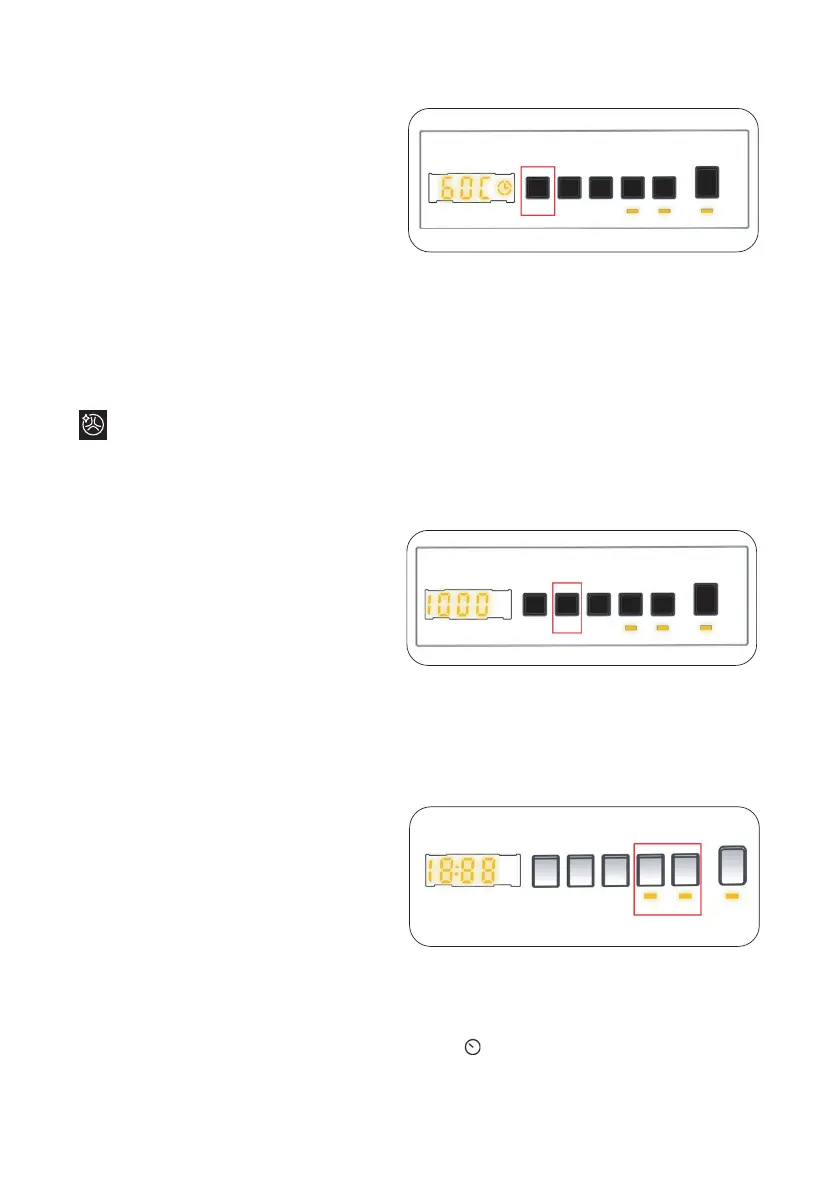
1. Temperature Selection
Use the washing water temperature adjustment
button to alter the automatically programmed
washing water temperature.
When you select a programme the maximum temperature for that programme is automatically selected.
To adjust the temperature, press the water temperature adjustment button until the desired temperature is
displayed on the digital display.
You can gradually decrease the washing water temperature between the maximum washing water temperature
of the selected programme and cold washing (- - C) selections by pressing the temperature adjustment button.
2. Spin Speed Selection
When you select a programme, the maximum spin speed is automatically selected.
To adjust the spin speed between the maximum spin speed and the cancel spinning option (- - -), press the
Spin speed button until the desired speed is displayed.
If you have skipped the spin speed you want to set, keep pressing the spin speed adjustment button until
the desired spin speed is displayed again.
3. Delay Timer(*)
You can use this auxiliary function to delay the start time of the washing cycle for 1 to 23 hours .
To use the delay function:
• Press the delay key once.
• “01h” will be displayed. the electronic display. will light up on
•
Press the delay key until you reach the time after which you want the machine to start the
washing cycle.
You can perform drum cleaning for your machine by pressing the washing water temperature
adjustment button for 3 seconds. It should be used without laundry. It is recommended to use once a
month.
Bekijk gratis de handleiding van Kernau KFWM 7412 I, stel vragen en lees de antwoorden op veelvoorkomende problemen, of gebruik onze assistent om sneller informatie in de handleiding te vinden of uitleg te krijgen over specifieke functies.
Productinformatie
| Merk | Kernau |
| Model | KFWM 7412 I |
| Categorie | Wasmachine |
| Taal | Nederlands |
| Grootte | 15726 MB |