Infiniton WM-F124AWX handleiding
Handleiding
Je bekijkt pagina 39 van 76
39 inniton.es
How to use
English
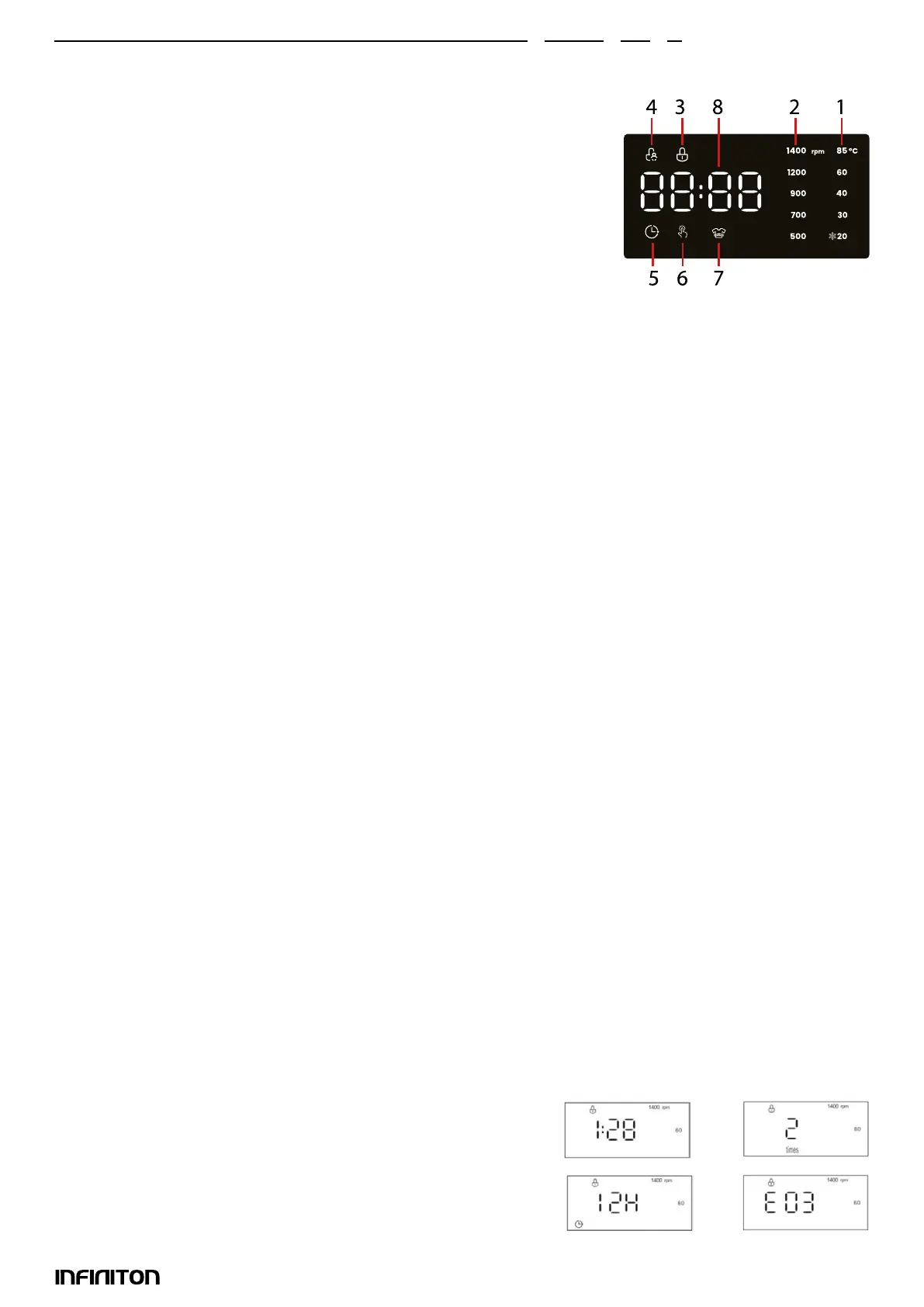
M. DISPLAY: The display is useful for programming the washer and offers a wealth of information.
1. Temperature indicator
When a program is selected, the indicator light for the preset tempera-
ture value of this program will light up on the display.
You can change the temperature value by pressing the TEMP button.
There are ve temperature value indicator lights. When a temperature
value is selected, the corresponding indicator will light up on the dis-
play. If all temperature value indicator lights are off, it indicates that the
appliance uses only cold water without using the heater in this program.
2. SPIN SPEED Indicator Light
When a program is selected, the indicator light for the default spin speed value of this program will light
up on the display.
You can change the spin speed value by pressing this button. There are ve spin speed indicator lights
on the display. When a spin speed value is selected, the corresponding spin speed value indicator light
will light up on the display. If all the spin speed value indicator lights are off, it indicates that the applian-
ce does not spin after the nal drain process in this program.
3. DOOR LOCK indicator:
Indicator light on indicates that the door is locked. To avoid any damage, wait until this light turns off
before opening the door.
To open the door during a cycle, press the START/PAUSE button, if the DOOR LOCK indicator light is off, the
door can be opened.
4. CHILD LOCK indicator light
The lit indicator light indicates that the CHILD LOCK function is activated, and the control panel is locked.
5. PROGRAMMED START indicator
The lit indicator light indicates that this function is activated. The countdown to the end of the selected
wash cycle will appear on the display.
6. ONE TOUCH indicator
This light indicates that the One Touch wash program has been selected. There are three ways to set the
One Touch wash program.
7. Rinse Count Indicator
When the indicator light is on, you can select the rinse count, the selected rinse count will appear on the
display.
8. DISPLAY
A. Remaining time of the current wash cycle
B. Programmed start time
C. Rinse
D. Error Code
A C
B D
Bekijk gratis de handleiding van Infiniton WM-F124AWX, stel vragen en lees de antwoorden op veelvoorkomende problemen, of gebruik onze assistent om sneller informatie in de handleiding te vinden of uitleg te krijgen over specifieke functies.
Productinformatie
| Merk | Infiniton |
| Model | WM-F124AWX |
| Categorie | Wasmachine |
| Taal | Nederlands |
| Grootte | 10166 MB |