Hisense WD3S9043BB3 handleiding
Handleiding
Je bekijkt pagina 36 van 57
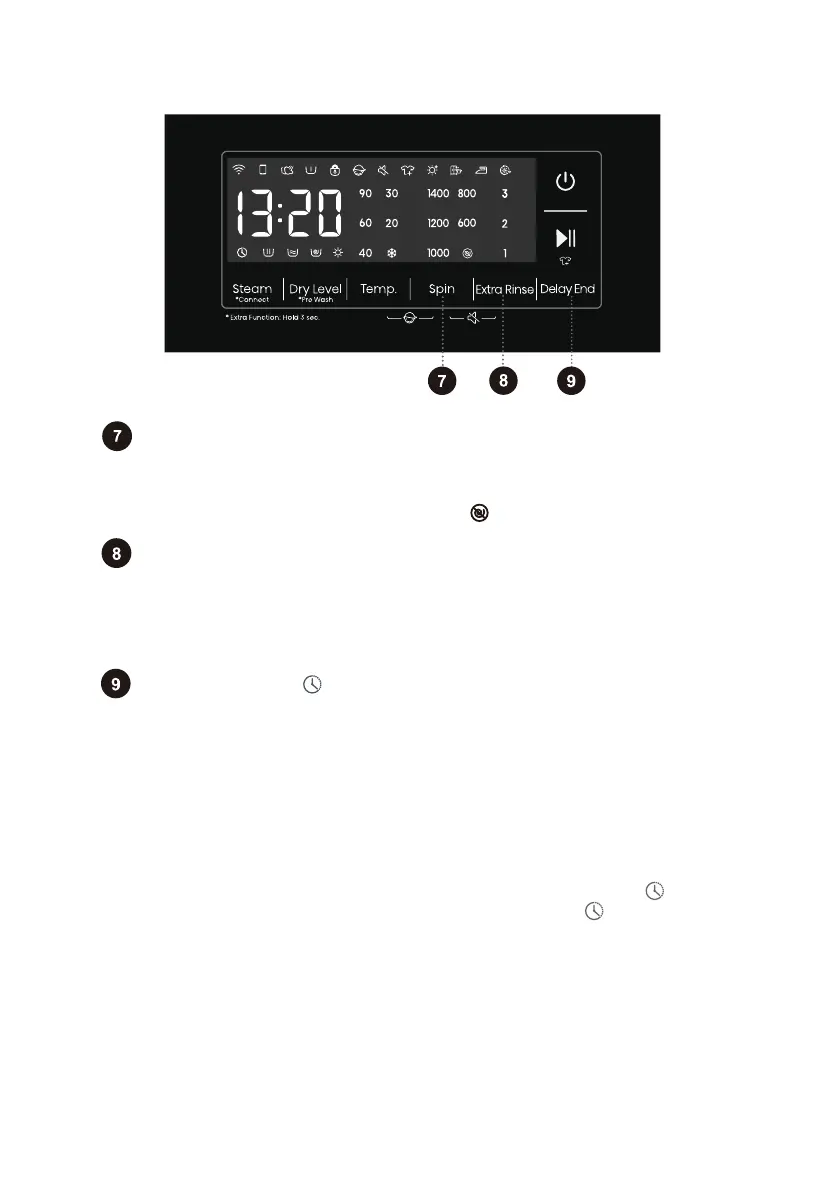
Delay End
36
If the Delay End function was chosen before starting a program, it can be
canceled by pressing any other function key. Once the program has started, you
need to press and hold the Power button to turn off and restart the machine to
cancel the Delay End function.
When the Delay End function is being selected (set), the Clock icon" "is always on;
When the Delay End programme is running, the Clock icon" "flashes.
Use this feature to schedule washing at a convenient time.
Press this key to set the Delay End time.This key is only valid in standby mode.
After the Delay End function is selected, each time the Delay End key is pressed,
the time increases by 1h. The maximum selectable time range is 24 hours.
The Delay End time is the end time, that is, it includes the washing time, so the
Delay End time must be greater than the washing time.Based on your settings, the
start time of the cycle will be determined by the machine's internal logic.Press to
choose a preset unit of hours.
Spin
Extra Rinse
Use this to adjust the spinning rate. With preset or selected spinning rate,
the selected spinning rate will be lit on the display unit.
If you select draining without spinning, the " " will appear on the display unit.
In the standby state, after Extra Rinse is selected, the number of Extra Rinse is
shown,which may be used a maximum of three times. In addition, the default
rinsing times plus the number of Extra Rinse cannot exceed five times. After the
program is started, the indicator is always on.
Bekijk gratis de handleiding van Hisense WD3S9043BB3, stel vragen en lees de antwoorden op veelvoorkomende problemen, of gebruik onze assistent om sneller informatie in de handleiding te vinden of uitleg te krijgen over specifieke functies.
Productinformatie
| Merk | Hisense |
| Model | WD3S9043BB3 |
| Categorie | Wasmachine |
| Taal | Nederlands |
| Grootte | 5415 MB |