
Grundig GWPE 89E6168 WW handleiding
Handleiding
Je bekijkt pagina 27 van 44
27 / EN
Washing Machine / User Manual
4.3.8.2 Functions/Programmes Selected by Pressing the Function Keys for 3 Seconds
• Anti-Crease+
Press and hold 1. Auxiliary function button for 3 seconds. When the function is selected, the drum rotates
for up to 8 hours for preventing the laundry from creasing at the end of the programme. You can cancel the
programme and take your laundry out at any time during the 8-hour duration. Press the function selection key
or the machine on/off key to cancel the function.
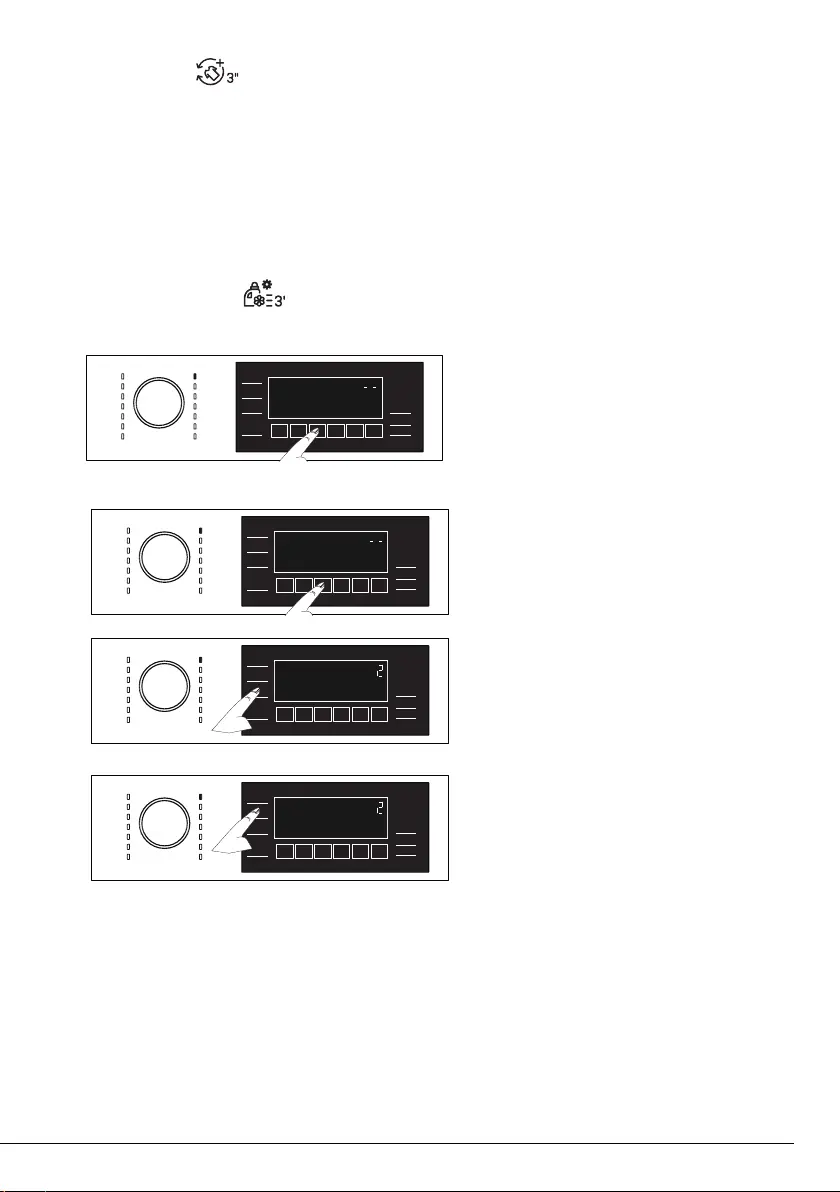
• Auto Dosage Setting
Activates by pressing down the 3rd auxiliary function key (automatic dosage) for 3 seconds. Liquid Detergent
or Softener dosage amount can be changed with this function.
Changing liquid detergent and softener dosage settings:
• Press and hold Automatic Dosage key for 3
seconds.
• The liquid detergent dosage level settings can
be changed by pressing down “Spin” selection
key as shown below:
1 : Low
2 : Medium
3 : High
• The softener dosage level settings can be
changed by pressing down “Temperature”
selection key as shown below:
1 : Low
2 : Medium
3 : High
• When dosage amount setting process is completed, you can return to the main menu by pressing the
automatic dosage key. Until a new setting is selected, dosing will be done according to the latest setting
you have selected in all programs.
Bekijk gratis de handleiding van Grundig GWPE 89E6168 WW, stel vragen en lees de antwoorden op veelvoorkomende problemen, of gebruik onze assistent om sneller informatie in de handleiding te vinden of uitleg te krijgen over specifieke functies.
Productinformatie
| Merk | Grundig |
| Model | GWPE 89E6168 WW |
| Categorie | Wasmachine |
| Taal | Nederlands |
| Grootte | 4544 MB |





