
Grundig GWP 810616 WW handleiding
Handleiding
Je bekijkt pagina 33 van 44
33 / EN
Washing Machine / User Manual
• Follow the instructions on the remote control application screen.
• When setup is complete, give your washing machine a name. On the "Products" page in the app you can
see the product you just added.
C
If you cannot complete the setup successfully in 5 minutes, your washing machine will automatically turn itself off. In this
case, you will have to start over the setup steps. If the problem is persisting, contact authorized service.
You can use your washing machine with more than one smart device. To do this, download the Remote Control app on the other
smart devices as well. When you launch the app, you will need to log in with the account you previously created and paired your
washing machine. Otherwise, please read "Setting up a washing machine that is connected to someone else's account".
C
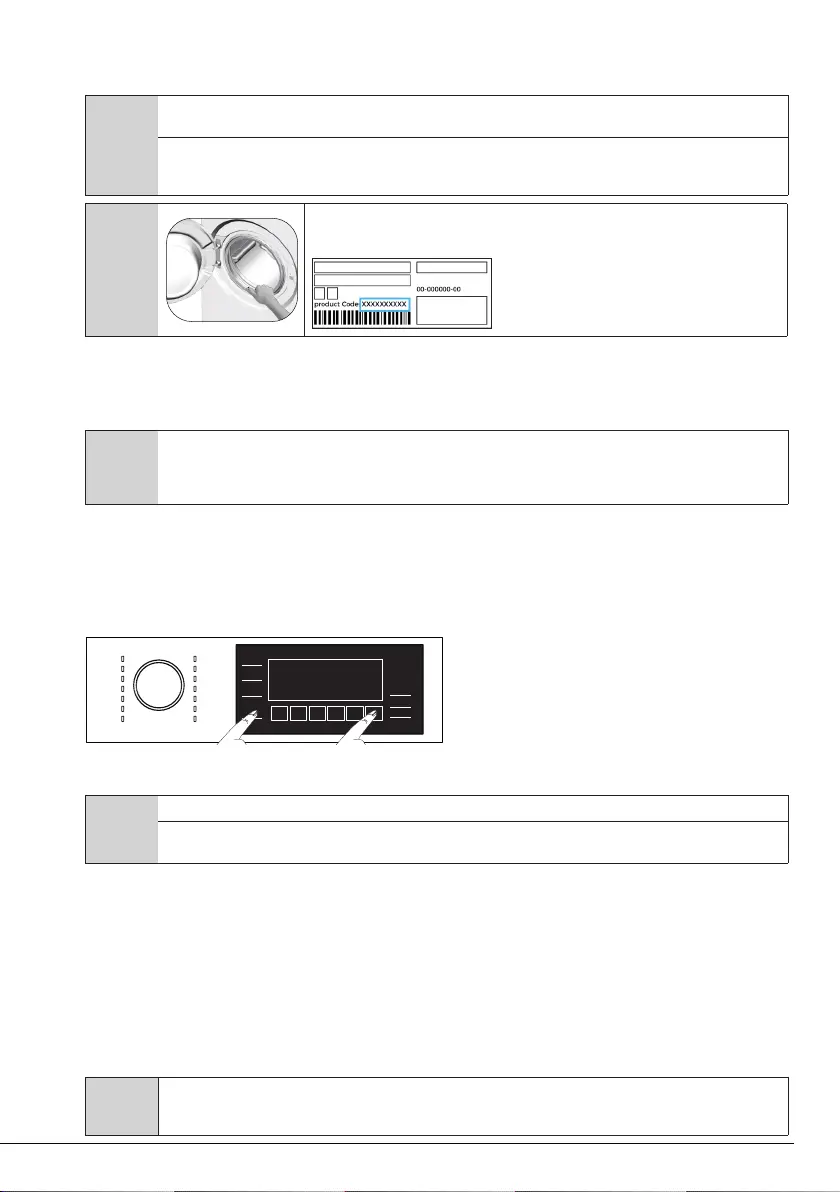
Remote Control Application may require you to type the product number shown on the product
label. You can find the product label inside of the loading door. The product number will be
shown on this label.
4.3.15.2 Setting up a washing machine that is connected to someone else's account
If the washing machine you want to use, has been registered to the system with someone else’s account, first
create a new account for the Remote Control registration and setup and open the HomeWhiz app with this
account. Follow the steps detailed in section 4.3.15.1 after login and set up the appliance.
C
Your product adding request shall be sent to the owner of the product by e-mail. You may start to use the product in
common after the owner confirms. In addition, the owner of the product may accept or reject the request sent by the app.
Click on the settings tab on the home page of the application. Enter the User Matching Settings and the sent request is
accepted if desired.
4.3.15.3 Deleting the Remote Control Account Match
Follow the following steps in order to delete a washing machine previously matched with someone else’s
account.
• Turn on your machine by using the On/Off button.
• When your machine is running, push and hold the Remote Control and End Time Setting buttons for 5
seconds.
• You will hear a beep to notify your request after the countdown “5- 4- 3- 2- 1” on the screen. Deleting the
match will take a few seconds.
A
After this operation, you cannot use the Remote Control function of your washing machine until you do another setup.
Your product does not need to be connected to the internet in order to delete an account matching. Your request will be
received. This matching will be automatically deleted when the product is first connected to the internet.
4.3.15.4 Remote Control function and its use
The wireless connection will automatically turn on after the Remote Control setup. To activate or deactivate the
wireless connection, see “4.3.8.2 Wireless Connection”.
If you turn your washing machine off and on when the wireless connection is active, the wireless connection
will re-connect. In cases of changing your network password or turning the modem off, the wireless
connection will automatically turn off. Therefore, you will need to re-open the wireless connection when you
want to use the Remote Control function.
You can check your connection status with the wireless connection symbol on the screen. If the symbol is
continuously on, it means you have internet connection. If the symbol is blinking, it means the machine is
trying to connect. If the symbol is off, you have no connection.
A
When the wireless connection is on in your product, Remote Control function will be selectable.
If the Remote Control function cannot be selected, check the connection status. If the connection cannot be established,
repeat the initial setup settings on the appliance.
Bekijk gratis de handleiding van Grundig GWP 810616 WW, stel vragen en lees de antwoorden op veelvoorkomende problemen, of gebruik onze assistent om sneller informatie in de handleiding te vinden of uitleg te krijgen over specifieke functies.
Productinformatie
| Merk | Grundig |
| Model | GWP 810616 WW |
| Categorie | Wasmachine |
| Taal | Nederlands |
| Grootte | 4577 MB |





