
Grundig GWP 694210 W handleiding
Handleiding
Je bekijkt pagina 28 van 40
28 / EN
Washing Machine / User Manual
4 Programme follow-up indicator lights on the display will show the current programme step.
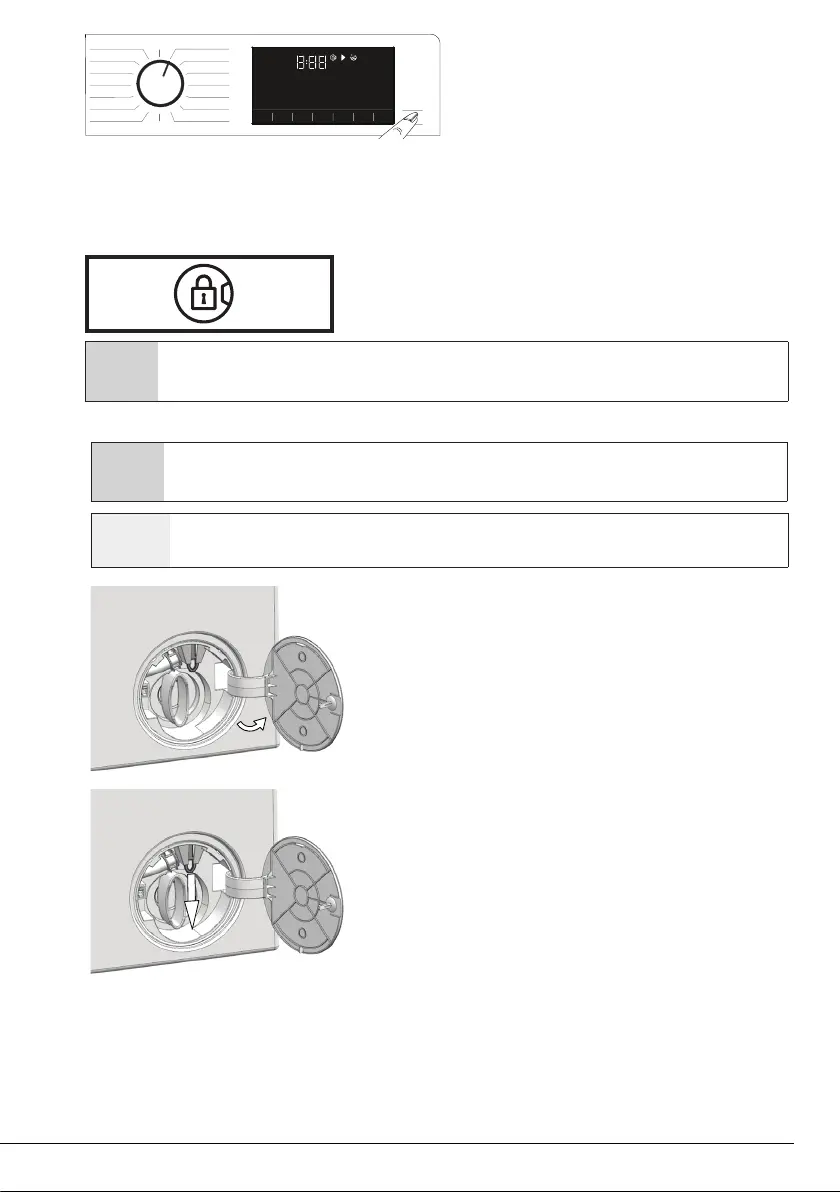
4.3.11 Loading door lock
There is a locking system on the loading door of the machine that prevents opening of the loading door in
cases when the water level is unsuitable.
"Door Locked" symbol appears on the display when the loading door is locked.
C
If the Remote Control Function is selected, the door will be locked. In order to open the door you must deactivate Remote
Start Function by either pressing the Remote Start button or changing the programme position.
Opening the loading door in case of power failure:
C
In case of a power failure, you can use the loading door emergency handle under the pump filter lid to manually open the
loading door.
A
WARNING: Before opening the loading door, make sure that there is no water in the machine to avoid flooding. Water
may be hot and could cause scalding.
• Turn off and unplug the appliance.
• Open the pump filter lid.
• Pull and release the loading door emergency handle with a tool. Then,
open the loading door.
• Repeat the previous step if the loading door does not open.
Bekijk gratis de handleiding van Grundig GWP 694210 W, stel vragen en lees de antwoorden op veelvoorkomende problemen, of gebruik onze assistent om sneller informatie in de handleiding te vinden of uitleg te krijgen over specifieke functies.
Productinformatie
| Merk | Grundig |
| Model | GWP 694210 W |
| Categorie | Wasmachine |
| Taal | Nederlands |
| Grootte | 3806 MB |





