
Grundig GWN69P430 handleiding
Handleiding
Je bekijkt pagina 23 van 76
23 / EN
Washing Machine / User’s Manual
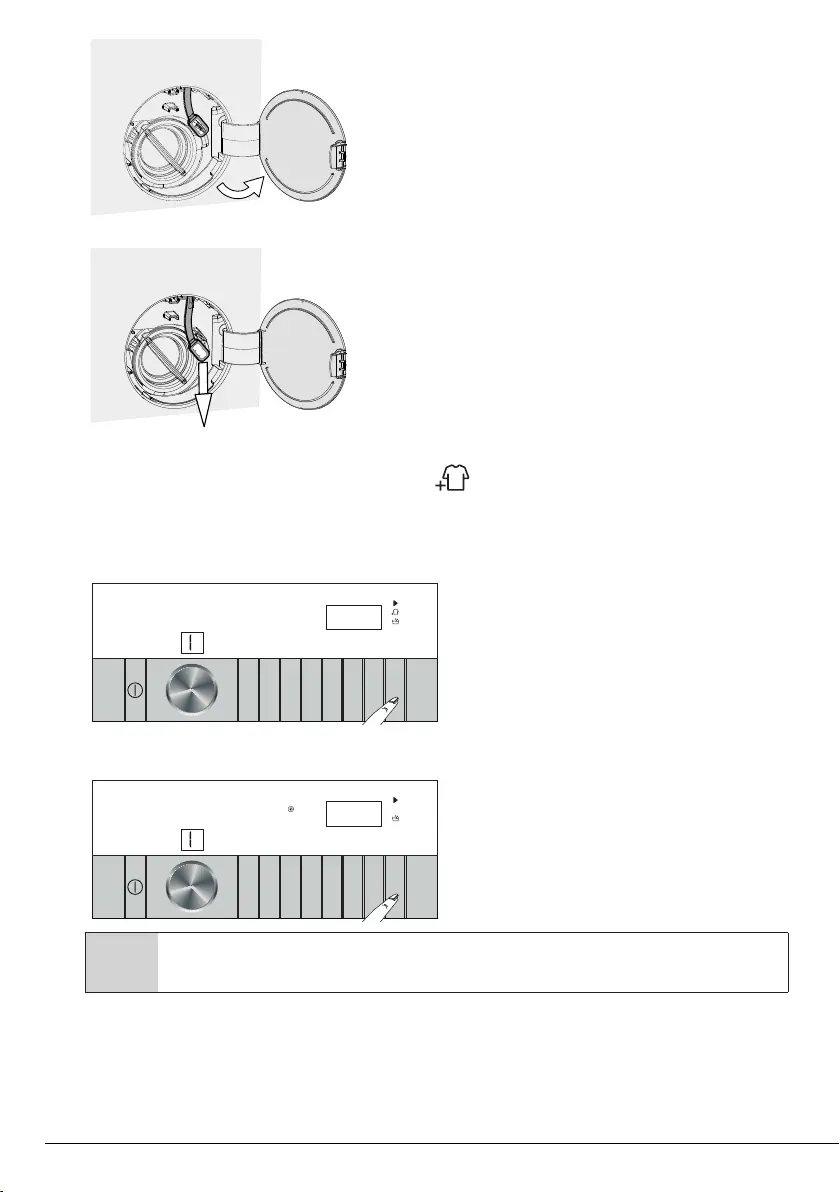
• Open the pump filter lid.
• Release the loading door emergency handle at the back of the filter lid.
• Pull down the loading door emergency handle to open the loading door.
After opening the door, return the emergency handle to its original position.
• If you cannot open the loading door, try pulling down the handle again.
4.3.12 Changing the selections after programme has started
Adding laundry after the programme has started :
When you press Start/Pause, if the condition of the machine is suitable, the laundry adding symbol on the
display will turn on, door lock will be disabled and the door will open so that you can add laundry. When the
door lock is disabled, the door lock symbol on the display will disappear. After adding the laundry, close the
door and press Start/Pause again to continue the washing cycle.
9
10
11
12
13
14
15
16
8
7
6
5
4
3
2
1
When you press Start/Pause, if the water level in the machine is not sufficient, the door lock will not be
disabled and the door lock symbol will still be shown on the display.
9
10
11
12
13
14
15
16
8
7
6
5
4
3
2
1
C
If the temperature of the water inside the machine is above 50°C, you cannot disable the door lock even if the water level
is suitable.
Bekijk gratis de handleiding van Grundig GWN69P430, stel vragen en lees de antwoorden op veelvoorkomende problemen, of gebruik onze assistent om sneller informatie in de handleiding te vinden of uitleg te krijgen over specifieke functies.
Productinformatie
| Merk | Grundig |
| Model | GWN69P430 |
| Categorie | Wasmachine |
| Taal | Nederlands |
| Grootte | 8383 MB |





