
Grundig GW9P88418MB2 ES handleiding
Handleiding
Je bekijkt pagina 83 van 96
EN / 81
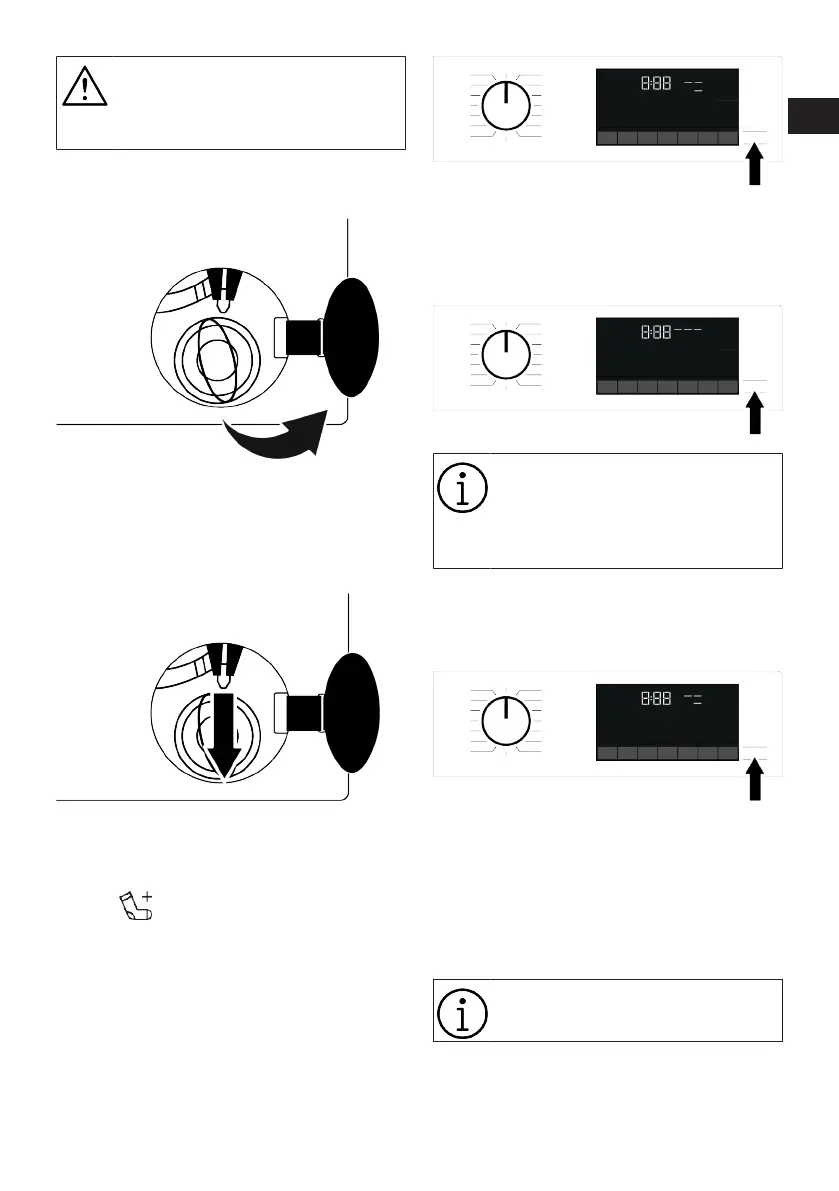
To avoid any water overflow before
opening the loading door, make
sure there is no water left inside the
product.
1. Turn off and unplug the product.
2. Open the pump filter lid.
3. Pull down the loading door emergency
handle with a tool and release. Then
open the loading door.
4. If the loading door does not open then
repeat the previous step.
6.12 Changing the Selections After
Programme has Started
Adding laundry after the programme has
started :
If the water level in the machine is suitable
when you press Start/Pause button, the
door lock will be deactivated and the door
will open, allowing you to add garments.
The door lock symbol on the display goes
off when the door lock is deactivated. After
adding garments, close the door and press
Start/Pause button once again to resume
the washing cycle.
If the water level in the machine is not suit-
able when you press Start/Pause button,
the door lock cannot be deactivated and
the door lock symbol on the display re-
mains on.
If the temperature of the water in-
side the machine is above 50°C,
you cannot deactivate the door lock
for safety reasons, even if the water
level is suitable.
Switching the machine to pause mode:
Press the Start/Pause button to switch the
machine to pause mode. Pause symbol will
flash on the display.
Changing the programme selection after
programme has started:
The programme change is not allowed
when the current programme is running.
You can select the new programme after
switching the current programme to pause
mode.
The selected programme starts
anew.
RO
EN
Bekijk gratis de handleiding van Grundig GW9P88418MB2 ES, stel vragen en lees de antwoorden op veelvoorkomende problemen, of gebruik onze assistent om sneller informatie in de handleiding te vinden of uitleg te krijgen over specifieke functies.
Productinformatie
| Merk | Grundig |
| Model | GW9P88418MB2 ES |
| Categorie | Wasmachine |
| Taal | Nederlands |
| Grootte | 8927 MB |




